If you want to stop basic bot submissions in a PHP form, a simple image CAPTCHA is still a practical option. In this tutorial, I will show you how to build one in core PHP by using sessions for validation and the GD library to generate the CAPTCHA image.
This example stays focused on the core use case. We will create a custom text CAPTCHA, show it inside a contact form, validate it on the server, and keep the code small enough to understand and reuse.
Our demo uses a session-backed CAPTCHA value, a dynamically generated image, and normal server-side form validation. This keeps the example easy to follow while still using modern PHP-friendly choices like secure random generation. For the image layer, PHP’s GD extension is the key requirement, and for random character selection, PHP provides secure functions like random_int().
Quick answer
To create a PHP CAPTCHA, generate a random code on the server, store it in the session, render that code as an image with GD, and compare the submitted value with the session value during form submission. If the values match, continue processing the form. If not, reject the request and generate a new CAPTCHA.
This approach works well for simple contact forms and small internal tools. If you need stronger bot protection on a public-facing site with heavier abuse risk, see the related PHP contact form with Google reCAPTCHA tutorial. If you want to show CAPTCHA only after repeated suspicious attempts, the failed login CAPTCHA example is also useful.
What this tutorial builds
- A clean PHP contact form
- A custom CAPTCHA image generated at runtime
- Server-side CAPTCHA validation using PHP session data
- A refreshable CAPTCHA image
- Minimal, practical styling that is easy to publish and extend
In the next section, I will show the example project files and explain how the CAPTCHA flow works.
Project structure
The example project is kept small on purpose. Each file has one clear job.
php-captcha/
├── index.php
├── captcha-image.php
├── process.php
├── includes/
│   └── functions.php
└── README.md- index.php renders the form and shows the CAPTCHA image.
- captcha-image.php creates the CAPTCHA image dynamically with PHP GD.
- process.php validates the form input and checks the CAPTCHA on the server.
- includes/functions.php holds reusable helper functions.
- README.md explains how to run the project locally.
How the CAPTCHA flow works
- The form page loads and requests the CAPTCHA image.
- The image script generates a random code.
- The code is stored in the PHP session.
- The same code is drawn into an image and sent to the browser.
- The user types the visible code into the form.
- On submit, PHP compares the typed value with the session value.
- If the values match, the form passes CAPTCHA validation.
- If they do not match, the form shows an error and loads a new CAPTCHA.
This is the main idea. The important point is that validation happens only on the server. The browser should never be trusted for CAPTCHA checks.
Example output
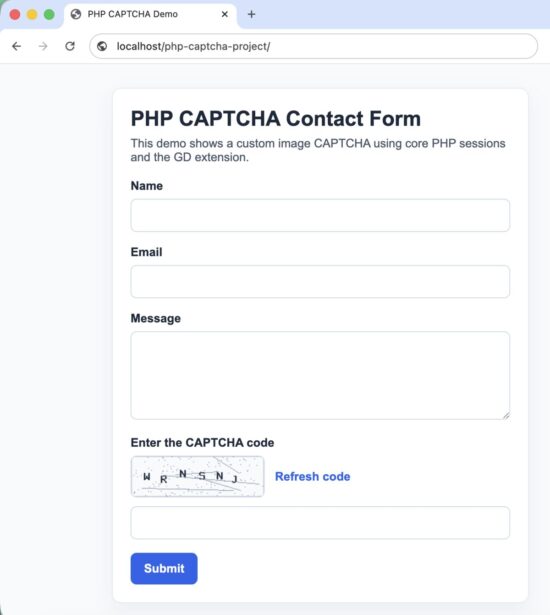
Custom PHP CAPTCHA form example with image verification
Setup notes
Before running the project, make sure PHP sessions are working and the GD extension is enabled. Then place the folder inside your local web root and open index.php in the browser.
Now let us start with the main form page.
Main form page
The main page displays the form, loads the CAPTCHA image, and provides a simple refresh option. The UI is intentionally light so the code stays easy to study.
<?php
declare(strict_types=1);

session_start();

$formData = $_SESSION['form_data'] ?? [
    'name' => '',
    'email' => '',
    'message' => '',
];

$errors = $_SESSION['errors'] ?? [];
$successMessage = $_SESSION['success_message'] ?? '';

unset($_SESSION['form_data'], $_SESSION['errors'], $_SESSION['success_message']);
?>
<!DOCTYPE html>
<html lang="en">
<head>
    <meta charset="UTF-8">
    <meta name="viewport" content="width=device-width, initial-scale=1.0">
    <title>PHP CAPTCHA Demo</title>
    <style>
        body {
            font-family: Arial, sans-serif;
            background: #f4f6f8;
            color: #222;
            margin: 0;
            padding: 40px 16px;
        }

        .container {
            max-width: 720px;
            margin: 0 auto;
            background: #fff;
            border: 1px solid #d9dee5;
            border-radius: 8px;
            padding: 24px;
            box-sizing: border-box;
        }

        h1 {
            margin-top: 0;
            font-size: 28px;
        }

        p {
            line-height: 1.6;
        }

        .form-row {
            margin-bottom: 18px;
        }

        label {
            display: block;
            font-weight: bold;
            margin-bottom: 8px;
        }

        input[type="text"],
        input[type="email"],
        textarea {
            width: 100%;
            padding: 12px;
            border: 1px solid #c9d2dc;
            border-radius: 6px;
            box-sizing: border-box;
            font-size: 16px;
        }

        textarea {
            min-height: 140px;
            resize: vertical;
        }

        .captcha-wrap {
            display: flex;
            align-items: center;
            gap: 12px;
            flex-wrap: wrap;
            margin-bottom: 10px;
        }

        .captcha-box {
            border: 1px solid #c9d2dc;
            border-radius: 6px;
            overflow: hidden;
            background: #fff;
        }

        .refresh-link {
            color: #0a58ca;
            text-decoration: none;
            font-size: 14px;
        }

        .refresh-link:hover {
            text-decoration: underline;
        }

        .btn {
            background: #0a58ca;
            color: #fff;
            border: 0;
            border-radius: 6px;
            padding: 12px 18px;
            font-size: 16px;
            cursor: pointer;
        }

        .btn:hover {
            background: #0849a6;
        }

        .error-box,
        .success-box {
            padding: 14px 16px;
            border-radius: 6px;
            margin-bottom: 18px;
        }

        .error-box {
            background: #fff1f1;
            border: 1px solid #efc2c2;
            color: #9f1d1d;
        }

        .success-box {
            background: #eef9f0;
            border: 1px solid #bfe3c5;
            color: #146c2e;
        }

        .field-error {
            color: #b42318;
            font-size: 14px;
            margin-top: 6px;
        }
    </style>
</head>
<body>
    <div class="container">
        <h1>Contact Form with PHP CAPTCHA</h1>
        <p>Fill in the form and enter the characters shown in the CAPTCHA image.</p>

        <?php if ($successMessage !== ''): ?>
            <div class="success-box"><?= htmlspecialchars($successMessage, ENT_QUOTES, 'UTF-8') ?></div>
        <?php endif; ?>

        <?php if (!empty($errors['general'])): ?>
            <div class="error-box"><?= htmlspecialchars($errors['general'], ENT_QUOTES, 'UTF-8') ?></div>
        <?php endif; ?>

        <form method="post" action="process.php">
            <div class="form-row">
                <label for="name">Name</label>
                <input
                    type="text"
                    id="name"
                    name="name"
                    value="<?= htmlspecialchars($formData['name'], ENT_QUOTES, 'UTF-8') ?>"
                >
                <?php if (!empty($errors['name'])): ?>
                    <div class="field-error"><?= htmlspecialchars($errors['name'], ENT_QUOTES, 'UTF-8') ?></div>
                <?php endif; ?>
            </div>

            <div class="form-row">
                <label for="email">Email</label>
                <input
                    type="email"
                    id="email"
                    name="email"
                    value="<?= htmlspecialchars($formData['email'], ENT_QUOTES, 'UTF-8') ?>"
                >
                <?php if (!empty($errors['email'])): ?>
                    <div class="field-error"><?= htmlspecialchars($errors['email'], ENT_QUOTES, 'UTF-8') ?></div>
                <?php endif; ?>
            </div>

            <div class="form-row">
                <label for="message">Message</label>
                <textarea id="message" name="message"><?= htmlspecialchars($formData['message'], ENT_QUOTES, 'UTF-8') ?></textarea>
                <?php if (!empty($errors['message'])): ?>
                    <div class="field-error"><?= htmlspecialchars($errors['message'], ENT_QUOTES, 'UTF-8') ?></div>
                <?php endif; ?>
            </div>

            <div class="form-row">
                <label for="captcha">Enter the code shown below</label>

                <div class="captcha-wrap">
                    <div class="captcha-box">
                        <img
                            src="captcha-image.php?ts=<?= time() ?>"
                            alt="CAPTCHA image"
                            id="captchaImage"
                            width="180"
                            height="60"
                        >
                    </div>

                    <a href="#" class="refresh-link" id="refreshCaptcha">Refresh CAPTCHA</a>
                </div>

                <input type="text" id="captcha" name="captcha" autocomplete="off">
                <?php if (!empty($errors['captcha'])): ?>
                    <div class="field-error"><?= htmlspecialchars($errors['captcha'], ENT_QUOTES, 'UTF-8') ?></div>
                <?php endif; ?>
            </div>

            <button type="submit" class="btn">Send Message</button>
        </form>
    </div>

    <script>
        const refreshLink = document.getElementById('refreshCaptcha');
        const captchaImage = document.getElementById('captchaImage');

        refreshLink.addEventListener('click', function (event) {
            event.preventDefault();
            captchaImage.src = 'captcha-image.php?ts=' + Date.now();
        });
    </script>
</body>
</html>
This page does three useful things. It keeps the form readable, preserves submitted values after validation errors, and makes CAPTCHA refresh easy without reloading the full page.
The timestamp query string added to the image URL helps avoid browser caching. Without that, the browser may keep showing an older CAPTCHA image even after refresh.
Next, we will create the PHP file that generates the CAPTCHA image itself.
Generate the CAPTCHA image
This file creates the CAPTCHA text, stores it in the session, and renders it as an image. The code uses uppercase letters and numbers, which are easy to type and work well for a simple demo.
<?php
declare(strict_types=1);

session_start();

require __DIR__ . '/includes/functions.php';

$captchaCode = generateCaptchaCode(6);
$_SESSION['captcha_code'] = $captchaCode;

$imageWidth = 180;
$imageHeight = 60;

$image = imagecreatetruecolor($imageWidth, $imageHeight);

$backgroundColor = imagecolorallocate($image, 245, 247, 250);
$textColor = imagecolorallocate($image, 34, 34, 34);
$lineColor = imagecolorallocate($image, 180, 190, 200);
$noiseColor = imagecolorallocate($image, 210, 218, 226);

imagefilledrectangle($image, 0, 0, $imageWidth, $imageHeight, $backgroundColor);

for ($i = 0; $i < 6; $i++) {
    imageline(
        $image,
        random_int(0, $imageWidth),
        random_int(0, $imageHeight),
        random_int(0, $imageWidth),
        random_int(0, $imageHeight),
        $lineColor
    );
}

for ($i = 0; $i < 120; $i++) {
    imagesetpixel(
        $image,
        random_int(0, $imageWidth - 1),
        random_int(0, $imageHeight - 1),
        $noiseColor
    );
}

$fontSize = 5;
$textX = 30;
$textY = 22;

imagestring($image, $fontSize, $textX, $textY, $captchaCode, $textColor);

header('Content-Type: image/png');
header('Cache-Control: no-store, no-cache, must-revalidate, max-age=0');

imagepng($image);
imagedestroy($image);
This version uses imagestring() to keep the setup simple. That is enough for many tutorial projects and small forms. If you want a more polished image later, you can switch to TrueType fonts with imagettftext().
The session value is the most important part here. The image is only for display. The real validation depends on the server-side value stored in the session.
Notice that we also send no-cache headers. That reduces the chance of stale CAPTCHA images being reused by the browser.
Helper function for random code generation
Now add a helper function to generate a safe random CAPTCHA string.
<?php
declare(strict_types=1);

function generateCaptchaCode(int $length = 6): string
{
    $characters = 'ABCDEFGHJKLMNPQRSTUVWXYZ23456789';
    $charactersLength = strlen($characters);
    $captchaCode = '';

    for ($i = 0; $i < $length; $i++) {
        $captchaCode .= $characters[random_int(0, $charactersLength - 1)];
    }

    return $captchaCode;
}
This character set skips confusing characters like O, 0, I, and 1. That makes the CAPTCHA easier for real users to solve.
Next, let us validate the submitted form and compare the user input against the stored CAPTCHA value.
Validate the form and check the CAPTCHA
The form handler should validate normal fields first and then verify the CAPTCHA on the server. This is where the protection actually happens.
<?php
declare(strict_types=1);

session_start();

require __DIR__ . '/includes/functions.php';

if ($_SERVER['REQUEST_METHOD'] !== 'POST') {
    header('Location: index.php');
    exit;
}

$name = trim($_POST['name'] ?? '');
$email = trim($_POST['email'] ?? '');
$message = trim($_POST['message'] ?? '');
$captcha = strtoupper(trim($_POST['captcha'] ?? ''));

$errors = [];

if ($name === '') {
    $errors['name'] = 'Please enter your name.';
}

if ($email === '') {
    $errors['email'] = 'Please enter your email address.';
} elseif (!filter_var($email, FILTER_VALIDATE_EMAIL)) {
    $errors['email'] = 'Please enter a valid email address.';
}

if ($message === '') {
    $errors['message'] = 'Please enter your message.';
}

if ($captcha === '') {
    $errors['captcha'] = 'Please enter the CAPTCHA code.';
} elseif (
    !isset($_SESSION['captcha_code']) ||
    !hash_equals($_SESSION['captcha_code'], $captcha)
) {
    $errors['captcha'] = 'The CAPTCHA code is incorrect.';
}

$_SESSION['form_data'] = [
    'name' => $name,
    'email' => $email,
    'message' => $message,
];

unset($_SESSION['captcha_code']);

if (!empty($errors)) {
    $_SESSION['errors'] = $errors;
    header('Location: index.php');
    exit;
}

$_SESSION['success_message'] = 'Form submitted successfully.';

$_SESSION['form_data'] = [
    'name' => '',
    'email' => '',
    'message' => '',
];

header('Location: index.php');
exit;
This file keeps the logic simple and safe. It checks the request method, sanitizes input for validation, compares the submitted CAPTCHA against the session value, and clears the CAPTCHA after each attempt.
That last step matters. Once a CAPTCHA is checked, it should not stay reusable in the session. Clearing it forces a fresh challenge on the next form view or submission cycle.
Why use hash_equals() here
The user-entered CAPTCHA and the session value are short strings, but it is still a good habit to use hash_equals() for string comparison in security-related checks. It is a safer comparison method than a plain equality check in these kinds of flows.
How to run the project locally
- Download the source code zip and extract it into your local web root.
- Make sure PHP is installed and the GD extension is enabled.
- Start your local server, or use your existing Apache or Nginx setup.
- Open the project in the browser and load
index.php. - Submit the form once with a wrong CAPTCHA and once with the correct CAPTCHA to test both paths.
For a local one-command test, PHP also provides the built-in development server. From the project folder, you can run php -S localhost:8000 and then open the site in your browser.
In the next section, I will cover the security points that matter most for this kind of CAPTCHA form.
Security considerations
A custom CAPTCHA can reduce basic bot activity, but it should not be treated as complete form security. It is only one layer. A real contact form still needs normal input validation and a few extra protections around submission flow.
- Always validate on the server. Never trust client-side checks for CAPTCHA or form input.
- Expire the CAPTCHA after use. This example clears the session value after validation so the same code cannot be reused.
- Use sessions carefully. CAPTCHA validation depends on a working server-side session. If sessions are broken, CAPTCHA checks will fail.
- Limit repeated submissions. CAPTCHA helps, but rate limiting is still useful if a form is being abused.
- Escape output when redisplaying form values. That prevents cross-site scripting issues when showing submitted input again after validation errors.
- Do not rely on CAPTCHA alone. For public-facing forms, combine it with CSRF protection, input validation, and spam controls.
If your form sends email, stores messages in a database, or triggers backend actions, those parts need their own validation and security checks too. CAPTCHA only answers one question: did the user solve the challenge correctly?
For forms that process uploaded files or save content permanently, it is also a good idea to review broader input-handling guidance. PHP’s filter functions help with validation, but each field still needs rules that fit the actual use case.
Common errors and fixes
CAPTCHA image does not load
This usually means the GD extension is not enabled, or the image script has a PHP error before sending the image output. Check your PHP configuration and error log first.
CAPTCHA always fails even with the correct code
In most cases, the PHP session is not persisting correctly between requests. Make sure sessions are enabled and that the same browser session is used for both loading the image and submitting the form.
Refreshing the CAPTCHA still shows the old image
That is usually a browser caching issue. Adding a changing query string like a timestamp helps force a fresh request for the image.
Characters are hard to read
Reduce the visual noise, use a cleaner character set, or switch to a TrueType font with better spacing. A CAPTCHA that real users cannot solve easily becomes a usability problem.
Form data disappears after validation errors
Store the submitted values temporarily in the session and repopulate the form after redirect. That is what the demo project does for the name, email, and message fields.
Next, let us cover a few practical questions developers usually have before using this in a real project.
Developer FAQ
Do I need a database for this PHP CAPTCHA?
No. A basic CAPTCHA like this does not need a database. The generated code is stored in the PHP session and checked during form submission.
Can I use this CAPTCHA in a login form?
Yes. The same pattern works for login forms, contact forms, and small admin tools. In many cases, it is better to show CAPTCHA only after repeated failed attempts instead of showing it on every first login try.
Is a custom CAPTCHA enough for a public website?
It depends on the traffic and abuse level. For a small site, this can be enough to stop simple bot submissions. For a higher-risk public form, stronger protection like reCAPTCHA or layered anti-spam checks may be a better fit.
Can I refresh the CAPTCHA without reloading the whole page?
Yes. This example already does that by updating the image URL with JavaScript and a changing timestamp value.
Why store the CAPTCHA in a session?
The session keeps the correct value on the server, where the user cannot directly modify it. That makes validation reliable and simple.
Can I make the CAPTCHA harder?
Yes, but do it carefully. Adding more distortion, noise, or random font angles can make it harder for bots, but it can also make it frustrating for real users. A CAPTCHA should still be readable.
Should CAPTCHA be case-sensitive?
Usually, no. A case-insensitive CAPTCHA is easier for users. In this tutorial, the submitted value is converted to uppercase before comparison so the user does not have to worry about letter case.
When this approach is a good fit
This custom PHP CAPTCHA is a good fit when you want a lightweight solution with no third-party dependency, no API keys, and full control over the code. It works well for tutorials, internal tools, small contact forms, and simple custom PHP applications.
It is not the best fit when your form is under heavy automated abuse, when accessibility is a major concern, or when you want the strongest possible bot filtering with less maintenance.
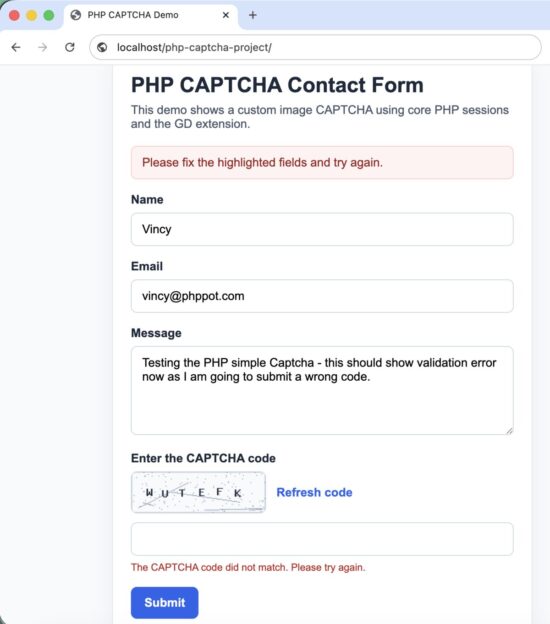
PHP CAPTCHA validation example with error handling
Conclusion
A simple PHP CAPTCHA is still useful when you need a lightweight bot check in a custom form. The key parts are straightforward: generate the code securely, store it in the session, draw it as an image, and validate only on the server.
Keep the implementation readable. Keep the CAPTCHA usable. And remember that CAPTCHA is only one part of form security, not the whole story.
Download the source code
You can download the complete working project and test it locally before integrating it into your own form flow.


Very good, thank you.
Welcome Aria Irani.
nice
I am very much gratefull to you maam. I get many things to learn from you.
Thank you Aadarsh for the compliment. Keep reading and sharing.
how to add the php capcha to a form which is sending form data as email
Please reply to my email
Regards
Manish,
On successful validation, get the form data and send email. I have written another post “PHP Contact Form” and it does that. You need to combine both these. Otherwise, I have a product “Iris”, check my shop and you can buy that.
thank you.
Welcome Abhay.
Nice focus on seurity.
Thank you Manuel
How to make font size bigger?
Hi Denden,
In style.css, you can add a line as “font-size: 1.1rem” for the body.
Thanks a lot madam
Welcome Ainul
verrrrry gooood, thanks very much
Welcome Khoonraz
Strange enough, when I try this example on my Windows dev.machine, I don’t get a form, but just an entirely black window.
I had no experience with GD at all, but on analyzing the script with the PHP manual, the script is clear to me.
The result however is not as imagined by reading the code: in Vivaldi I get a white square in the middle of an all black screen, plus an eternal loop in the image analyzer. In Firefox it’s all black, but with a message that the image can’t be shown because it contains errors; alas, not wich ones.
Where have I gone wrong?
Hi David,
There is one main area this code will face issue. Unavailability of the GD image extension. Check if it is installed and enabled.
Great Thanks
Welcome Amir.
Appreciate your focus on security. Most of the PHP article code in Internet do not follow basic security principles. But your code is good, discussing security in the article and writing code in that angle is really appreciable.
Hi Dmitry,
Thank you for the appreciations. I am happy particularly when someone notices these intricate things. Thank you.
Can you please suggest how to creaate “CAPTCHA generstion using gender and age”.
Hi Gourab,
Can you explain your question please? Do you want to add gender and age as fields in the form?
Hi there, I am having a problem integrating this captcha. The image doesn’t get rendered when I integrate it into my form. Pls help. Thanks in advance. Great work though, Vincy!
Hi Rounak,
Most probably the issue could be due to unavailability of GD extension. You need to check if GD image extension is installed and enabled for PHP.
That work nice but can you work on generating url link for a video which has been uploaded in a page. It should function in a way that when a user click on generate button it will automatically generate an url link to the video which anyone can download the video through the link posted in any blog platform or social media
Hi Asad,
Sure, I have noted your requirement and added it to my todo (to write) list. I will publish soon.
Its cool but I see a little problem.. If you make a mistake on the CAPCHA… it clears the form data. so user has to enter it all again.
Hi George,
I have updated the code. Now if the validation error is shown, the filled values are retained. Thank you for the feedback.
tq madam
Welcome Jahuva
When someone enters an incorrect Recaptcha (or does not enter it at all), the form refreshes, and the person who filled the form loses all entered data. The data gets deleted on submitting the form if the ReCpaatch is missing! In real life, and I can talk about myself, I might not fill the form again. The form should hold the information on refresh rather than refreshing the whole form and losing the data. I strongly suggest revising this part of the code to consider this. Other than this comment, great work!
Hi Abe,
I have taken your comment and updated the code. Now if the validation error is shown, the filled values are retained. Thank you for the feedback.
random_bytes(64) is not working. if i change it with md5(mt_rand(1000, 9999)); than its work. what is the problem.
Hi Umang,
I have used random_int(..) and it should work without any issues. Do you get any exceptions?
thank you vincy for the amazing website and for all articles you wrote. it made my coding journey easy. god bless you.
Thank you so much Colbey. Keep learning, best wishes.
I am very much gratefull to you maam. I get many things to learn from you
Welcome Anubhav
Thank you but I download the project and installed in my localhost ,unfortunately it does not work . It can not display captcha image can you please guide.
Hi Gokul,
Mostly the issue could be due to the non-availability of GD image plugin. You need to check if GD is installed, enabled and available to PHP code.
Thank you Vincy !!!
Welcome Julian
Hi Vincy,
I appreciate this captcha code and I am trying to implement it. I am having trouble getting the image to render in the browser.
By chance, is there a missing php script named captcha_code.php?
It is used in the css background url descriptor but I do not see a description of what it is or the code it contains. It is not in the download zip files.
.captcha-input {
background: #FFF url(‘captcha_code.php’) repeat-y left center;
padding-left: 85px;
}
Thanks.
Brad
Hi Brad,
I have created a file named captcha-image.php and it is available as part of the project download zip. It is present at the end of the article.
Good pl share codginater laravel captcha
how to impliment controller and display
on page
Here is a tutorial on Laravel Captcha: https://phppot.com/laravel/captcha-in-laravel/
Here is a tutorial on Google reCAPTCHA with Laravel: https://phppot.com/laravel/how-to-setup-google-recaptcha-in-laravel-with-an-example/
Vincy, Can i Use this for commercial purpose
Yes Yuvraj. You are free to download and use this code for commercial purposes. Not only this code, you can download and use any code from PHPpot.com free and use it for commercial purposes.
so we need to create table in the database too , to get working?
I didn’t use database for this simple PHP example project. I just planned to keep things simple and focus on the captcha image generation and drive the concept.