PHP date formatting changes how a date or time is displayed. It does not change the moment represented by the value. You can produce a database-style date, a readable date, an API timestamp, or a localized result from the same date object.
This guide covers date(), DateTimeImmutable::format(), and safe conversion from one known format to another. It also explains the format characters, timezone rules, and validation checks that prevent incorrect dates.
Quick answer
Use DateTimeImmutable::format() when you already have a date object:
<?php

$date = new DateTimeImmutable(
    '2026-07-14 16:45:30',
    new DateTimeZone('Asia/Kolkata')
);

echo $date->format('Y-m-d');
echo PHP_EOL;
echo $date->format('F j, Y');
echo PHP_EOL;
echo $date->format('Y-m-d H:i:s P');
This produces:
2026-07-14
July 14, 2026
2026-07-14 16:45:30 +05:30
To convert a string from one known format to another, parse the input format first and then apply the output format:
<?php

$input = '14/07/2026';

$date = DateTimeImmutable::createFromFormat(
    '!d/m/Y',
    $input,
    new DateTimeZone('UTC')
);

if ($date === false) {
    exit('Invalid date.');
}

echo $date->format('Y-m-d');
The output is 2026-07-14. The input format and output format are separate. PHP first reads the original value as d/m/Y, then renders it as Y-m-d.
PHP date format converter example
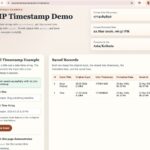
The example project lets you enter a date, select its input format, and choose a different output format. It validates the date before displaying the result.
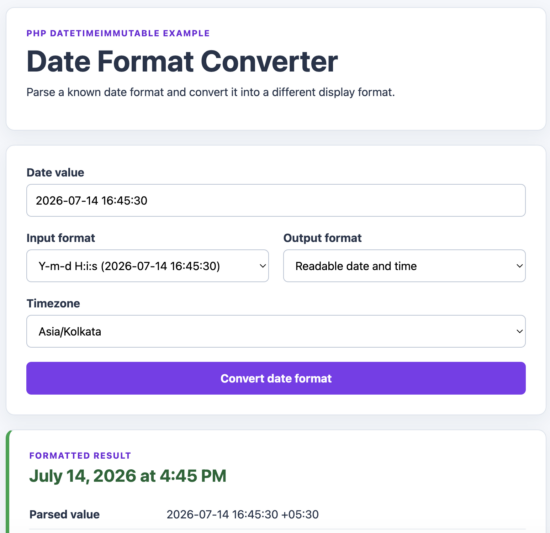
PHP DateTimeImmutable example converting a known input date format into a readable output format.
Common PHP date format examples
PHP uses individual characters as placeholders for date and time components. The same format patterns work with date() and DateTimeImmutable::format().
| Format | Example output | Common use |
|---|---|---|
Y-m-d |
2026-07-14 |
Database-style date |
Y-m-d H:i:s |
2026-07-14 16:45:30 |
Database-style date and time |
d/m/Y |
14/07/2026 |
Day-first display |
m/d/Y |
07/14/2026 |
US-style display |
F j, Y |
July 14, 2026 |
Readable date |
l, F j, Y |
Tuesday, July 14, 2026 |
Full weekday and date |
H:i |
16:45 |
24-hour time |
g:i A |
4:45 PM |
12-hour time |
Y-m-d\TH:i:sP |
2026-07-14T16:45:30+05:30 |
ISO 8601 date and time |
Format the current date with date()
The first argument of date() is required. It defines the output format. The optional second argument is a Unix timestamp.
<?php

date_default_timezone_set('Asia/Kolkata');

echo date('Y-m-d');
echo PHP_EOL;
echo date('F j, Y');
echo PHP_EOL;
echo date('Y-m-d H:i:s');
When the timestamp is omitted, PHP formats the current date and time. See PHP current date and time for more examples focused on the current value.
Format a Unix timestamp with date()
Pass the timestamp as the second argument when formatting a specific instant.
<?php

date_default_timezone_set('UTC');

$timestamp = 1784047530;

echo date('Y-m-d H:i:s', $timestamp);
The timezone does not belong to the timestamp itself. PHP applies its configured default timezone when date() creates the output string.
Format a DateTimeImmutable object
Use the object’s format() method when the date already has a timezone attached.
<?php

$date = new DateTimeImmutable(
    '2026-07-14 16:45:30',
    new DateTimeZone('Asia/Kolkata')
);

echo $date->format('d/m/Y');
echo PHP_EOL;
echo $date->format('F j, Y');
echo PHP_EOL;
echo $date->format('g:i A P');
For application code, this approach makes the timezone visible and avoids depending on an unknown server default.
PHP date format characters
Format characters are case-sensitive. For example, m represents a numeric month, while M represents a short month name. Lowercase h uses a 12-hour clock, while uppercase H uses a 24-hour clock.
Day format characters
| Character | Description | Example |
|---|---|---|
d |
Day of the month with a leading zero | 01 to 31 |
j |
Day of the month without a leading zero | 1 to 31 |
D |
Short weekday name | Tue |
l |
Full weekday name | Tuesday |
N |
ISO weekday number, starting with Monday | 1 to 7 |
w |
Weekday number, starting with Sunday | 0 to 6 |
S |
English ordinal suffix | st, nd, rd, or th |
z |
Zero-based day of the year | 0 to 365 |
The S character is usually combined with j:
<?php

$date = new DateTimeImmutable('2026-07-14');

echo $date->format('jS F Y');
The output is 14th July 2026.
Week format characters
| Character | Description | Example |
|---|---|---|
W |
ISO week number with a leading zero | 01 to 53 |
o |
ISO week-numbering year | 2026 |
Use o with W. During the first and last days of a calendar year, the ISO week-numbering year can differ from the calendar year.
<?php

$date = new DateTimeImmutable('2026-07-14');

echo $date->format('o-\WW-N');
Month format characters
| Character | Description | Example |
|---|---|---|
m |
Month with a leading zero | 01 to 12 |
n |
Month without a leading zero | 1 to 12 |
M |
Short month name | Jul |
F |
Full month name | July |
t |
Number of days in the month | 28 to 31 |
Year format characters
| Character | Description | Example |
|---|---|---|
Y |
Four-digit calendar year | 2026 |
y |
Two-digit year | 26 |
L |
Whether the year is a leap year | 1 or 0 |
Time format characters
| Character | Description | Example |
|---|---|---|
H |
24-hour value with a leading zero | 00 to 23 |
G |
24-hour value without a leading zero | 0 to 23 |
h |
12-hour value with a leading zero | 01 to 12 |
g |
12-hour value without a leading zero | 1 to 12 |
i |
Minutes with a leading zero | 00 to 59 |
s |
Seconds with a leading zero | 00 to 59 |
a |
Lowercase meridiem | am or pm |
A |
Uppercase meridiem | AM or PM |
u |
Microseconds | 654321 |
v |
Milliseconds | 654 |
The date() function accepts integer timestamps, so it cannot preserve microseconds. Use a DateTimeImmutable object when formatting u or v.
Timezone format characters
| Character | Description | Example |
|---|---|---|
e |
Timezone identifier | Asia/Kolkata |
T |
Timezone abbreviation | IST |
O |
UTC offset without a colon | +0530 |
P |
UTC offset with a colon | +05:30 |
p |
Same as P, but displays Z for UTC |
Z |
Z |
Timezone offset in seconds | 19800 |
Complete date and timestamp characters
| Character | Description | Example |
|---|---|---|
c |
ISO 8601 date and time | 2026-07-14T16:45:30+05:30 |
r |
RFC 2822 formatted date | Tue, 14 Jul 2026 16:45:30 +0530 |
U |
Unix timestamp | 1784047530 |
Change a date from one format to another
Changing a date format has two steps:
- Parse the input string according to its known format.
- Format the resulting date object with the required output format.
Use DateTimeImmutable::createFromFormat() when the input follows a defined pattern.
Convert DD/MM/YYYY to YYYY-MM-DD
<?php

$input = '14/07/2026';

$date = DateTimeImmutable::createFromFormat(
    '!d/m/Y',
    $input,
    new DateTimeZone('UTC')
);

if ($date === false) {
    exit('Invalid date.');
}

echo $date->format('Y-m-d');
The output is:
2026-07-14The characters d/m/Y describe the input. The characters Y-m-d describe the output.
Convert YYYY-MM-DD to DD/MM/YYYY
<?php

$input = '2026-07-14';

$date = DateTimeImmutable::createFromFormat(
    '!Y-m-d',
    $input,
    new DateTimeZone('UTC')
);

if ($date === false) {
    exit('Invalid date.');
}

echo $date->format('d/m/Y');
The output is 14/07/2026.
Validate the date before formatting it
Checking only for false is not enough. PHP can normalize an out-of-range date. For example, an invalid day can roll forward into the following month.
Check parsing warnings and errors, then compare the formatted date with the original input.
<?php

function parseDate(
    string $input,
    string $format,
    DateTimeZone $timezone
): ?DateTimeImmutable {
    $date = DateTimeImmutable::createFromFormat(
        '!' . $format,
        $input,
        $timezone
    );

    $parseErrors = DateTimeImmutable::getLastErrors();

    $hasErrors = $parseErrors !== false
        && (
            $parseErrors['warning_count'] > 0
            || $parseErrors['error_count'] > 0
        );

    if (
        $date === false
        || $hasErrors
        || $date->format($format) !== $input
    ) {
        return null;
    }

    return $date;
}

$date = parseDate(
    '14/07/2026',
    'd/m/Y',
    new DateTimeZone('UTC')
);

if ($date === null) {
    echo 'Enter a valid date.';
} else {
    echo $date->format('Y-m-d');
}
This function rejects values that do not match the expected format exactly.
Why the parsing format starts with !
The ! character resets date and time fields that are not present in the input. A date-only value therefore starts at midnight instead of inheriting the current hour, minute, and second.
<?php

$date = DateTimeImmutable::createFromFormat(
    '!Y-m-d',
    '2026-07-14',
    new DateTimeZone('UTC')
);

echo $date->format('Y-m-d H:i:s');
The output is:
2026-07-14 00:00:00Convert a date and time format
Include the time components in both the parsing format and the output format.
<?php

$input = '14/07/2026 16:45';

$date = DateTimeImmutable::createFromFormat(
    '!d/m/Y H:i',
    $input,
    new DateTimeZone('Asia/Kolkata')
);

$parseErrors = DateTimeImmutable::getLastErrors();

$hasErrors = $parseErrors !== false
    && (
        $parseErrors['warning_count'] > 0
        || $parseErrors['error_count'] > 0
    );

if (
    $date === false
    || $hasErrors
    || $date->format('d/m/Y H:i') !== $input
) {
    exit('Invalid date and time.');
}

echo $date->format('Y-m-d H:i:s P');
The output contains the selected timezone offset:
2026-07-14 16:45:00 +05:30When is strtotime() acceptable?
strtotime() is useful for supported English date expressions written by a developer, such as next Monday or +7 days.
<?php

$timestamp = strtotime('next Monday');

if ($timestamp === false) {
    exit('Could not parse the date.');
}

echo date('Y-m-d', $timestamp);
Do not use strtotime() to guess ambiguous numeric input such as 04/05/2026. Use createFromFormat() when the source format is known.
Escape literal text in a date format
Letters inside a format string may be interpreted as date characters. Escape literal letters with a backslash when they should appear as ordinary text.
For example, this format is incorrect:
<?php

$date = new DateTimeImmutable('2026-07-14 16:45:30');

echo $date->format('F j, Y at g:i A');
The letters a and t have special meanings. PHP will not print the word “at” as expected.
Escape both letters:
<?php

$date = new DateTimeImmutable('2026-07-14 16:45:30');

echo $date->format('F j, Y \a\t g:i A');
The output is:
July 14, 2026 at 4:45 PMEscape complete words
Escape every letter that must be printed literally. Do not assume that an unrecognized letter will remain ordinary text in future PHP versions.
<?php

$date = new DateTimeImmutable('2026-07-14');

echo $date->format(
    'l \t\h\e jS \d\a\y \o\f F Y'
);
The output is:
Tuesday the 14th day of July 2026Prefer single-quoted format strings
Single-quoted PHP strings make date-format escaping easier to read. In a double-quoted PHP string, sequences such as \t can be interpreted by PHP before the format reaches DateTimeImmutable::format().
This version is clear and predictable:
<?php

$format = 'F j, Y \a\t g:i A';

echo $date->format($format);
Use standard date and time formats
PHP provides constants for common formats used by APIs, feeds, email headers, and data exchange. Constants are clearer than repeating a complex format string throughout an application.
ISO 8601 and RFC 3339
<?php

$date = new DateTimeImmutable(
    '2026-07-14 16:45:30',
    new DateTimeZone('Asia/Kolkata')
);

echo $date->format(DateTimeInterface::ATOM);
echo PHP_EOL;
echo $date->format(DateTimeInterface::RFC3339);
Both produce a value such as:
2026-07-14T16:45:30+05:30For new code, prefer DateTimeInterface::ATOM or DateTimeInterface::RFC3339 over the historical ISO8601 constant.
RFC 3339 with milliseconds
Use RFC3339_EXTENDED when the receiving system expects milliseconds.
<?php

$date = new DateTimeImmutable(
    '2026-07-14 16:45:30.654',
    new DateTimeZone('Asia/Kolkata')
);

echo $date->format(
    DateTimeInterface::RFC3339_EXTENDED
);
The output is:
2026-07-14T16:45:30.654+05:30RFC 2822
RFC 2822 formatting is commonly used for email and feed dates.
<?php

echo $date->format(DateTimeInterface::RFC2822);
The output resembles:
Tue, 14 Jul 2026 16:45:30 +0530Format dates in a specific timezone
A format string controls the output layout. It does not choose the timezone. Set or convert the timezone before formatting the date.
Attach a timezone when creating the date
<?php

$date = new DateTimeImmutable(
    '2026-07-14 16:45:30',
    new DateTimeZone('Asia/Kolkata')
);

echo $date->format('Y-m-d H:i:s P e');
The output includes the UTC offset and timezone identifier:
2026-07-14 16:45:30 +05:30 Asia/KolkataConvert the timezone before formatting
Use setTimezone() to display the same moment in another timezone.
<?php

$kolkataDate = new DateTimeImmutable(
    '2026-07-14 16:45:30',
    new DateTimeZone('Asia/Kolkata')
);

$utcDate = $kolkataDate->setTimezone(
    new DateTimeZone('UTC')
);

echo $kolkataDate->format('Y-m-d H:i:s P');
echo PHP_EOL;
echo $utcDate->format('Y-m-d H:i:s P');
The two strings display different clock times, but both objects represent the same instant. Their Unix timestamps remain equal.
Format a timestamp with date()
The date() function uses PHP’s default timezone. Set it before formatting a timestamp when the application configuration has not already done so.
<?php

$timestamp = 1784047530;

date_default_timezone_set('UTC');
echo date('Y-m-d H:i:s P', $timestamp);

echo PHP_EOL;

date_default_timezone_set('Asia/Kolkata');
echo date('Y-m-d H:i:s P', $timestamp);
Both lines format the same timestamp. The selected default timezone changes the displayed date, time, and offset.
Use timezone identifiers instead of abbreviations
Identifiers such as America/New_York and Europe/London contain regional timezone rules. Abbreviations such as CST and IST can be ambiguous.
Use a regional identifier when the location matters. Use UTC for values that must remain consistent between systems. See PHP timezone conversion for more timezone-specific examples.
Do not convert date-only values without a reason
A birthday, invoice date, or other calendar-only value may not represent a precise moment. Adding midnight and converting it to another timezone can move it to the previous or next calendar date.
Keep a date-only value as Y-m-d when timezone conversion has no meaning for the business rule.
Format localized dates with IntlDateFormatter
date() and DateTimeImmutable::format() return English month and weekday names. They do not translate names such as July or Tuesday based on a locale.
Use IntlDateFormatter when the output must follow a language or regional convention. The PHP Internationalization extension must be available on the server.
Format a date in French
<?php

$date = new DateTimeImmutable(
    '2026-07-14 16:45:30',
    new DateTimeZone('Europe/Paris')
);

$formatter = new IntlDateFormatter(
    'fr_FR',
    IntlDateFormatter::LONG,
    IntlDateFormatter::NONE,
    'Europe/Paris',
    IntlDateFormatter::GREGORIAN,
    'd MMMM y'
);

echo $formatter->format($date);
The output is:
14 juillet 2026Format a localized date and time
<?php

$date = new DateTimeImmutable(
    '2026-07-14 16:45:30',
    new DateTimeZone('America/New_York')
);

$formatter = new IntlDateFormatter(
    'en_US',
    IntlDateFormatter::FULL,
    IntlDateFormatter::SHORT,
    'America/New_York'
);

echo $formatter->format($date);
The formatter uses the locale for month names, weekday names, ordering, punctuation, and the 12-hour or 24-hour clock convention.
PHP and ICU format characters are different
The custom pattern passed to IntlDateFormatter uses ICU date-format syntax. It does not use the same character rules as date() or DateTimeImmutable::format().
For example, an ICU pattern commonly uses:
yyyyfor a four-digit yearMMfor a two-digit monthddfor a two-digit dayMMMMfor a full localized month name
<?php

$formatter = new IntlDateFormatter(
    'de_DE',
    IntlDateFormatter::NONE,
    IntlDateFormatter::NONE,
    'Europe/Berlin',
    IntlDateFormatter::GREGORIAN,
    'dd. MMMM yyyy'
);

echo $formatter->format($date);
Do not copy a PHP format such as Y-m-d directly into an ICU pattern and expect the same result.
Avoid strftime() in new code
Older PHP examples often use setlocale() with strftime() for translated dates. strftime() is deprecated in current PHP versions.
Use IntlDateFormatter for new localization code. It is explicit about the locale and timezone and does not depend on the operating system’s locale configuration in the same way.
Format a MySQL date in PHP
A MySQL DATE or DATETIME value is normally returned to PHP as a string. A value such as 2026-07-14 16:45:30 is not a Unix timestamp, so do not pass it directly as the second argument of date().
Parse the known database format into a date object, then apply the display format.
<?php

$databaseValue = '2026-07-14 16:45:30';

$date = DateTimeImmutable::createFromFormat(
    '!Y-m-d H:i:s',
    $databaseValue,
    new DateTimeZone('UTC')
);

$parseErrors = DateTimeImmutable::getLastErrors();

$hasErrors = $parseErrors !== false
    && (
        $parseErrors['warning_count'] > 0
        || $parseErrors['error_count'] > 0
    );

if (
    $date === false
    || $hasErrors
    || $date->format('Y-m-d H:i:s') !== $databaseValue
) {
    exit('Invalid database date.');
}

echo $date->format('F j, Y g:i A');
The output is:
July 14, 2026 4:45 PMFormat a date retrieved with MySQLi
The following example loads one UTC date with a prepared statement and converts it into the user’s timezone for display.
<?php

$orderId = 25;

$stmt = $mysqli->prepare(
    'SELECT created_at FROM orders WHERE id = ?'
);
$stmt->bind_param('i', $orderId);
$stmt->execute();

$result = $stmt->get_result();
$order = $result->fetch_assoc();

if ($order === null) {
    exit('Order not found.');
}

$createdAt = DateTimeImmutable::createFromFormat(
    '!Y-m-d H:i:s',
    $order['created_at'],
    new DateTimeZone('UTC')
);

$parseErrors = DateTimeImmutable::getLastErrors();

$hasErrors = $parseErrors !== false
    && (
        $parseErrors['warning_count'] > 0
        || $parseErrors['error_count'] > 0
    );

if (
    $createdAt === false
    || $hasErrors
    || $createdAt->format('Y-m-d H:i:s')
        !== $order['created_at']
) {
    exit('Invalid order date.');
}

$userDate = $createdAt->setTimezone(
    new DateTimeZone('Asia/Kolkata')
);

echo $userDate->format('F j, Y g:i A P');
This example assumes that created_at contains a UTC date and time. Use the timezone that matches the way the database value was originally stored.
Keep storage and display formats separate
Use a predictable storage format such as Y-m-d H:i:s for database values. Apply a reader-friendly format only when displaying the value.
Do not save localized strings such as July 14, 2026 at 4:45 PM in a date column. They are harder to sort, compare, filter, and convert. See MySQL date and time for more database-specific examples.
Common PHP date format errors
Treating the format argument as optional
The format argument of date() is required. Only the timestamp is optional.
<?php

echo date('Y-m-d');
When the timestamp is omitted, PHP uses the current time.
Passing a date string to date()
The second argument of date() must be an integer Unix timestamp or null. It does not accept a MySQL date string as a timestamp.
This is incorrect:
<?php

echo date('d/m/Y', '2026-07-14');
Parse the string first:
<?php

$date = DateTimeImmutable::createFromFormat(
    '!Y-m-d',
    '2026-07-14',
    new DateTimeZone('UTC')
);

if ($date === false) {
    exit('Invalid date.');
}

echo $date->format('d/m/Y');
Using m for minutes
Lowercase m means month. Use lowercase i for minutes.
<?php

echo date('H:i:s');
Using h without AM or PM
Lowercase h uses a 12-hour clock. Include A or a so the reader can distinguish morning from evening.
<?php

echo date('h:i A');
Use uppercase H for a 24-hour clock:
<?php

echo date('H:i');
Using y when a four-digit year is required
Lowercase y returns a two-digit year such as 26. Use uppercase Y to return 2026.
Guessing an ambiguous input format
A value such as 04/05/2026 may mean April 5 or May 4. PHP cannot know the intended order from the string alone.
Define the expected input format and parse it with createFromFormat().
<?php

$input = '04/05/2026';

$dayFirst = DateTimeImmutable::createFromFormat(
    '!d/m/Y',
    $input,
    new DateTimeZone('UTC')
);

$monthFirst = DateTimeImmutable::createFromFormat(
    '!m/d/Y',
    $input,
    new DateTimeZone('UTC')
);
These objects represent different dates. The application must decide which input format it accepts.
Ignoring parsing warnings
createFromFormat() can normalize invalid components. A date such as 31/04/2026 may roll into May instead of failing immediately.
Check getLastErrors() and compare the formatted result with the input before accepting the date.
Formatting in the wrong timezone
A correct format can still display the wrong date or hour if the timezone is incorrect. Attach the intended timezone to the object or convert it with setTimezone() before calling format().
Expecting translated month names from date()
date() and DateTimeImmutable::format() produce English month and weekday names. Use IntlDateFormatter for localized output.
Forgetting to escape literal letters
Words inside a format string may contain valid format characters. Escape literal letters with backslashes.
<?php

echo $date->format('F j, Y \a\t g:i A');
Security considerations
Date formatting does not execute a format string as PHP code. User-controlled date values, timezone names, and format strings must still be validated before the application uses or displays them.
Allow only supported formats
Use an allow-list when a form lets users choose an input or output format. This keeps the accepted formats predictable and prevents unexpected output.
<?php

$allowedInputFormats = [
    'Y-m-d',
    'd/m/Y',
    'm/d/Y',
];

$allowedOutputFormats = [
    'Y-m-d',
    'd/m/Y',
    'F j, Y',
];

$inputFormat = $_POST['input_format'] ?? '';
$outputFormat = $_POST['output_format'] ?? '';

if (!in_array($inputFormat, $allowedInputFormats, true)) {
    exit('Unsupported input format.');
}

if (!in_array($outputFormat, $allowedOutputFormats, true)) {
    exit('Unsupported output format.');
}
Validate the timezone
Do not pass an unchecked request value directly to DateTimeZone. Compare it with the timezones supported by the application.
<?php

$allowedTimezones = [
    'UTC',
    'Asia/Kolkata',
    'Europe/London',
    'America/New_York',
];

$timezoneInput = $_POST['timezone'] ?? 'UTC';

if (!in_array($timezoneInput, $allowedTimezones, true)) {
    exit('Unsupported timezone.');
}

$timezone = new DateTimeZone($timezoneInput);
Limit and validate the date input
Set a reasonable length limit before parsing a submitted date. Then verify that it matches the selected format.
<?php

$dateInput = trim($_POST['date'] ?? '');

if ($dateInput === '' || strlen($dateInput) > 100) {
    exit('Enter a valid date.');
}

$date = DateTimeImmutable::createFromFormat(
    '!' . $inputFormat,
    $dateInput,
    $timezone
);

$parseErrors = DateTimeImmutable::getLastErrors();

$hasErrors = $parseErrors !== false
    && (
        $parseErrors['warning_count'] > 0
        || $parseErrors['error_count'] > 0
    );

if (
    $date === false
    || $hasErrors
    || $date->format($inputFormat) !== $dateInput
) {
    exit('The date does not match the expected format.');
}
Escape formatted output
A user-controlled format string can contain literal text. Escape the formatted result before inserting it into HTML.
<?php

$formattedDate = $date->format($outputFormat);

echo htmlspecialchars(
    $formattedDate,
    ENT_QUOTES | ENT_SUBSTITUTE,
    'UTF-8'
);
Also escape any original date value, timezone label, or validation message that includes user input.
Keep storage formats controlled by the application
Do not let a request choose the database storage format. Store dates in the format defined by the database schema. Apply user-facing formats only when reading and displaying the value.
Developer FAQ
How do I format the current date in PHP?
Set the required timezone and call date() with an output format:
<?php

date_default_timezone_set('Asia/Kolkata');

echo date('Y-m-d');
How do I change YYYY-MM-DD to DD/MM/YYYY?
Parse the known input format and then apply the output format:
<?php

$date = DateTimeImmutable::createFromFormat(
    '!Y-m-d',
    '2026-07-14',
    new DateTimeZone('UTC')
);

if ($date === false) {
    exit('Invalid date.');
}

echo $date->format('d/m/Y');
The output is 14/07/2026.
What is the PHP format for YYYY-MM-DD HH:MM:SS?
Use Y-m-d H:i:s.
<?php

echo $date->format('Y-m-d H:i:s');
PHP uses i for minutes because m already represents the month.
What is the difference between date() and format()?
date() formats an integer Unix timestamp and uses PHP’s default timezone. DateTimeImmutable::format() formats a date object that can carry its own timezone.
Use date() for a short timestamp-formatting task. Use DateTimeImmutable when parsing strings, converting timezones, validating dates, or applying several formats.
What does date_format() do?
date_format() is the procedural form of the DateTimeInterface::format() method.
<?php

$date = date_create('2026-07-14 16:45:30');

echo date_format($date, 'F j, Y');
For new object-oriented code, $date->format() is usually easier to read.
How do I format a MySQL DATETIME value?
Parse the database string with the format Y-m-d H:i:s. Then apply the required display format.
<?php

$date = DateTimeImmutable::createFromFormat(
    '!Y-m-d H:i:s',
    '2026-07-14 16:45:30',
    new DateTimeZone('UTC')
);

if ($date === false) {
    exit('Invalid database date.');
}

echo $date->format('F j, Y g:i A');
How do I create an ISO 8601 date in PHP?
Use DateTimeInterface::ATOM or DateTimeInterface::RFC3339.
<?php

echo $date->format(DateTimeInterface::RFC3339);
The result includes the date, time, and UTC offset.
Why did PHP change my invalid date?
PHP can normalize out-of-range components. For example, an extra day may roll into the next month.
After calling createFromFormat(), check getLastErrors() for warnings and errors. Compare the formatted result with the original input before accepting it.
How do I translate month and weekday names?
Use IntlDateFormatter with the required locale and timezone. date() and DateTimeImmutable::format() return English names.
Should I store formatted dates in the database?
Store dates in the structured format required by the database schema. Apply human-readable or localized formatting only when displaying the value.
Where can I learn date arithmetic and comparisons?
This guide focuses on formatting and converting date strings. See PHP date and time for date intervals, comparisons, parsing, and timezone-aware calculations.
Download the PHP date formatter example project
The example project provides a working date format converter built with DateTimeImmutable::createFromFormat(). It accepts a date, a known input format, an output format, and a timezone.
The project includes:
- Strict parsing of known date formats
- Input and output format allow-lists
- Timezone validation
- Parsing warning and error checks
- Exact input comparison to reject normalized dates
- Escaped HTML output
- A responsive form and clear result box
No database or third-party package is required.
Project files
php-date-formatter-demo/
├── assets/
│   └── styles.css
├── index.php
└── README.md
Run the project locally
- Download and extract the ZIP file.
- Open a terminal in the extracted
php-date-formatter-demodirectory. - Start PHP’s local development server.
php -S localhost:8000The command uses port 8000 as an example. You may replace it with any available local port.
Open http://localhost:8000 in a browser. If you selected a different port, use the same port in the browser address.
Enter a date that matches the selected input format. Choose the required output format and timezone, then click Convert date format.

Excellent tutorial, comprehensive, thanks.
Welcome Manuel.