PHP can get the current date and time with the date() function or a DateTimeImmutable object. The important part is choosing the correct timezone. Otherwise, the result may match the server timezone instead of the timezone your application expects.
This guide shows the shortest working examples first. It then explains local time, UTC, Unix timestamps, common formats, and the mistakes that often cause an incorrect date.
Quick answer
For application code, create a DateTimeImmutable object with an explicit timezone:
<?php

$now = new DateTimeImmutable(
    'now',
    new DateTimeZone('Asia/Kolkata')
);

echo $now->format('Y-m-d');
echo PHP_EOL;
echo $now->format('Y-m-d H:i:s');
The first line of output contains the current date. The second contains the current date and time.
For a short script, you can set the default timezone and use date():
<?php

date_default_timezone_set('Asia/Kolkata');

echo date('Y-m-d H:i:s');
The date() function uses PHP’s default timezone. DateTimeImmutable lets you attach the intended timezone directly to the value, which makes the code easier to review and reuse.
PHP reads the current time from the server. It does not automatically know the timezone or clock setting of the visitor’s device.
PHP current date and time example
The example below displays the same current instant as a local date, UTC value, ISO 8601 string, and Unix timestamp.
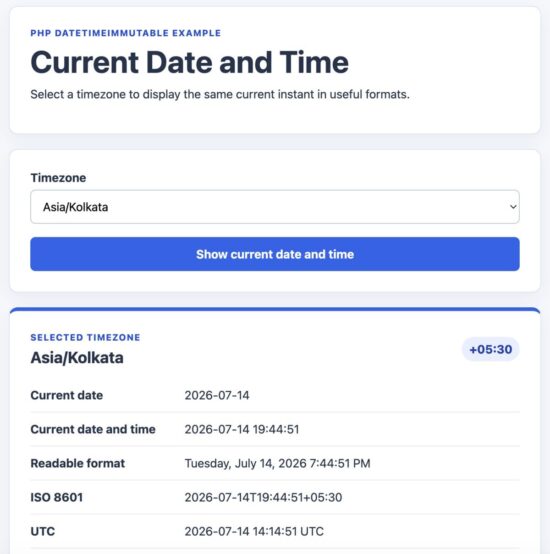
PHP current date and time displayed in local, UTC, ISO 8601, and Unix timestamp formats.
Get the current date with date()
The date() function returns a formatted date or time string. Its first argument is the output format. Its optional second argument is a Unix timestamp.
When the timestamp is omitted, PHP uses the current time.
<?php

date_default_timezone_set('Asia/Kolkata');

echo date('Y-m-d');
This returns the current date in year-month-day format, such as 2026-07-14.
Get the current date in common formats
<?php

date_default_timezone_set('Asia/Kolkata');

echo date('Y-m-d');
echo PHP_EOL;

echo date('d-m-Y');
echo PHP_EOL;

echo date('F j, Y');
echo PHP_EOL;

echo date('l, F j, Y');
The same date can be displayed as:
2026-07-14
14-07-2026
July 14, 2026
Tuesday, July 14, 2026
Get the current time
Use H:i:s for a 24-hour time:
<?php

date_default_timezone_set('Asia/Kolkata');

echo date('H:i:s');
Use h:i:s A for a 12-hour time with AM or PM:
<?php

date_default_timezone_set('Asia/Kolkata');

echo date('h:i:s A');
Get the current date and time together
<?php

date_default_timezone_set('Asia/Kolkata');

echo date('Y-m-d H:i:s');
The format characters used above are:
| Character | Meaning | Example |
|---|---|---|
Y |
Four-digit year | 2026 |
m |
Month with a leading zero | 07 |
d |
Day with a leading zero | 14 |
H |
Hour in 24-hour format | 16 |
i |
Minutes | 45 |
s |
Seconds | 30 |
A |
Uppercase AM or PM | PM |
PHP format characters are case-sensitive. For example, m means month, while i means minutes. See formatting dates in PHP for a more detailed format reference.
Use one timestamp for several related values
Separate calls that read the current time can cross a second or even a date boundary. Capture the timestamp once when several outputs must describe the same instant.
<?php

date_default_timezone_set('Asia/Kolkata');

$now = time();

$currentDate = date('Y-m-d', $now);
$currentTime = date('H:i:s', $now);

echo $currentDate;
echo PHP_EOL;
echo $currentTime;
Get the current date with DateTimeImmutable
DateTimeImmutable represents the current date, time, and timezone as one value. This is useful when the date will be formatted more than once or passed to other application code.
<?php

$timezone = new DateTimeZone('Asia/Kolkata');
$now = new DateTimeImmutable('now', $timezone);

echo $now->format('Y-m-d');
echo PHP_EOL;
echo $now->format('Y-m-d H:i:s');
echo PHP_EOL;
echo $now->format('l, F j, Y g:i:s A');
The same object is used for every output. This ensures that each formatted value represents the same instant.
Why use DateTimeImmutable for the current date?
The class provides a few practical advantages:
- The timezone is attached directly to the date object.
- The same current value can be formatted several ways.
- The object can be converted to another timezone.
- Methods that adjust the date return a new object.
- The original current value remains unchanged.
The last point helps prevent accidental changes when a date is reused.
<?php

$now = new DateTimeImmutable(
    'now',
    new DateTimeZone('UTC')
);

$tomorrow = $now->modify('+1 day');

echo $now->format('Y-m-d');
echo PHP_EOL;
echo $tomorrow->format('Y-m-d');
Get today’s date at midnight
The value now includes the current clock time. Use today when you need the start of the current calendar date in a specific timezone.
<?php

$timezone = new DateTimeZone('Asia/Kolkata');

$today = new DateTimeImmutable('today', $timezone);

echo $today->format('Y-m-d H:i:s');
The time portion is 00:00:00. This is different from formatting now without displaying its time. A now object still contains the current hour, minute, and second even when the output contains only Y-m-d.
Get individual current date values
Use format() when the application needs separate values for the year, month, day, or weekday.
<?php

$now = new DateTimeImmutable(
    'now',
    new DateTimeZone('Asia/Kolkata')
);

$year = (int) $now->format('Y');
$month = (int) $now->format('n');
$day = (int) $now->format('j');
$weekday = $now->format('l');

echo $year;
echo PHP_EOL;
echo $month;
echo PHP_EOL;
echo $day;
echo PHP_EOL;
echo $weekday;
Casting numeric components to integers removes leading zeros and gives the application a numeric value instead of a formatted string.
Get the current date in a specific timezone
The current calendar date can differ between timezones. When it is shortly after midnight in one region, it may still be the previous date somewhere else.
Use a timezone identifier from PHP’s list of supported timezones. Common examples include UTC, Asia/Kolkata, Europe/London, and America/New_York.
<?php

$timezone = new DateTimeZone('America/New_York');
$now = new DateTimeImmutable('now', $timezone);

echo $now->format('Y-m-d H:i:s P e');
The P character displays the UTC offset. The e character displays the timezone identifier.
Show the same current instant in two timezones
Create the current value once. Then use setTimezone() to display that same instant in another region.
<?php

$utcNow = new DateTimeImmutable(
    'now',
    new DateTimeZone('UTC')
);

$kolkataNow = $utcNow->setTimezone(
    new DateTimeZone('Asia/Kolkata')
);

echo $utcNow->format('Y-m-d H:i:s P');
echo PHP_EOL;
echo $kolkataNow->format('Y-m-d H:i:s P');
The clock time and possibly the date will change. Both objects still represent the same instant, so their Unix timestamps are equal.
Get the current UTC date and time
Use a UTC timezone object when your application works with APIs, logs, or stored event times.
<?php

$utcNow = new DateTimeImmutable(
    'now',
    new DateTimeZone('UTC')
);

echo $utcNow->format('Y-m-d H:i:s T');
You can also use gmdate() for a short procedural example:
<?php

echo gmdate('Y-m-d H:i:s');
gmdate() formats the current value in UTC. In comparison, date() uses PHP’s configured default timezone.
Set the default timezone for date()
Call date_default_timezone_set() before using procedural date functions when the application configuration has not already set the correct timezone.
<?php

date_default_timezone_set('Europe/London');

echo date('Y-m-d H:i:s T');
This changes the default timezone for date and time functions executed later in the script. It does not change the server’s system clock.
Server timezone and visitor timezone are different
PHP runs on the server, so it cannot automatically read the visitor’s device timezone. If the page must show each visitor’s local date, collect a valid timezone identifier from the browser or the user’s profile. Send that identifier to PHP and validate it before creating a DateTimeZone object.
Prefer regional identifiers over abbreviations such as CST or IST. Abbreviations can be ambiguous, while regional identifiers include the rules needed for offset changes. For more examples, see PHP timezone conversion.
Get the current Unix timestamp
The time() function returns the current Unix timestamp. It is an integer containing the number of seconds since January 1, 1970 at 00:00:00 UTC.
<?php

$currentTimestamp = time();

echo $currentTimestamp;
A Unix timestamp identifies an instant. It does not contain a timezone. Changing PHP’s default timezone does not change the value returned by time().
Get the timestamp from DateTimeImmutable
Use getTimestamp() when the current date is already available as a DateTimeImmutable object.
<?php

$now = new DateTimeImmutable(
    'now',
    new DateTimeZone('Asia/Kolkata')
);

echo $now->getTimestamp();
The object’s timezone controls how the current value is displayed. It does not change the instant represented by the timestamp.
Format the current timestamp
Pass a timestamp as the optional second argument of date():
<?php

date_default_timezone_set('Asia/Kolkata');

$timestamp = time();

echo date('Y-m-d H:i:s', $timestamp);
Capturing the timestamp once is helpful when several formatted values must remain consistent.
Get the request start time
time() reads the time when it is called. PHP also provides the time when the current request started through $_SERVER['REQUEST_TIME'].
<?php

$requestTimestamp = (int) $_SERVER['REQUEST_TIME'];

$requestStartedAt = (new DateTimeImmutable('@' . $requestTimestamp))
    ->setTimezone(new DateTimeZone('Asia/Kolkata'));

echo $requestStartedAt->format('Y-m-d H:i:s');
This distinction can matter in a long-running request. Use $_SERVER['REQUEST_TIME'] when every operation should refer to the start of the request. Use time() when you need the time at the exact point where the function runs.
Get the current time with microseconds
Use microtime(true) only when sub-second precision is required, such as measuring execution time.
<?php

$currentTime = microtime(true);

echo $currentTime;
The function returns a floating-point value containing seconds and a fractional part. It is not needed when displaying an ordinary current date and time.
See the PHP timestamp guide for more examples of converting and using timestamps.
Get current date components
PHP can return the current year, month, day, weekday, and time as separate values. This is useful when an older API expects an array or when an application needs numeric components.
Get current date values with getdate()
The getdate() function returns an associative array. Pass a timestamp to make it clear which instant the array represents.
<?php

date_default_timezone_set('Asia/Kolkata');

$now = time();
$parts = getdate($now);

echo $parts['year'];
echo PHP_EOL;
echo $parts['mon'];
echo PHP_EOL;
echo $parts['mday'];
echo PHP_EOL;
echo $parts['weekday'];
echo PHP_EOL;
echo $parts['hours'];
echo PHP_EOL;
echo $parts['minutes'];
Some commonly used array keys are:
| Key | Value |
|---|---|
year |
Four-digit year |
mon |
Month from 1 to 12 |
mday |
Day of the month |
wday |
Weekday number from 0 for Sunday to 6 for Saturday |
weekday |
Full weekday name |
month |
Full month name |
hours |
Hour in 24-hour format |
minutes |
Minutes |
seconds |
Seconds |
0 |
The Unix timestamp |
Get one current component with idate()
The idate() function returns one date or time component as an integer.
<?php

date_default_timezone_set('Asia/Kolkata');

echo idate('Y');
echo PHP_EOL;
echo idate('m');
echo PHP_EOL;
echo idate('d');
Unlike date(), idate() accepts only one format character at a time. Its return value is an integer.
Which approach should you use?
Use getdate() when an array of current components is genuinely useful. Use idate() when you need one numeric component in a small procedural script.
For new application code, a single DateTimeImmutable object is usually clearer because it keeps the current instant and timezone together.
<?php

$now = new DateTimeImmutable(
    'now',
    new DateTimeZone('Asia/Kolkata')
);

$year = (int) $now->format('Y');
$month = (int) $now->format('n');
$day = (int) $now->format('j');
Common errors and fixes
The current date is one day ahead or behind
This is usually a timezone problem. The server may be using UTC while the application expects a regional timezone, or the server may have an unrelated default setting.
<?php

echo date_default_timezone_get();
Pass the required timezone explicitly when creating the current date:
<?php

$now = new DateTimeImmutable(
    'now',
    new DateTimeZone('Asia/Kolkata')
);

echo $now->format('Y-m-d');
The minutes display the month number
Use i for minutes. Lowercase m represents the month.
<?php

echo date('H:i:s');
PHP format characters are case-sensitive. H:i:s produces a 24-hour time with minutes and seconds.
PHP does not show the visitor’s local date
PHP executes on the server. Functions such as date() and time() do not automatically know the visitor’s device timezone.
Store the user’s timezone in their profile or obtain it from the browser. Send the timezone identifier to PHP, validate it, and use it when creating the date object.
Calling date_default_timezone_set() does not change time()
The time() function returns the current Unix timestamp. A timestamp does not contain a local timezone.
Changing the default timezone affects how date() formats that timestamp. It does not change the timestamp itself.
<?php

$timestamp = time();

date_default_timezone_set('UTC');
echo date('Y-m-d H:i:s', $timestamp);
echo PHP_EOL;

date_default_timezone_set('Asia/Kolkata');
echo date('Y-m-d H:i:s', $timestamp);
Both lines format the same instant, but they display it in different timezones.
Related current values do not match
Several calls to date() or time() can cross a second, minute, or date boundary. Capture the current instant once when the values must stay consistent.
<?php

$now = new DateTimeImmutable(
    'now',
    new DateTimeZone('UTC')
);

$currentDate = $now->format('Y-m-d');
$currentTime = $now->format('H:i:s');
The ISO week year looks wrong near New Year
The ISO week-numbering year can differ from the calendar year during the first or last days of a year. Use o with the ISO week number W.
<?php

$now = new DateTimeImmutable(
    'now',
    new DateTimeZone('UTC')
);

echo $now->format('o-\WW-N');
Use Y for an ordinary calendar year. Use o when formatting an ISO week date.
gmdate() and date() return different hours
This is expected. gmdate() always formats the value in UTC. date() uses PHP’s default timezone.
<?php

date_default_timezone_set('Asia/Kolkata');

$now = time();

echo date('Y-m-d H:i:s', $now);
echo PHP_EOL;
echo gmdate('Y-m-d H:i:s', $now);
Choose the function based on the timezone required by the output.
Security considerations
Displaying the current date is not usually a security-sensitive operation. The surrounding application logic can be sensitive when the date controls expiry, access, payments, or scheduled actions.
Use server time for expiry checks
Do not trust a current time submitted by the browser. A user can change form values, request data, and their device clock.
<?php

$now = new DateTimeImmutable(
    'now',
    new DateTimeZone('UTC')
);

if ($now >= $expiresAt) {
    echo 'Expired';
}
Calculate the current time and enforce the rule on the server. Browser time can still be used for display-only clocks and countdowns.
Validate a submitted timezone
If users can select a timezone, do not pass an unchecked request value directly to DateTimeZone. Validate it against the timezones supported by the application.
<?php

$allowedTimezones = [
    'UTC',
    'Asia/Kolkata',
    'Europe/London',
    'America/New_York',
];

$timezoneInput = $_POST['timezone'] ?? 'UTC';

if (!in_array($timezoneInput, $allowedTimezones, true)) {
    exit('Unsupported timezone.');
}

$now = new DateTimeImmutable(
    'now',
    new DateTimeZone($timezoneInput)
);

echo $now->format('Y-m-d H:i:s');
An allow-list also ensures that the application displays only the regions supported by its interface and business rules.
Escape timezone labels and other user data
A date generated from a fixed format contains predictable characters. User-provided labels and request values must still be escaped before they are inserted into HTML.
<?php

function escape(string $value): string
{
    return htmlspecialchars(
        $value,
        ENT_QUOTES | ENT_SUBSTITUTE,
        'UTF-8'
    );
}

echo escape($timezoneInput);
Use a reliable server clock
PHP reads the current time from the operating system. Important expiry and audit logic therefore depends on the server clock being correct.
Keep production servers synchronized with a reliable time service. Application code cannot correct an inaccurate system clock simply by changing the PHP timezone.
Developer FAQ
What is the simplest way to get the current date in PHP?
Set the required timezone and call date() with a date format:
<?php

date_default_timezone_set('Asia/Kolkata');

echo date('Y-m-d');
How do I get the current date and time in PHP?
Include both date and time format characters:
<?php

date_default_timezone_set('Asia/Kolkata');

echo date('Y-m-d H:i:s');
Should I use date() or DateTimeImmutable?
Use date() for a short formatting task. Use DateTimeImmutable when the current value needs an explicit timezone, several output formats, timezone conversion, or additional application logic.
DateTimeImmutable also makes it easier to capture the current instant once and reuse it consistently.
How do I get the current date in UTC?
Create the current value with a UTC timezone:
<?php

$now = new DateTimeImmutable(
    'now',
    new DateTimeZone('UTC')
);

echo $now->format('Y-m-d H:i:s T');
For a short procedural version, use gmdate('Y-m-d H:i:s').
Does time() use the server timezone?
time() returns a Unix timestamp. The timestamp itself has no local timezone. A timezone becomes relevant when PHP formats that timestamp as a readable date and time.
How do I get the visitor’s current date?
PHP cannot automatically read the visitor’s device timezone because it runs on the server. Obtain the timezone identifier from the browser or the user’s saved profile. Validate it before using it in PHP.
Why is the PHP current date incorrect?
The most common cause is an unexpected timezone. Check date_default_timezone_get() and compare it with the timezone the application requires.
An incorrect operating system clock can also produce the wrong result. Changing the PHP timezone changes the displayed offset, not the underlying server clock.
Is NOW() a PHP function?
No. NOW() is commonly used by databases such as MySQL. In PHP, use date(), time(), or DateTimeImmutable.
Be careful when PHP and the database use different timezone settings. For application-controlled timestamps, it is often clearer to create one UTC value in PHP and pass it to the database.
How do I keep the same current time across a request?
Capture the current value once and reuse it:
<?php

$now = new DateTimeImmutable(
    'now',
    new DateTimeZone('UTC')
);
Use $_SERVER['REQUEST_TIME'] instead when the value must represent the exact start of the PHP request.
Where can I learn date calculations and parsing?
This article stays focused on retrieving the current value. See PHP date and time for parsing, comparison, date intervals, and calendar calculations.
Download the PHP current date example project
The example project displays the current date and time in a selected timezone. It uses one DateTimeImmutable object so every output represents the same instant.
The project displays:
- The current date in
Y-m-dformat - The current date and time
- A readable date format
- An ISO 8601 value
- The corresponding UTC value
- The current Unix timestamp
The timezone selector uses an allow-list. Dynamic output is escaped before it is added to the page. The project does not require a database or an external package.
Project files
php-current-date-demo/
├── assets/
│   └── styles.css
├── index.php
└── README.md
Run the project locally
- Download and extract the ZIP file.
- Open a terminal in the extracted
php-current-date-demodirectory. - Start the PHP development server.
php -S localhost:8000Open http://localhost:8000 in a browser. Select a timezone and click Show current date and time.


Nice tutorial, best on the Internet. Better than the official PHP docs. Thanks a lot.
So happy to see your comment. Welcome.