Sessions and cookies both help PHP remember data between page requests. But they do it in different ways.
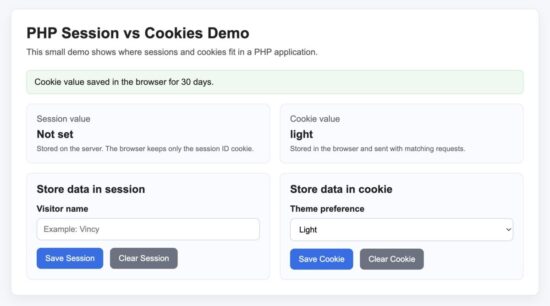
A session stores data on the server. The browser usually stores only a session ID. A cookie stores data in the user’s browser and sends it back to the server with matching requests.
This difference matters when you build login systems, shopping carts, user preferences, CSRF protection, and remember-me features.
Quick Answer
Use a PHP session when the data should stay on the server and should not be directly visible or editable in the browser. Use a cookie when the browser needs to remember a small value across visits.
- Session: Best for login state, user ID, CSRF token, cart data, and secure temporary state.
- Cookie: Best for theme choice, language preference, consent status, and remember-me tokens.
Do not store passwords, plain user IDs for authentication, payment details, or sensitive personal data directly in cookies.
What Is a PHP Session?
A PHP session stores user-related data on the server. PHP creates a unique session ID and usually stores that ID in a browser cookie named PHPSESSID.
When the browser sends the session ID back on the next request, PHP loads the matching session data from the server.
This makes sessions more secure than storing sensitive values directly inside cookies.
Common Uses of Sessions
- User login state
- Shopping cart data
- CSRF tokens
- Temporary flash messages
- Multi-step form progress
Simple PHP Session Example
<?php
session_start();

$_SESSION['username'] = 'john';

echo "Session value saved.";
?>
Read the session value on another page:
<?php
session_start();

if (isset($_SESSION['username'])) {
    echo $_SESSION['username'];
}
?>
Destroying a Session
Sessions should be destroyed during logout.
<?php
session_start();

session_unset();
session_destroy();

echo "Session destroyed.";
?>
If you are building authentication systems, you may also like this guide on PHP login script with session.
What Is a Cookie in PHP?
A cookie stores small pieces of data directly in the user’s browser. The browser automatically sends the cookie back to the server on future requests.
Cookies can stay even after the browser closes, depending on their expiry time.
Common Uses of Cookies
- Remember me login
- Language preference
- Dark mode setting
- User tracking consent
- Analytics identifiers
Simple PHP Cookie Example
Create a cookie:
<?php
setcookie(
    "theme",
    "dark",
    time() + 86400,
    "/"
);

echo "Cookie created.";
?>
Read the cookie value:
<?php
if (isset($_COOKIE['theme'])) {
    echo $_COOKIE['theme'];
}
?>
Delete a Cookie
<?php
setcookie(
    "theme",
    "",
    time() - 3600,
    "/"
);

echo "Cookie deleted.";
?>
PHP internally uses cookies for sessions unless configured otherwise. You can learn more about HTTP cookies in the official MDN cookie documentation.
PHP Session vs Cookies
The main difference is where the data is stored.
| Feature | Session | Cookie |
|---|---|---|
| Storage Location | Server | Browser |
| Security | More secure | Less secure |
| Data Size | Larger | Small |
| Expiration | Ends after session timeout or logout | Can persist for days or months |
| Server Load | Uses server storage | Stored in browser |
| Best Use Cases | Authentication and sensitive data | User preferences and persistence |
When Should You Use Sessions?
Use sessions when the data is sensitive or temporary.
- User authentication
- Checkout process
- Admin access control
- Secure application state
When Should You Use Cookies?
Use cookies when the browser should remember something across visits.
- Remember selected language
- Store UI preferences
- Remember login token
- Analytics and consent tracking
Security Considerations
Sessions are generally safer because the actual data stays on the server. But sessions are still vulnerable if attackers steal the session ID.
Cookies are easier to tamper with because they are stored in the browser.
Secure Session Practices
- Call
session_regenerate_id()after login - Destroy sessions during logout
- Use HTTPS
- Set secure cookie flags
<?php
session_start();

session_regenerate_id(true);
?>
Secure Cookie Practices
Set cookies with the httponly and secure flags whenever possible.
<?php
setcookie(
    "remember_token",
    "sample-token",
    [
        "expires" => time() + 86400,
        "path" => "/",
        "secure" => true,
        "httponly" => true,
        "samesite" => "Lax"
    ]
);
?>
The official PHP documentation also recommends secure session handling for authentication-related applications. See the PHP session documentation for more details.
Common Errors and Fixes
Headers Already Sent
This happens when output is sent before session_start() or setcookie().
Wrong:
<?php
echo "Hello";

session_start();
?>
Correct:
<?php
session_start();

echo "Hello";
?>
Session Value Not Available
You must call session_start() on every page that reads or writes session data.
<?php
session_start();

$_SESSION['username'] = 'john';
?>
Cookie Not Updating Immediately
Cookies become available on the next request after they are set.
Session Expiring Too Quickly
PHP sessions expire after inactivity. The timeout depends on the server configuration.
You can check the current session lifetime using:
<?php
echo ini_get('session.gc_maxlifetime');
?>
How PHP Sessions Internally Use Cookies
Many beginners think sessions and cookies are completely separate. But in normal PHP setups, sessions actually depend on cookies.
When you call session_start(), PHP creates a unique session ID. That ID is usually stored in a browser cookie named PHPSESSID.
The browser sends this cookie back on every request. PHP then uses the ID to load the correct session data from the server.
So even though session data stays on the server, a small cookie is still commonly involved.
Inspecting the PHPSESSID session cookie in browser developer tools
Developer FAQ
Are sessions safer than cookies?
Yes. Sessions are usually safer because the actual data stays on the server.
Can sessions work without cookies?
Yes. PHP can pass session IDs through URLs, but this is generally not recommended because of security risks.
Can I store arrays in PHP sessions?
Yes. PHP sessions can store arrays and associative arrays directly.
<?php
session_start();

$_SESSION['cart'] = [
    "Keyboard",
    "Mouse"
];
?>
What is the default PHP session cookie name?
By default, PHP uses the PHPSESSID cookie.
Should login systems use cookies or sessions?
Login state is usually managed with sessions. Cookies may still be used for remember-me functionality.
Can users modify cookies?
Yes. Users can edit cookies from the browser. That is why sensitive authentication logic should not rely directly on cookie values.
Can users modify sessions?
Users normally cannot directly modify server-side session data. However, attackers may hijack sessions if they steal the session ID.
Conclusion
Sessions and cookies solve similar problems, but they are designed for different purposes.
Use sessions when security matters and the data should stay on the server. Use cookies when the browser needs to remember small values across visits.
In real applications, both are commonly used together. PHP sessions themselves usually depend on cookies internally.
If you are working on authentication or user state management, understanding the difference between sessions and cookies is important for both security and performance.
Download Source Code
Download the complete working demo project used in this tutorial:


Wow, thank you for this nice cute article.
Welcome Kesavan.
Useful for extra knowledge of PHP cookies
Thank you Rohit.
I like your content
Thank you Bro.