PHP SimpleXML parser is the easiest way to read small XML files in PHP. It converts XML data into a SimpleXMLElement object. Then you can access XML elements and attributes using normal object and array syntax.
Use SimpleXML when the XML structure is simple and the file size is small or medium. If you want to compare SimpleXML with event-based parsing, DOMDocument, and XMLReader, read the main guide on PHP XML Parser.
In this tutorial, we will read an XML file with book records. Then we will show the parsed XML data in an HTML table.
Quick Answer
Use simplexml_load_file() to read XML from a file. Use simplexml_load_string() to read XML from a string.
<?php
$xml = simplexml_load_file('books.xml');

foreach ($xml->book as $book) {
    echo $book->title . PHP_EOL;
}
?>
The simplexml_load_file() function returns a SimpleXMLElement object on success. If loading fails, it returns false. The PHP manual also recommends using strict comparison when checking the return value because the function may return values that evaluate to false. You can read the official reference for simplexml_load_file().
When should you use SimpleXML?
Use SimpleXML when you want a simple and readable way to access XML data in PHP. It is a good choice for small XML files, API XML responses, configuration files, product feeds, and other XML documents with a simple structure.
SimpleXML is not the best choice for every XML task. It is mainly for reading XML, not for complex editing or streaming very large files.
| Requirement | Recommended option |
|---|---|
| Read a small XML file | SimpleXML |
| Read XML from a string | SimpleXML |
| Access XML attributes easily | SimpleXML |
| Edit, add, or remove XML nodes | DOMDocument |
| Read a very large XML file | XMLReader |
| Parse XML using event handlers | PHP XML Parser |
Example XML file
The example project uses a small XML file with book records. Each book has an id attribute and child elements for title, author, category, price, and availability.
<?xml version="1.0" encoding="UTF-8"?>
<catalog>
    <book id="B1001">
        <title>Clean PHP Basics</title>
        <author>Meera Iyer</author>
        <category>PHP</category>
        <price currency="USD">19.99</price>
        <available>true</available>
    </book>
    <book id="B1002">
        <title>Practical MySQL Queries</title>
        <author>Daniel Roy</author>
        <category>Database</category>
        <price currency="USD">24.50</price>
        <available>true</available>
    </book>
    <book id="B1003">
        <title>XML for Web Developers</title>
        <author>Sarah Thomas</author>
        <category>XML</category>
        <price currency="USD">17.75</price>
        <available>false</available>
    </book>
</catalog>
Save this file as books.xml. The PHP code will load this XML file and read each <book> node.
Read XML file using simplexml_load_file()
The simplexml_load_file() function reads an XML file and converts it into a SimpleXMLElement object. Then you can loop through the XML nodes using PHP object syntax.
The following example reads books.xml, collects each book record, and stores it in an array.
<?php
declare(strict_types=1);

libxml_use_internal_errors(true);

$xmlFile = __DIR__ . '/books.xml';
$books = [];
$errorMessage = '';

if (!file_exists($xmlFile)) {
    $errorMessage = 'The XML file was not found.';
} else {
    $xml = simplexml_load_file($xmlFile);

    if ($xml === false) {
        $errors = libxml_get_errors();
        $firstError = $errors[0]->message ?? 'Unable to read the XML file.';
        $errorMessage = trim($firstError);
        libxml_clear_errors();
    } else {
        foreach ($xml->book as $book) {
            $books[] = [
                'id' => (string) $book['id'],
                'title' => (string) $book->title,
                'author' => (string) $book->author,
                'category' => (string) $book->category,
                'price' => (string) $book->price,
                'currency' => (string) $book->price['currency'],
                'available' => ((string) $book->available === 'true') ? 'Available' : 'Not Available',
            ];
        }
    }
}
?>
The book id is stored as an XML attribute. You can access it using array syntax.
$id = (string) $book['id'];The price currency is also an attribute. Since it belongs to the <price> element, read it from $book->price.
$currency = (string) $book->price['currency'];The title, author, category, price, and available values are child elements. You can read them using object syntax.
$title = (string) $book->title;
$author = (string) $book->author;
Display the SimpleXML result in HTML
After reading the XML file, the parsed book records can be displayed in an HTML table. Escape the output with htmlspecialchars() before printing it in the browser.
<?php
function e(string $value): string
{
    return htmlspecialchars($value, ENT_QUOTES, 'UTF-8');
}
?>

<!DOCTYPE html>
<html lang="en">
<head>
    <meta charset="UTF-8">
    <meta name="viewport" content="width=device-width, initial-scale=1.0">
    <title>PHP SimpleXML Parser Demo</title>
    <link rel="stylesheet" href="style.css">
</head>
<body>
    <main class="page">
        <section class="card">
            <h1>PHP SimpleXML Parser Demo</h1>
            <p>This example reads book data from an XML file using simplexml_load_file().</p>

            <?php if ($errorMessage !== '') : ?>
                <div class="message error">
                    <?php echo e($errorMessage); ?>
                </div>
            <?php elseif (empty($books)) : ?>
                <div class="message">
                    No books found in the XML file.
                </div>
            <?php else : ?>
                <div class="table-wrap">
                    <table>
                        <thead>
                            <tr>
                                <th>ID</th>
                                <th>Title</th>
                                <th>Author</th>
                                <th>Category</th>
                                <th>Price</th>
                                <th>Status</th>
                            </tr>
                        </thead>
                        <tbody>
                            <?php foreach ($books as $book) : ?>
                                <tr>
                                    <td><?php echo e($book['id']); ?></td>
                                    <td><?php echo e($book['title']); ?></td>
                                    <td><?php echo e($book['author']); ?></td>
                                    <td><?php echo e($book['category']); ?></td>
                                    <td><?php echo e($book['currency'] . ' ' . $book['price']); ?></td>
                                    <td><?php echo e($book['available']); ?></td>
                                </tr>
                            <?php endforeach; ?>
                        </tbody>
                    </table>
                </div>
            <?php endif; ?>
        </section>
    </main>
</body>
</html>
Example output
When the page runs successfully, the browser shows the XML book records in a table.
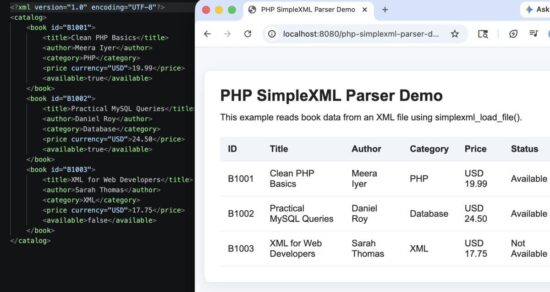
SimpleXML parser output displaying book records from an XML file.
Read XML from a string using simplexml_load_string()
Sometimes the XML content may come from an API response, a database field, or another PHP variable. In that case, use simplexml_load_string() instead of simplexml_load_file().
<?php
$xmlString = '<book id="B1004">
    <title>PHP Web Development</title>
    <author>Arun Kumar</author>
    <category>PHP</category>
    <price currency="USD">29.00</price>
    <available>true</available>
</book>';

$book = simplexml_load_string($xmlString);

if ($book !== false) {
    echo (string) $book->title;
}
?>
The usage is almost the same. The only difference is that simplexml_load_file() reads from a file path, while simplexml_load_string() reads from an XML string.
| Function | Use it when |
|---|---|
simplexml_load_file() |
The XML content is stored in a file. |
simplexml_load_string() |
The XML content is already available as a string. |
You can read the official PHP reference for simplexml_load_string() for more details about its arguments and return value.
Handle SimpleXML errors
Do not assume that the XML file will always be valid. The file may be missing, empty, or broken. It may also contain invalid XML syntax.
Use libxml_use_internal_errors(true) before loading XML. This lets you handle XML errors in your code instead of showing warnings directly in the browser.
libxml_use_internal_errors(true);

$xml = simplexml_load_file($xmlFile);

if ($xml === false) {
    $errors = libxml_get_errors();
    $firstError = $errors[0]->message ?? 'Unable to read the XML file.';
    $errorMessage = trim($firstError);
    libxml_clear_errors();
}
This is useful in real projects. You can show a simple error message to the user and log the detailed error separately if needed.
Common errors and fixes
SimpleXML is easy to use, but XML parsing can still fail because of file paths, invalid XML, missing extensions, or unsafe output. These are the common issues to check first.
simplexml_load_file() returns false
This usually means the file path is wrong or the XML content is not valid. First check the file path.
$xmlFile = __DIR__ . '/books.xml';Then check XML errors with libxml_get_errors().
if ($xml === false) {
    foreach (libxml_get_errors() as $error) {
        echo trim($error->message);
    }

    libxml_clear_errors();
}
XML attribute value is empty
If the value is stored as an attribute, read it with array syntax. For example, the book id is stored as id on the <book> tag.
$id = (string) $book['id'];If the value is inside a child element, read it with object syntax.
$title = (string) $book->title;SimpleXML extension is missing
If the SimpleXML extension is not enabled, PHP will not recognize SimpleXML functions. You can check your PHP modules from the command line.
php -m | grep SimpleXMLOn most standard PHP installations, SimpleXML is already enabled.
Special characters break the HTML output
Do not print XML values directly into HTML. Escape the values before showing them in the browser.
echo htmlspecialchars($book['title'], ENT_QUOTES, 'UTF-8');Security considerations
SimpleXML makes XML reading easy, but the XML content may still be unsafe. Treat XML from uploads, APIs, feeds, and third-party systems as external input.
- Validate the source of the XML before reading it.
- Use
libxml_use_internal_errors(true)to handle parsing errors cleanly. - Escape all XML values before printing them in HTML.
- Use file size limits if users can upload XML files.
- Avoid loading unknown remote XML URLs directly without validation and timeout control.
If your project accepts XML from outside systems, it is also worth understanding XML-related risks like XXE. The OWASP page on XML External Entity processing explains this risk in detail.
Developer FAQ
What is SimpleXML in PHP?
SimpleXML is a PHP extension for reading XML data as an object. It lets you access XML elements with object syntax and XML attributes with array syntax.
When should I use SimpleXML?
Use SimpleXML when the XML file is small or medium and has a simple structure. It is a good fit for reading configuration XML, simple API responses, product feeds, and RSS-like XML data.
Is SimpleXML better than DOMDocument?
SimpleXML is easier for reading XML. DOMDocument is better when you need to create, edit, add, or remove XML nodes. If your task is only to read values, SimpleXML is usually simpler.
Can SimpleXML parse XML from a URL?
Yes, but avoid loading unknown remote URLs directly in production. Validate the URL, use proper timeout handling, and prefer fetching the remote XML with a controlled HTTP request before parsing it.
How do I read XML attributes in SimpleXML?
Use array syntax to read XML attributes.
$id = (string) $book['id'];
$currency = (string) $book->price['currency'];
How do I convert SimpleXML data to a PHP array?
For simple XML data, loop through the nodes and build the array yourself. This gives you better control over field names, attributes, and value types.
$books = [];

foreach ($xml->book as $book) {
    $books[] = [
        'id' => (string) $book['id'],
        'title' => (string) $book->title,
        'author' => (string) $book->author,
    ];
}
Conclusion
PHP SimpleXML parser is a good choice when you want to read small and simple XML files with clean code. It lets you load XML from a file or string, read child elements, access attributes, and convert the data into a PHP array.
For more advanced XML work, choose the parser based on the job. Use DOMDocument when you need to edit XML. Use XMLReader when you need to read very large XML files. Use PHP XML Parser when you want event-based parsing with handler functions.
The downloadable example below gives you a complete working SimpleXML project with a sample XML file, error handling, safe output, and a clean result table.
Download source code
Download the PHP SimpleXML parser example project and run it in your local PHP environment.