PHP XMLReader is useful when you want to read large XML files without loading the full document into memory. It reads the XML document step by step, like a cursor moving from one node to the next.
This makes XMLReader a good choice for product feeds, exports, logs, reports, and other XML files that may become too large for SimpleXML or DOMDocument.
If you want a comparison of SimpleXML, DOMDocument, XMLReader, and event-based XML parsing, read the main guide on PHP XML Parser. This tutorial focuses only on XMLReader and large XML file reading.
Quick Answer
Use XMLReader::open() to open an XML file. Then use read() inside a loop to move through the XML nodes one by one.
<?php
$reader = new XMLReader();

if (!$reader->open('products.xml', 'UTF-8')) {
    throw new RuntimeException('Unable to open XML file.');
}

while ($reader->read()) {
    if ($reader->nodeType === XMLReader::ELEMENT && $reader->name === 'product') {
        echo $reader->getAttribute('sku') . PHP_EOL;
    }
}

$reader->close();
?>
The PHP manual describes XMLReader as a pull parser. It moves forward through the XML stream and stops at each node on the way. You can read the official reference for the XMLReader class.
When should you use XMLReader?
Use XMLReader when the XML file is large or when you want to read the document node by node. It does not create a full XML object tree in memory.
For a small XML file, SimpleXML is usually easier. For editing XML nodes, DOMDocument is a better choice. XMLReader is best when memory usage matters.
| Requirement | Recommended option |
|---|---|
| Read a small XML file with simple code | SimpleXML |
| Edit, add, or remove XML nodes | DOMDocument |
| Read a large XML file node by node | XMLReader |
| Process only selected nodes from a large XML file | XMLReader |
| Use event handlers for start tags, end tags, and text | PHP XML Parser |
Example XML file
The example project uses a product XML file. Each product has a sku attribute and child elements for name, category, price, and stock.
<?xml version="1.0" encoding="UTF-8"?>
<products>
    <product sku="P1001">
        <name>Wireless Mouse</name>
        <category>Computer Accessories</category>
        <price currency="USD">24.99</price>
        <stock>Available</stock>
    </product>
    <product sku="P1002">
        <name>USB Keyboard</name>
        <category>Computer Accessories</category>
        <price currency="USD">39.50</price>
        <stock>Available</stock>
    </product>
    <product sku="P1003">
        <name>Laptop Stand</name>
        <category>Office Desk</category>
        <price currency="USD">31.25</price>
        <stock>Out of Stock</stock>
    </product>
    <product sku="P1004">
        <name>Noise Cancelling Headphones</name>
        <category>Audio</category>
        <price currency="USD">89.00</price>
        <stock>Available</stock>
    </product>
</products>
The sample XML file is small so the tutorial is easy to follow. The same pattern is useful when the real XML file has thousands of similar nodes.
Save this file as products.xml. The PHP code will use XMLReader to move through this file and process each <product> node.
Create the XMLReader parser class
The parser class opens the XML file with XMLReader. Then it moves through the file one node at a time. When it finds a <product> element, it reads only that product node.
This example uses XMLReader for streaming and SimpleXML only for the current product node. This keeps the code simple while still avoiding loading the full XML document into memory.
<?php
declare(strict_types=1);

final class ProductXmlReader
{
    public function read(string $filePath): array
    {
        if (!file_exists($filePath)) {
            throw new RuntimeException('XML file not found.');
        }

        $reader = new XMLReader();

        if (!$reader->open($filePath, 'UTF-8')) {
            throw new RuntimeException('Unable to open XML file.');
        }

        $products = [];

        while ($reader->read()) {
            if ($reader->nodeType === XMLReader::ELEMENT && $reader->name === 'product') {
                $product = $this->readProduct($reader);

                if (!empty($product)) {
                    $products[] = $product;
                }
            }
        }

        $reader->close();

        return $products;
    }

    private function readProduct(XMLReader $reader): array
    {
        $sku = $reader->getAttribute('sku') ?? '';
        $productXml = $reader->readOuterXml();

        if ($productXml === '') {
            return [];
        }

        $product = simplexml_load_string($productXml);

        if ($product === false) {
            return [];
        }

        return [
            'sku' => $sku,
            'name' => (string) $product->name,
            'category' => (string) $product->category,
            'price' => (string) $product->price,
            'currency' => (string) $product->price['currency'],
            'stock' => (string) $product->stock,
        ];
    }
}
?>
The read() method is the main method. It opens the XML file, loops through the nodes, and returns the product list as an array.
The readProduct() method reads one product node. It gets the sku attribute with getAttribute(). Then it reads the current product XML with readOuterXml() and converts only that small part into a SimpleXML object.
Display the XMLReader result in HTML
After reading the XML file, include the parser class in index.php. Then call the read() method and display the returned product records in a table.
Use htmlspecialchars() before printing XML values in the browser. This keeps the output safe if the XML contains special characters.
<?php
declare(strict_types=1);

require_once __DIR__ . '/ProductXmlReader.php';

libxml_use_internal_errors(true);

$products = [];
$errorMessage = '';

try {
    $xmlReader = new ProductXmlReader();
    $products = $xmlReader->read(__DIR__ . '/products.xml');
} catch (RuntimeException $exception) {
    $errorMessage = $exception->getMessage();
}

function e(string $value): string
{
    return htmlspecialchars($value, ENT_QUOTES, 'UTF-8');
}
?>

<!DOCTYPE html>
<html lang="en">
<head>
    <meta charset="UTF-8">
    <meta name="viewport" content="width=device-width, initial-scale=1.0">
    <title>PHP XMLReader Demo</title>
    <link rel="stylesheet" href="style.css">
</head>
<body>
    <main class="page">
        <section class="card">
            <h1>PHP XMLReader Demo</h1>
            <p>This example reads product nodes from an XML file using XMLReader.</p>

            <?php if ($errorMessage !== '') : ?>
                <div class="message error">
                    <?php echo e($errorMessage); ?>
                </div>
            <?php elseif (empty($products)) : ?>
                <div class="message">
                    No products found in the XML file.
                </div>
            <?php else : ?>
                <div class="table-wrap">
                    <table>
                        <thead>
                            <tr>
                                <th>SKU</th>
                                <th>Name</th>
                                <th>Category</th>
                                <th>Price</th>
                                <th>Stock</th>
                            </tr>
                        </thead>
                        <tbody>
                            <?php foreach ($products as $product) : ?>
                                <tr>
                                    <td><?php echo e($product['sku'] ?? ''); ?></td>
                                    <td><?php echo e($product['name'] ?? ''); ?></td>
                                    <td><?php echo e($product['category'] ?? ''); ?></td>
                                    <td><?php echo e(($product['currency'] ?? '') . ' ' . ($product['price'] ?? '')); ?></td>
                                    <td><?php echo e($product['stock'] ?? ''); ?></td>
                                </tr>
                            <?php endforeach; ?>
                        </tbody>
                    </table>
                </div>
            <?php endif; ?>
        </section>
    </main>
</body>
</html>
Example output
When the page runs successfully, the browser shows the product records read from the XML file.
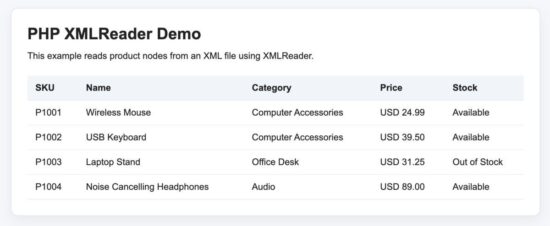
XMLReader output displaying product records read from an XML file.
How the XMLReader code works
The code starts by creating an XMLReader object.
$reader = new XMLReader();Then it opens the XML file. If the file cannot be opened, the code throws an exception.
if (!$reader->open($filePath, 'UTF-8')) {
    throw new RuntimeException('Unable to open XML file.');
}
The read() method moves the reader to the next node in the XML document. The loop continues until there are no more nodes to read.
while ($reader->read()) {
    if ($reader->nodeType === XMLReader::ELEMENT && $reader->name === 'product') {
        $product = $this->readProduct($reader);

        if (!empty($product)) {
            $products[] = $product;
        }
    }
}
The condition checks whether the current node is an element and whether the element name is product. This lets us process only product nodes and ignore the rest of the XML document.
The getAttribute() method reads the sku attribute from the current <product> element.
$sku = $reader->getAttribute('sku') ?? '';The readOuterXml() method reads the full XML for the current node. In this example, it reads one complete <product> block.
$productXml = $reader->readOuterXml();Then the code converts only that small product block into a SimpleXML object. This keeps the parsing code easy to read.
$product = simplexml_load_string($productXml);Finally, the reader is closed after the loop is complete.
$reader->close();This approach is practical because XMLReader moves through the main file one node at a time. It avoids loading the full XML document as one large object.
Common errors and fixes
XMLReader errors are usually related to file paths, missing PHP extensions, invalid XML, or unsafe output. These are the common issues to check first.
Class “XMLReader” not found
This means the XMLReader extension is not enabled in your PHP installation. You can check the loaded PHP modules from the command line.
php -m | grep XMLReaderIf it is missing, enable the XML extension for your PHP setup and restart the web server.
Unable to open XML file
This usually means the file path is wrong or PHP does not have permission to read the file.
$products = $xmlReader->read(__DIR__ . '/products.xml');Keep the XML file in the same project folder, or pass the correct absolute path.
XMLReader returns empty result
Check whether the element name in your condition matches the XML file. XML tag names are case-sensitive.
if ($reader->nodeType === XMLReader::ELEMENT && $reader->name === 'product') {
    $product = $this->readProduct($reader);
}
If your XML uses <Product> instead of <product>, update the condition accordingly.
simplexml_load_string() returns false
In this example, XMLReader reads the current product block and SimpleXML parses that small block. If the block is invalid, simplexml_load_string() may return false.
Use libxml_use_internal_errors(true) and inspect libxml_get_errors() while debugging invalid XML content.
libxml_use_internal_errors(true);

$product = simplexml_load_string($productXml);

if ($product === false) {
    foreach (libxml_get_errors() as $error) {
        echo trim($error->message);
    }

    libxml_clear_errors();
}
Special characters break the HTML output
Do not print XML values directly into HTML. Escape the values before showing them in the browser.
echo htmlspecialchars($product['name'] ?? '', ENT_QUOTES, 'UTF-8');Security considerations
XML files may come from uploads, APIs, partner feeds, exports, or third-party systems. Treat them as external input unless you fully control the source.
- Validate the XML source before reading it.
- Use file size limits for uploaded XML files.
- Escape XML values before printing them in HTML.
- Do not expose full server file paths in production error messages.
- Avoid reading unknown remote XML URLs directly without validation and timeout control.
If your project accepts XML from outside systems, also understand XML-related risks such as XXE. The OWASP page on XML External Entity processing explains this issue in detail.
Developer FAQ
What is XMLReader in PHP?
XMLReader is a PHP extension for reading XML documents node by node. It works like a forward-only cursor. The reader moves through the XML document and stops at each node.
When should I use XMLReader?
Use XMLReader when the XML file is large or when you want to process only selected nodes from the file. It is useful for large product feeds, exports, logs, reports, and XML data imports.
Is XMLReader better than SimpleXML?
XMLReader is better for large XML files because it does not load the full document into memory. SimpleXML is easier for small XML files because it gives simple object-style access to XML nodes.
Can XMLReader read XML from a string?
Yes. Use XMLReader::XML() when the XML content is already available as a string.
$reader = new XMLReader();
$reader->XML($xmlString);
How do I read an attribute using XMLReader?
Use getAttribute() when the reader is positioned on the element that has the attribute.
$sku = $reader->getAttribute('sku');Can I combine XMLReader with SimpleXML?
Yes. This is a practical pattern. Use XMLReader to move through the large XML file. When you reach the node you need, read that small node with readOuterXml() and parse it with SimpleXML.
$productXml = $reader->readOuterXml();
$product = simplexml_load_string($productXml);
Conclusion
PHP XMLReader is a good choice when you need to read large XML files in PHP. It reads the document step by step and avoids loading the full XML file into memory.
For small XML files, SimpleXML is usually easier. For editing XML nodes, DOMDocument is better. For event-based XML parsing with handler functions, use PHP XML Parser.
The downloadable example below gives you a complete working XMLReader project. It reads product nodes from an XML file, extracts attributes and child values, handles errors, and displays the result in a clean table.
Download source code
Download the PHP XMLReader example project and run it in your local PHP environment.