PHP XML Parser is an event-based parser for reading XML documents in PHP. It does not load the full XML document as a tree. Instead, it reads the XML content and calls handler functions when it finds an opening tag, closing tag, or text data.
This parser is useful when you want more control over the parsing flow. It is also useful when you do not want to keep the full XML document in memory.
For simple XML files, PHP SimpleXML parser is usually easier. For editing XML nodes, PHP DOM parser is a better choice. This tutorial focuses on PHP XML Parser extension and shows how to parse XML with event handlers.
Quick Answer
To parse XML with PHP XML Parser, create a parser with xml_parser_create(), attach handler functions with xml_set_element_handler() and xml_set_character_data_handler(), then parse the XML content using xml_parse().
<?php
$parser = xml_parser_create('UTF-8');

xml_set_element_handler($parser, 'startElement', 'endElement');
xml_set_character_data_handler($parser, 'characterData');

xml_parse($parser, $xmlContent, true);

xml_parser_free($parser);
?>
The official PHP manual defines xml_parse() as the function that parses an XML document and calls the configured handlers during parsing. You can read more in the PHP xml_parse() manual.
What is PHP XML Parser?
PHP XML Parser is a built-in extension for parsing XML documents with event handlers. It is based on the Expat XML parser library.
This parser reads the XML content step by step. When it finds an opening tag, it calls a start element handler. When it finds a closing tag, it calls an end element handler. When it finds text between tags, it calls a character data handler.
This style is different from tree-based parsers like SimpleXML and DOMDocument. Tree-based parsers load the XML document into an object or document tree. PHP XML Parser does not work like that. It reacts to parsing events.
When should you use PHP XML Parser?
Use PHP XML Parser when you want to process XML with event handlers. It is useful when the XML file has a predictable structure and you want to collect only the data you need.
For many day-to-day tasks, SimpleXML is easier. But PHP XML Parser gives you more control over the parsing process.
| Requirement | Recommended parser |
|---|---|
| Read a small XML file with simple nodes | SimpleXML |
| Edit, add, or remove XML nodes | DOMDocument |
| Read XML step by step with handlers | PHP XML Parser |
| Read a large XML file in streaming mode | PHP XMLReader |
| Read RSS feed data | PHP RSS feed parser |
In this tutorial, we will parse a product XML file and display the product list in a clean HTML table.
Example XML file
The example project uses a small XML file with product records. Each product has an id, name, category, price, and stock status.
<?xml version="1.0" encoding="UTF-8"?>
<products>
    <product>
        <id>P1001</id>
        <name>Wireless Mouse</name>
        <category>Computer Accessories</category>
        <price>24.99</price>
        <stock>Available</stock>
    </product>
    <product>
        <id>P1002</id>
        <name>USB Keyboard</name>
        <category>Computer Accessories</category>
        <price>39.50</price>
        <stock>Available</stock>
    </product>
    <product>
        <id>P1003</id>
        <name>Laptop Stand</name>
        <category>Office Desk</category>
        <price>31.25</price>
        <stock>Out of Stock</stock>
    </product>
</products>
Save this file as products.xml. The PHP parser will read this file and build a product array from the XML content.
Create the PHP XML parser class
The parser class stores the current tag, the current product, and the final product list. It uses three handler methods:
startElement()runs when the parser finds an opening tag.endElement()runs when the parser finds a closing tag.characterData()runs when the parser finds text between tags.
The following code uses proper method callables. This avoids deprecated warnings in PHP 8.4 and newer versions.
<?php
class ProductXmlParser
{
    private array $products = [];
    private array $currentProduct = [];
    private string $currentElement = '';

    public function parse(string $filePath): array
    {
        if (!file_exists($filePath)) {
            throw new RuntimeException('XML file not found.');
        }

        $xmlContent = file_get_contents($filePath);

        if ($xmlContent === false) {
            throw new RuntimeException('Unable to read XML file.');
        }

        $parser = xml_parser_create('UTF-8');

        xml_parser_set_option($parser, XML_OPTION_CASE_FOLDING, false);
        xml_parser_set_option($parser, XML_OPTION_SKIP_WHITE, true);

        xml_set_element_handler(
            $parser,
            [$this, 'startElement'],
            [$this, 'endElement']
        );

        xml_set_character_data_handler(
            $parser,
            [$this, 'characterData']
        );

        if (!xml_parse($parser, $xmlContent, true)) {
            $error = sprintf(
                'XML error: %s at line %d',
                xml_error_string(xml_get_error_code($parser)),
                xml_get_current_line_number($parser)
            );

            xml_parser_free($parser);

            throw new RuntimeException($error);
        }

        xml_parser_free($parser);

        return $this->products;
    }

    private function startElement(XMLParser $parser, string $name, array $attributes): void
    {
        $this->currentElement = $name;

        if ($name === 'product') {
            $this->currentProduct = [];
        }
    }

    private function endElement(XMLParser $parser, string $name): void
    {
        if ($name === 'product' && !empty($this->currentProduct)) {
            $this->products[] = $this->currentProduct;
        }

        $this->currentElement = '';
    }

    private function characterData(XMLParser $parser, string $data): void
    {
        $value = trim($data);

        if ($value === '' || $this->currentElement === '') {
            return;
        }

        if (in_array($this->currentElement, ['id', 'name', 'category', 'price', 'stock'], true)) {
            $this->currentProduct[$this->currentElement] = $value;
        }
    }
}
?>
Parse the XML file and show the result
After creating the parser class, call the parse() method with the XML file path. The method returns the parsed product records as an array.
The result can then be displayed in an HTML table. Use htmlspecialchars() while printing values to avoid unsafe output in the browser.
<?php
require_once __DIR__ . '/ProductXmlParser.php';

$products = [];
$errorMessage = '';

try {
    $parser = new ProductXmlParser();
    $products = $parser->parse(__DIR__ . '/products.xml');
} catch (RuntimeException $exception) {
    $errorMessage = $exception->getMessage();
}
?>

<!DOCTYPE html>
<html lang="en">
<head>
    <meta charset="UTF-8">
    <meta name="viewport" content="width=device-width, initial-scale=1.0">
    <title>PHP XML Parser Demo</title>
    <link rel="stylesheet" href="style.css">
</head>
<body>
    <main class="page">
        <section class="card">
            <h1>PHP XML Parser Demo</h1>
            <p>This example reads product data from an XML file and displays it in a table.</p>

            <?php if ($errorMessage !== '') : ?>
                <div class="message error">
                    <?php echo htmlspecialchars($errorMessage, ENT_QUOTES, 'UTF-8'); ?>
                </div>
            <?php elseif (empty($products)) : ?>
                <div class="message">
                    No products found in the XML file.
                </div>
            <?php else : ?>
                <div class="table-wrap">
                    <table>
                        <thead>
                            <tr>
                                <th>ID</th>
                                <th>Name</th>
                                <th>Category</th>
                                <th>Price</th>
                                <th>Stock</th>
                            </tr>
                        </thead>
                        <tbody>
                            <?php foreach ($products as $product) : ?>
                                <tr>
                                    <td><?php echo htmlspecialchars($product['id'] ?? '', ENT_QUOTES, 'UTF-8'); ?></td>
                                    <td><?php echo htmlspecialchars($product['name'] ?? '', ENT_QUOTES, 'UTF-8'); ?></td>
                                    <td><?php echo htmlspecialchars($product['category'] ?? '', ENT_QUOTES, 'UTF-8'); ?></td>
                                    <td>$<?php echo htmlspecialchars($product['price'] ?? '', ENT_QUOTES, 'UTF-8'); ?></td>
                                    <td><?php echo htmlspecialchars($product['stock'] ?? '', ENT_QUOTES, 'UTF-8'); ?></td>
                                </tr>
                            <?php endforeach; ?>
                        </tbody>
                    </table>
                </div>
            <?php endif; ?>
        </section>
    </main>
</body>
</html>
Example output
When the parser runs successfully, the browser shows the XML data as a product table.
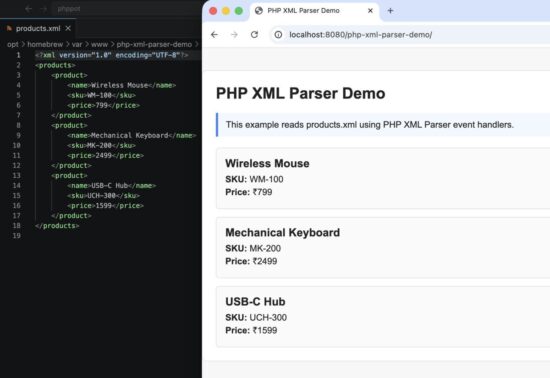
PHP XML Parser example output with product records from an XML file.
How the PHP XML parser code works
The parser starts by reading the XML file content with file_get_contents(). Then it creates a parser resource with xml_parser_create().
$parser = xml_parser_create('UTF-8');The parser is configured to preserve the original tag case. This is done by setting XML_OPTION_CASE_FOLDING to false.
xml_parser_set_option($parser, XML_OPTION_CASE_FOLDING, false);Next, the code registers the handler methods. These methods are called automatically while the XML content is parsed.
xml_set_element_handler(
    $parser,
    [$this, 'startElement'],
    [$this, 'endElement']
);

xml_set_character_data_handler(
    $parser,
    [$this, 'characterData']
);
The startElement() method runs when the parser finds an opening tag. In this example, when the parser finds a <product> tag, it starts a new product array.
private function startElement(XMLParser $parser, string $name, array $attributes): void
{
    $this->currentElement = $name;

    if ($name === 'product') {
        $this->currentProduct = [];
    }
}
The characterData() method runs when text is found between XML tags. The code trims the text and stores it under the current element name.
private function characterData(XMLParser $parser, string $data): void
{
    $value = trim($data);

    if ($value === '' || $this->currentElement === '') {
        return;
    }

    if (in_array($this->currentElement, ['id', 'name', 'category', 'price', 'stock'], true)) {
        $this->currentProduct[$this->currentElement] = $value;
    }
}
The endElement() method runs when a closing tag is found. When the parser reaches </product>, it adds the completed product to the final product list.
private function endElement(XMLParser $parser, string $name): void
{
    if ($name === 'product' && !empty($this->currentProduct)) {
        $this->products[] = $this->currentProduct;
    }

    $this->currentElement = '';
}
Finally, xml_parse() parses the XML content. If the XML has an error, the code gets the error message and line number.
if (!xml_parse($parser, $xmlContent, true)) {
    $error = sprintf(
        'XML error: %s at line %d',
        xml_error_string(xml_get_error_code($parser)),
        xml_get_current_line_number($parser)
    );

    xml_parser_free($parser);

    throw new RuntimeException($error);
}
This makes the example easier to debug. If the XML file has a missing closing tag or invalid character, the page will show a clear error instead of failing silently.
Common errors and fixes
XML parsing errors are usually caused by invalid XML, wrong encoding, missing files, or old handler syntax. These are the common issues to check first.
XML file not found
If the XML file path is wrong, file_get_contents() cannot read the file. Keep the XML file in the same project folder or use an absolute path.
$products = $parser->parse(__DIR__ . '/products.xml');XML error at a specific line
This happens when the XML document is not well formed. For example, a missing closing tag will break the parser.
<product>
    <id>P1001</id>
    <name>Wireless Mouse</name>
</product>
Check the line number shown in the error message. Then fix the XML syntax in that area.
Character data handler runs more than once
The character data handler can be called more than once for the same text node. This is normal parser behavior. If your XML can have long text values, append the value instead of replacing it.
$this->currentProduct[$this->currentElement] =
    ($this->currentProduct[$this->currentElement] ?? '') . $value;
For this product example, each value is small. So direct assignment is enough.
Deprecated warning in PHP 8.4
Older examples often use xml_set_object() with string method names. In PHP 8.4, this causes deprecated warnings.
Use proper method callables instead.
xml_set_element_handler(
    $parser,
    [$this, 'startElement'],
    [$this, 'endElement']
);
This is the cleaner way to register class methods as XML parser handlers.
Security considerations
Do not trust XML content just because it has a valid structure. XML may come from another system, a user upload, an API, or a feed URL. Always treat it as external input.
- Validate the XML source before parsing it.
- Do not print XML values directly in HTML.
- Use
htmlspecialchars()when showing parsed values in the browser. - Keep clear error handling, but do not expose sensitive server paths in production.
- Use file size limits if users can upload XML files.
The example uses htmlspecialchars() before printing values to the page. This protects the browser output if the XML contains unsafe text.
echo htmlspecialchars($product['name'] ?? '', ENT_QUOTES, 'UTF-8');For deeper XML security guidance, the OWASP reference on XML External Entity processing is a useful read.
Developer FAQ
Is PHP XML Parser the same as SimpleXML?
No. SimpleXML loads XML into an object-like structure and is easier for small XML files. PHP XML Parser is event-based. It calls handler functions while reading the XML content.
When should I use PHP XML Parser?
Use it when you want event-based parsing with start element, end element, and character data handlers. It is useful when you want more control over how XML is processed.
Can PHP XML Parser read large XML files?
It can process XML without building a full document tree. But for very large XML files, PHP XMLReader is often the better choice because it is designed for streaming XML reading.
Why is my XML tag name converted to uppercase?
By default, the parser may fold tag names to uppercase. Set XML_OPTION_CASE_FOLDING to false if you want to preserve the original tag name case.
xml_parser_set_option($parser, XML_OPTION_CASE_FOLDING, false);Can I parse XML from a URL?
Yes, but do it carefully. Validate the URL, set timeout limits, and avoid blindly parsing untrusted remote content. For production use, prefer a controlled HTTP client instead of directly depending on remote file access.
Does PHP XML Parser support UTF-8?
Yes. Create the parser with UTF-8 encoding and make sure the XML document also declares the correct encoding.
$parser = xml_parser_create('UTF-8');Conclusion
PHP XML Parser is useful when you want to parse XML with event handlers. It gives you control over opening tags, closing tags, and text content while the XML document is being read.
If your XML file is small and simple, SimpleXML may be easier. If you need to edit XML nodes, DOMDocument is better. If you need to stream very large XML files, XMLReader is usually the right tool. But when you want event-based XML parsing in PHP, this parser is a good fit.
The downloadable example below shows a complete working project. It reads a product XML file, parses it with handler methods, handles XML errors, and displays the result in a clean HTML table.
Download source code
Download the PHP XML Parser example project and run it in your local PHP environment.