Adding a watermark looks like a five-minute GD task. Then the logo gets a black rectangle, the text wanders off the image, or a large upload politely consumes all available memory. The actual overlay is simple. Preparing the images correctly is where most of the work lives.
This tutorial shows how to add either text or a transparent PNG logo to an image with PHP and the GD extension. The complete example accepts JPEG, PNG, and WebP uploads, calculates the watermark position, preserves transparency, and saves the result in the source image’s format.
Quick answer
To add an image watermark in PHP, load the source image and watermark as GD images, calculate the destination coordinates, and copy the watermark with imagecopy(). For a text watermark, use imagettftext() with a TrueType font.
This minimal example places a transparent PNG watermark in the bottom-right corner of a JPEG:
<?php

$source = imagecreatefromjpeg('photo.jpg');
$watermark = imagecreatefrompng('watermark.png');

if ($source === false || $watermark === false) {
    throw new RuntimeException('Could not load an image.');
}

$padding = 20;
$x = imagesx($source) - imagesx($watermark) - $padding;
$y = imagesy($source) - imagesy($watermark) - $padding;

imagecopy(
    $source,
    $watermark,
    $x,
    $y,
    0,
    0,
    imagesx($watermark),
    imagesy($watermark)
);

imagejpeg($source, 'watermarked-photo.jpg', 90);
Use imagecopy() when the PNG watermark already contains transparency. The function preserves its per-pixel alpha channel. imagecopymerge() has an opacity parameter, but it often produces disappointing results with transparent PNG logos because it does not preserve that alpha information in the same way.
What the complete example handles
The short snippet assumes both files are valid and the watermark fits inside the source image. A web-facing implementation needs a little more care. The downloadable project adds the missing practical pieces:
- JPEG, PNG, and WebP source images
- Text watermarks rendered with a bundled TrueType font
- Transparent PNG logo watermarks
- Automatic logo resizing when the watermark is too wide
- Five selectable watermark positions
- MIME-type, file-size, and image-dimension validation
- Random output filenames and CSRF protection
- Output in the same format as the source image
Requirements
You need PHP 8.2 or later with the GD, Fileinfo, and Mbstring extensions. GD must include support for the image formats you plan to process and FreeType support for TrueType text.
php -m | grep -E 'gd|fileinfo|mbstring'You can inspect the formats enabled in the current GD build with gd_info():
<?php

print_r(gd_info());
Look for enabled JPEG, PNG, WebP, and FreeType support. PHP may have the GD extension loaded without every image format being available, so checking the actual build saves a surprising amount of head-scratching.
Validate the uploaded image before opening it
The browser-provided filename and MIME type are not reliable validation inputs. A file named photo.jpg is not necessarily a JPEG, and $_FILES['type'] contains a value supplied by the client.
The example checks the upload error, file size, detected MIME type, and decoded image dimensions. It also limits the pixel count because a compressed 5 MB image can require far more than 5 MB of memory after GD decodes it.
const MAX_FILE_SIZE = 5 * 1024 * 1024;
const MAX_PIXELS = 20_000_000;
const ALLOWED_SOURCE_TYPES = [
    'image/jpeg',
    'image/png',
    'image/webp'
];

/**
 * @param array<string, mixed> $file
 * @param list<string> $allowedTypes
 * @return array{tmp_name: string, mime: string}
 */
function validateUpload(array $file, array $allowedTypes): array
{
    if (($file['error'] ?? UPLOAD_ERR_NO_FILE) !== UPLOAD_ERR_OK) {
        throw new RuntimeException(
            'Choose an image that is no larger than 5 MB.'
        );
    }

    $tmpName = (string) ($file['tmp_name'] ?? '');
    $fileSize = (int) ($file['size'] ?? 0);

    if (
        !is_uploaded_file($tmpName) ||
        $fileSize > MAX_FILE_SIZE
    ) {
        throw new RuntimeException(
            'The uploaded image is invalid or larger than 5 MB.'
        );
    }

    $mime = (new finfo(FILEINFO_MIME_TYPE))->file($tmpName);
    $imageSize = getimagesize($tmpName);

    if (
        !is_string($mime) ||
        !in_array($mime, $allowedTypes, true) ||
        $imageSize === false
    ) {
        throw new RuntimeException(
            'Upload a valid JPEG, PNG, or WebP image.'
        );
    }

    [$width, $height] = $imageSize;

    if (
        $width < 1 ||
        $height < 1 ||
        ($width * $height) > MAX_PIXELS
    ) {
        throw new RuntimeException(
            'The image dimensions are too large to process safely.'
        );
    }

    return [
        'tmp_name' => $tmpName,
        'mime' => $mime
    ];
}
The server-side finfo() check detects the file type from its contents. getimagesize() then confirms that PHP can recognize the file as an image and provides its dimensions.
Neither check should be used alone as a complete upload-security system. Together with is_uploaded_file(), strict allowed types, file-size limits, and pixel limits, they provide a sensible boundary for this focused example.
Load JPEG, PNG, and WebP images with one method
GD uses a separate loading function for each image format. Keeping that switch in one method prevents format checks from spreading through the rest of the application.
<?php

declare(strict_types=1);

namespace Phppot\Watermark;

use GdImage;
use RuntimeException;

final class ImageWatermarker
{
    private function __construct(private GdImage $image)
    {
        imagealphablending($this->image, true);
        imagesavealpha($this->image, true);
    }

    public static function fromFile(
        string $path,
        string $mime
    ): self {
        $image = match ($mime) {
            'image/jpeg' => imagecreatefromjpeg($path),
            'image/png' => imagecreatefrompng($path),
            'image/webp' => imagecreatefromwebp($path),
            default => false,
        };

        if (!$image instanceof GdImage) {
            throw new RuntimeException(
                'PHP GD could not read the source image.'
            );
        }

        return new self($image);
    }
}
The MIME value passed to this method comes from the server-side Fileinfo check, not from the filename extension. This matters when a valid image has the wrong extension and when somebody tries to disguise a different file type as an image.
imagealphablending() controls how subsequently drawn pixels combine with the destination. imagesavealpha() tells GD to retain the complete alpha channel when the result is saved as PNG or WebP. Calling both during construction gives the remaining watermark methods a consistent destination image.
Create the watermarker from the validated upload
The request handler can now validate the source and pass its detected type to the class:
$source = validateUpload(
    $_FILES['source_image'] ?? [],
    ALLOWED_SOURCE_TYPES
);

$watermarker = ImageWatermarker::fromFile(
    $source['tmp_name'],
    $source['mime']
);
At this point, the source image has passed the upload checks and exists as a GD image in memory. The next step is to calculate a position and apply either text or a PNG logo without losing transparency.
Calculate the watermark position
A watermark position is just an x and y coordinate on the destination image. The calculation becomes reusable when it accepts the dimensions of the rendered text or logo.
private const PADDING_RATIO = 0.025;

/**
 * @return array{int, int}
 */
private function coordinates(
    int $width,
    int $height,
    string $position
): array {
    $imageWidth = imagesx($this->image);
    $imageHeight = imagesy($this->image);

    $padding = max(
        12,
        (int) round(
            min($imageWidth, $imageHeight)
            * self::PADDING_RATIO
        )
    );

    return match ($position) {
        'top-left' => [
            $padding,
            $padding
        ],
        'top-right' => [
            max(0, $imageWidth - $width - $padding),
            $padding
        ],
        'bottom-left' => [
            $padding,
            max(0, $imageHeight - $height - $padding)
        ],
        'center' => [
            max(0, intdiv($imageWidth - $width, 2)),
            max(0, intdiv($imageHeight - $height, 2))
        ],
        default => [
            max(0, $imageWidth - $width - $padding),
            max(0, $imageHeight - $height - $padding)
        ],
    };
}
The padding is based on the smaller source dimension, with a minimum of 12 pixels. This keeps the spacing more consistent across portrait, landscape, and differently sized images.
The max(0, ...) checks prevent negative coordinates if a watermark is unexpectedly larger than the source. The logo method will also resize oversized watermarks, but keeping the coordinate method defensive costs very little.
Add a text watermark with a TrueType font
imagestring() works for small built-in bitmap text. For a watermark that scales with the source image, the imagettftext() TrueType text function is a better fit. It supports TrueType fonts, larger sizes, rotation, and alpha-aware colors.
The example calculates the font size from the source width and keeps it between 16 and 52 pixels. This avoids tiny text on ordinary photos and billboard-sized text on very large uploads.
public function addText(
    string $text,
    string $fontPath,
    string $position
): void {
    if (!is_file($fontPath)) {
        throw new RuntimeException(
            'The bundled TrueType font is missing.'
        );
    }

    $fontSize = max(
        16,
        min(
            52,
            (int) round(imagesx($this->image) * 0.045)
        )
    );

    $box = imagettfbbox(
        $fontSize,
        0,
        $fontPath,
        $text
    );

    if ($box === false) {
        throw new RuntimeException(
            'PHP GD could not measure the watermark text.'
        );
    }

    $width = $box[2] - $box[0];
    $height = $box[1] - $box[7];

    [$x, $top] = $this->coordinates(
        $width,
        $height,
        $position
    );

    $baseline = $top - $box[7];

    $shadow = imagecolorallocatealpha(
        $this->image,
        0,
        0,
        0,
        75
    );

    $white = imagecolorallocatealpha(
        $this->image,
        255,
        255,
        255,
        38
    );

    imagettftext(
        $this->image,
        $fontSize,
        0,
        $x + 2,
        $baseline + 2,
        $shadow,
        $fontPath,
        $text
    );

    imagettftext(
        $this->image,
        $fontSize,
        0,
        $x,
        $baseline,
        $white,
        $fontPath,
        $text
    );
}
Why the baseline needs special handling
The coordinates returned by imagettfbbox() describe the text’s bounding box relative to its baseline. Meanwhile, the positioning method calculates the top edge of the watermark. Passing that top coordinate directly to imagettftext() would place the text too high.
Subtracting $box[7] converts the calculated top edge into the baseline expected by GD:
$baseline = $top - $box[7];This small adjustment is easy to miss. It is also the usual reason a carefully calculated text watermark still appears a few pixels away from its intended position.
Add contrast without drawing a background box
The method renders the text twice. The first pass creates a two-pixel dark shadow. The second draws semi-transparent white text over it. This keeps the watermark readable on both light and dark areas without covering the image with an opaque rectangle.
GD alpha values run from 0 for fully opaque to 127 for fully transparent. That direction is the reverse of the opacity scales used by CSS and many image editors, so a higher value makes the color less visible.
The request handler calls the method with the submitted text, bundled font, and selected position:
$text = trim(
    (string) ($_POST['watermark_text'] ?? '')
);

if ($text === '' || mb_strlen($text) > 80) {
    throw new RuntimeException(
        'Enter watermark text between 1 and 80 characters.'
    );
}

$watermarker->addText(
    $text,
    __DIR__ . '/assets/Roboto.ttf',
    (string) ($_POST['position'] ?? 'bottom-right')
);
Add a transparent PNG logo watermark
A logo watermark should use a PNG with a transparent background. Before copying it, the example checks its width and scales it down when it occupies more than 28 percent of the source image.
The logo keeps its aspect ratio, so resizing the width also requires calculating a proportional height:
$newHeight = (int) round(
    imagesy($logo) * ($maxWidth / imagesx($logo))
);
The complete method creates a transparent destination canvas for the resized logo and uses imagecopyresampled() for smoother scaling.
private const LOGO_WIDTH_RATIO = 0.28;

public function addPngLogo(
    string $path,
    string $position
): void {
    $logo = imagecreatefrompng($path);

    if (!$logo instanceof GdImage) {
        throw new RuntimeException(
            'PHP GD could not read the PNG watermark.'
        );
    }

    imagealphablending($logo, false);
    imagesavealpha($logo, true);

    $maxWidth = max(
        1,
        (int) round(
            imagesx($this->image)
            * self::LOGO_WIDTH_RATIO
        )
    );

    if (imagesx($logo) > $maxWidth) {
        $newHeight = max(
            1,
            (int) round(
                imagesy($logo)
                * ($maxWidth / imagesx($logo))
            )
        );

        $resized = imagecreatetruecolor(
            $maxWidth,
            $newHeight
        );

        imagealphablending($resized, false);
        imagesavealpha($resized, true);

        $transparent = imagecolorallocatealpha(
            $resized,
            0,
            0,
            0,
            127
        );

        imagefill(
            $resized,
            0,
            0,
            $transparent
        );

        imagecopyresampled(
            $resized,
            $logo,
            0,
            0,
            0,
            0,
            $maxWidth,
            $newHeight,
            imagesx($logo),
            imagesy($logo)
        );

        $logo = $resized;
    }

    [$x, $y] = $this->coordinates(
        imagesx($logo),
        imagesy($logo),
        $position
    );

    imagecopy(
        $this->image,
        $logo,
        $x,
        $y,
        0,
        0,
        imagesx($logo),
        imagesy($logo)
    );
}
Setting alpha blending to false while preparing the logo canvas allows its alpha values to be copied rather than blended immediately. imagesavealpha() preserves the complete transparency information.
The final imagecopy() operation places the prepared logo on the source. There is no separate opacity argument because the PNG’s own alpha channel controls the opacity of each pixel. This lets a logo contain fully transparent, translucent, and opaque areas at the same time.
Validate the logo separately
The source upload accepts JPEG, PNG, or WebP. The logo upload is deliberately restricted to PNG because that format provides the transparent watermark behavior expected by this method.
$logo = validateUpload(
    $_FILES['watermark_image'] ?? [],
    ['image/png']
);

$watermarker->addPngLogo(
    $logo['tmp_name'],
    (string) ($_POST['position'] ?? 'bottom-right')
);
Do not decide that an upload is a PNG from its filename alone. Pass it through the same server-side MIME and image validation used for the source file.
Save the result in the source image format
Saving every result as JPEG would remove transparency from PNG images. It would also perform an unnecessary format conversion for WebP uploads. The class therefore selects the matching GD output function from the detected source MIME type.
public function save(
    string $path,
    string $mime
): void {
    $saved = match ($mime) {
        'image/jpeg' => imagejpeg(
            $this->image,
            $path,
            90
        ),
        'image/png' => imagepng(
            $this->image,
            $path,
            6
        ),
        'image/webp' => imagewebp(
            $this->image,
            $path,
            90
        ),
        default => false,
    };

    if (!$saved) {
        throw new RuntimeException(
            'PHP GD could not save the watermarked image.'
        );
    }
}
JPEG and WebP use a quality value of 90. PNG uses compression level 6, where 0 means no compression and 9 means maximum compression. PNG compression affects processing time and file size, not visual quality.
Generate an unpredictable output filename
Using the original client filename can cause collisions and awkward path-handling problems. Generate a server-controlled random filename and append the extension that corresponds to the validated MIME type:
$extension = match ($source['mime']) {
    'image/jpeg' => 'jpg',
    'image/png' => 'png',
    'image/webp' => 'webp',
};

$filename = bin2hex(random_bytes(12))
    . '.'
    . $extension;

$outputPath = __DIR__
    . '/output/'
    . $filename;

$watermarker->save(
    $outputPath,
    $source['mime']
);
The generated name contains 24 hexadecimal characters and does not reveal the user’s local filename. The output directory still needs appropriate server permissions, storage limits, and a cleanup policy. The example removes generated images after one hour when it handles a later request.
Connect the text and logo watermark modes
The request handler creates one ImageWatermarker instance and then applies the selected watermark type. Keeping the mode decision outside the class prevents upload and form concerns from leaking into the image-processing code.
$source = validateUpload(
    $_FILES['source_image'] ?? [],
    ALLOWED_SOURCE_TYPES
);

$mode = (string) (
    $_POST['watermark_type'] ?? 'text'
);

$position = (string) (
    $_POST['position'] ?? 'bottom-right'
);

$watermarker = ImageWatermarker::fromFile(
    $source['tmp_name'],
    $source['mime']
);

if ($mode === 'text') {
    $text = trim(
        (string) ($_POST['watermark_text'] ?? '')
    );

    if ($text === '' || mb_strlen($text) > 80) {
        throw new RuntimeException(
            'Enter watermark text between 1 and 80 characters.'
        );
    }

    $watermarker->addText(
        $text,
        __DIR__ . '/assets/Roboto.ttf',
        $position
    );
} elseif ($mode === 'logo') {
    $logo = validateUpload(
        $_FILES['watermark_image'] ?? [],
        ['image/png']
    );

    $watermarker->addPngLogo(
        $logo['tmp_name'],
        $position
    );
} else {
    throw new RuntimeException(
        'Choose a valid watermark type.'
    );
}
The coordinate method treats any unrecognized position as bottom-right. You can instead reject unknown values if the selected position will be stored or used for anything beyond drawing the watermark.
Protect the upload form with a CSRF token
The form changes server state by creating a file, so it should not accept a request vulnerable to cross-site request forgery. Generate a random token once per session and compare it during submission.
<?php

session_start();

if (empty($_SESSION['csrf_token'])) {
    $_SESSION['csrf_token'] = bin2hex(
        random_bytes(32)
    );
}

if ($_SERVER['REQUEST_METHOD'] === 'POST') {
    $submittedToken = (string) (
        $_POST['csrf_token'] ?? ''
    );

    if (
        !hash_equals(
            $_SESSION['csrf_token'],
            $submittedToken
        )
    ) {
        throw new RuntimeException(
            'The form expired. Refresh the page and try again.'
        );
    }
}
Add the token to the form as a hidden field. Escape the value when inserting it into HTML, even though this particular token contains only hexadecimal characters.
<input
    type="hidden"
    name="csrf_token"
    value="<?=
        htmlspecialchars(
            $_SESSION['csrf_token'],
            ENT_QUOTES,
            'UTF-8'
        )
    ?>"
>
Create the image upload form
The form uses multipart/form-data because it sends files. The accept attributes help users choose suitable files, but they are only a browser hint. The server-side validation remains authoritative.
<form method="post" enctype="multipart/form-data">
    <input
        type="hidden"
        name="csrf_token"
        value="CURRENT_SESSION_TOKEN"
    >

    <label for="source_image">Source image</label>
    <input
        id="source_image"
        name="source_image"
        type="file"
        accept="image/jpeg,image/png,image/webp"
        required
    >

    <fieldset>
        <legend>Watermark type</legend>

        <label>
            <input
                type="radio"
                name="watermark_type"
                value="text"
                checked
            >
            Text
        </label>

        <label>
            <input
                type="radio"
                name="watermark_type"
                value="logo"
            >
            PNG logo
        </label>
    </fieldset>

    <div data-watermark-panel="text">
        <label for="watermark_text">
            Watermark text
        </label>
        <input
            id="watermark_text"
            name="watermark_text"
            type="text"
            maxlength="80"
            value="PHPpot"
            required
        >
    </div>

    <div data-watermark-panel="logo" hidden>
        <label for="watermark_image">
            Transparent PNG logo
        </label>
        <input
            id="watermark_image"
            name="watermark_image"
            type="file"
            accept="image/png"
        >
    </div>

    <label for="position">Position</label>
    <select id="position" name="position">
        <option value="bottom-right">
            Bottom right
        </option>
        <option value="bottom-left">
            Bottom left
        </option>
        <option value="top-right">
            Top right
        </option>
        <option value="top-left">
            Top left
        </option>
        <option value="center">
            Center
        </option>
    </select>

    <button type="submit">
        Create watermarked image
    </button>
</form>
Show only the relevant watermark field
A small JavaScript helper switches between the text and logo controls. It also updates the required state, so a hidden logo input does not prevent a text-watermark submission.
const typeInputs = document.querySelectorAll(
    'input[name="watermark_type"]'
);

const panels = document.querySelectorAll(
    '[data-watermark-panel]'
);

const textInput = document.querySelector(
    '#watermark_text'
);

const logoInput = document.querySelector(
    '#watermark_image'
);

function updateWatermarkFields() {
    const selected = document.querySelector(
        'input[name="watermark_type"]:checked'
    ).value;

    panels.forEach((panel) => {
        panel.hidden =
            panel.dataset.watermarkPanel !== selected;
    });

    textInput.required = selected === 'text';
    logoInput.required = selected === 'logo';
}

typeInputs.forEach((input) => {
    input.addEventListener(
        'change',
        updateWatermarkFields
    );
});

updateWatermarkFields();
Display the generated image
After saving the result, provide a preview and a download link. Escape the generated relative URL before placing it in either attribute.
<?php if ($resultUrl !== null): ?>
    <section class="result" aria-live="polite">
        <h2>Watermarked image</h2>

        <img
            src="<?=
                htmlspecialchars(
                    $resultUrl,
                    ENT_QUOTES,
                    'UTF-8'
                )
            ?>"
            alt="Preview of the generated watermarked image"
        >

        <a
            class="download"
            href="<?=
                htmlspecialchars(
                    $resultUrl,
                    ENT_QUOTES,
                    'UTF-8'
                )
            ?>"
            download
        >
            Download image
        </a>
    </section>
<?php endif; ?>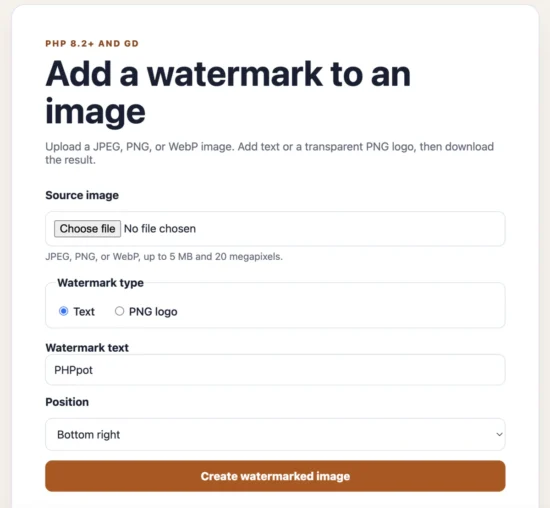
Add Text watermark to an uploaded image with PHP GD
Common PHP watermark errors and fixes
Call to undefined function imagecreatefromjpeg()
This error means the GD extension is missing or disabled. Confirm that the command-line and web-server PHP installations are using the same configuration:
php --ini
php -m | grep gd
It is common to enable GD for the command-line PHP binary while the web server uses a different php.ini file. Check the web configuration with a temporary phpinfo() page, then remove that page because it exposes detailed server information.
The PNG watermark has a black background
A black or solid background usually means the alpha channel was lost while creating or resizing the watermark canvas. Configure the new canvas before copying pixels into it:
imagealphablending($resized, false);
imagesavealpha($resized, true);

$transparent = imagecolorallocatealpha(
    $resized,
    0,
    0,
    0,
    127
);

imagefill($resized, 0, 0, $transparent);
Also confirm that the watermark is genuinely a transparent PNG. Renaming a JPEG file to .png does not give it an alpha channel, although it may give the debugging session some character.
The text is above or below the selected position
imagettftext() positions text from its baseline, not from the top of its visible bounding box. Measure the text with imagettfbbox() and convert the desired top coordinate to a baseline:
$baseline = $top - $box[7];Hard-coded coordinates may appear correct for one word and fail for another because letters can extend above or below the baseline by different amounts.
The watermark extends outside the source image
Compare the watermark dimensions with the source before calculating its position. The project limits a logo to 28 percent of the source width and scales its height proportionally.
Text can also become too wide when the user enters a long value. For unrestricted text, measure its bounding box and reduce the font size until it fits within the available width. The demo instead applies an 80-character limit and a bounded font size to keep the implementation focused.
Allowed memory size exhausted
The uploaded file size is not a reliable estimate of the memory GD will need. A highly compressed image expands into an uncompressed pixel buffer when decoded. A 6000 by 4000 image contains 24 million pixels before the source, logo, resized canvas, and output buffers are considered.
Limit both the compressed upload size and the decoded pixel count:
if (($width * $height) > 20_000_000) {
    throw new RuntimeException(
        'The image dimensions are too large to process safely.'
    );
}
For applications that must handle large photography files, process them in a background job with explicit memory and execution limits rather than keeping an HTTP request open.
PHP cannot save the output image
Check that the output directory exists and is writable by the web-server user. Build the destination path from a directory controlled by the application, not from an uploaded filename.
$outputDirectory = __DIR__ . '/output';

if (!is_dir($outputDirectory)) {
    mkdir($outputDirectory, 0755, true);
}
In production, directory creation should normally happen during deployment. Failing early with a clear configuration error is preferable to changing permissions during every image request.
Phone photos appear rotated
GD reads the stored pixel orientation but does not automatically apply a JPEG’s EXIF orientation value. Many phones store the camera pixels in one orientation and add metadata telling viewers how to rotate them.
If uploaded phone photos must retain their visual orientation, read the EXIF orientation before watermarking and rotate or flip the GD image accordingly. Do this before calculating the watermark coordinates because a 90-degree rotation swaps the image width and height.
Security and production considerations
The demo includes a practical validation baseline, but a public image-processing service also needs controls appropriate to its traffic and storage model.
- Do not trust extensions or client MIME values. Detect the type with Fileinfo and confirm that PHP can decode the image.
- Set file and pixel limits. Pixel limits protect memory more effectively than an upload-size limit alone.
- Generate output filenames. Do not use an unfiltered client filename as a filesystem path.
- Re-encode the image. Saving through GD creates a new image from decoded pixels instead of publishing the original upload unchanged.
- Remove old files. Use scheduled cleanup or object-storage lifecycle rules instead of allowing generated images to accumulate indefinitely.
- Add rate limits. Image decoding and resampling are CPU-intensive operations that can be abused even when every uploaded file is valid.
- Control access where necessary. A CSRF token prevents cross-site form submissions, but it does not replace authentication or authorization.
For a production application, storing generated files outside the public web directory gives you more control. Serve them through an authorized download route or upload them to managed object storage with restricted permissions and an expiration policy.
Developer FAQ
Should I use imagecopy() or imagecopymerge() for a PNG watermark?
Use imagecopy() when the PNG contains its own alpha channel. It preserves the watermark’s per-pixel transparency, including edges that are partially transparent.
imagecopymerge() applies one percentage value to the copied region and does not handle a transparent PNG’s alpha channel as expected. If the logo needs to be lighter, prepare it with the desired opacity or adjust its alpha values before copying it.
How can I change the text watermark opacity?
Change the final argument passed to imagecolorallocatealpha(). GD uses 0 for fully opaque and 127 for fully transparent:
$textColor = imagecolorallocatealpha(
    $image,
    255,
    255,
    255,
    50
);
Values around 35 to 65 usually provide a visible but unobtrusive text watermark. The best value depends on the source images and the purpose of the mark.
Can PHP add a watermark without changing the image format?
Yes. Detect the source MIME type and use its matching output function: imagejpeg(), imagepng(), or imagewebp(). Preserving the source format avoids removing PNG transparency or converting WebP uploads unnecessarily.
Does a watermark prevent people from copying an image?
No. A visible watermark discourages casual reuse and identifies the source, but it cannot prevent copying. A watermark near the edge is easy to crop. A larger central watermark is harder to remove but covers more of the image, so the right placement depends on whether branding or deterrence is the priority.
When should I use Imagick instead of GD?
GD is a good choice for a small application that needs common web formats and straightforward text or logo overlays. Imagick becomes useful when the workflow needs more advanced color handling, complex effects, broader format support, or large-scale image-processing features.
For this example, GD keeps installation and code requirements small while covering the intended JPEG, PNG, and WebP watermark workflow.
Download the PHP watermark project
The complete PHP 8.2+ example includes the upload form, responsive CSS, text and PNG-logo watermark modes, reusable ImageWatermarker class, bundled TrueType font, validation, CSRF protection, and local setup instructions.
Download the PHP watermark source code
Extract the ZIP, open the project directory, and start PHP’s development server:
php -S localhost:8000Open http://localhost:8000, upload a JPEG, PNG, or WebP image, and choose a text or transparent PNG logo watermark. No database or framework is required.


Thanks a lot !!!
For teaching us, such a nice topic of php…
Welcome Dinesh
Thank you for the best of the best article.
Welcome Prabhu
Great stuff, thank you.
Welcome Daisy.
Wow! God bless you for this. It’s quite simple to understand and comprehensive. You just earned a regular visitor!!
Thank you Oscar. Comments like this really motivates me. Have a good day. Keep reading.
Awesome article, Vincy. Can you scale the watermark? When I do it, the watermark is too zoomed in.
Thank you! Yes, resize the watermark before copying it onto the source image. The updated example automatically limits the logo to 28% of the source image width and preserves its aspect ratio using `imagecopyresampled()`. You can reduce `LOGO_WIDTH_RATIO` from `0.28` to a smaller value, such as `0.15`, if you want a smaller watermark.
Thanks, how to mod if want to use a logo
Thanks! Use a transparent PNG for the logo, load it with `imagecreatefrompng()`, and place it over the source image with `imagecopy()`. The updated “Add a transparent PNG logo watermark” section includes the complete code, automatic resizing, and positioning.
Your PHP / GD Text Watermarking Example is great. Especially using font type is good.
Thanks Dave