Redirecting users from one page to another is a common task in PHP applications. You might redirect a user after logging in, submitting a form, completing a payment, or when a page has moved to a new URL.
PHP performs a redirect by sending an HTTP Location header to the browser. This must happen before any HTML or other output is sent. It is also important to stop the script immediately after the redirect so that no additional code runs.
In this tutorial, you’ll learn how to redirect in PHP using header(), choose the right HTTP status code, avoid common mistakes such as the “Headers already sent” error, and implement redirects securely in real-world applications.
PHP Redirect Syntax
The simplest way to redirect to another page is to call header() with the Location header and then terminate the script using exit.
<?php

header('Location: dashboard.php');
exit;
The header() function sends an HTTP response header to the browser. In this example, the Location header instructs the browser to request dashboard.php. Calling exit immediately afterwards ensures that no further PHP code is executed.
By default, PHP sends a 302 Found (temporary redirect) response. Later in this article, you’ll learn when to use other redirect status codes such as 301, 303, 307, and 308.
PHP Redirect Status Codes
When redirecting a page, choosing the correct HTTP status code is just as important as specifying the destination URL. The status code tells browsers and search engines whether the redirect is temporary or permanent.
| Status Code | Meaning | Typical Use |
|---|---|---|
| 301 | Moved Permanently | A page has permanently moved to a new URL. |
| 302 | Found (Temporary Redirect) | Temporary redirects. This is PHP’s default. |
| 303 | See Other | Redirect after processing a POST request. |
| 307 | Temporary Redirect | Temporarily move a resource while preserving the original HTTP method. |
| 308 | Permanent Redirect | Permanently move a resource while preserving the original HTTP method. |
Specify the status code as the third parameter of the header() function.
301 Permanent Redirect
Use a 301 redirect when a page has permanently moved to a new URL. Search engines can transfer ranking signals from the old page to the new one over time.
<?php

header('Location: https://example.com/new-page.php', true, 301);
exit;
302 Temporary Redirect
A 302 redirect indicates that the move is temporary. It is suitable when a page is unavailable for a short period or when redirecting users based on application logic.
<?php

header('Location: maintenance.php', true, 302);
exit;
303 Redirect After Form Submission
A 303 See Other response is commonly used after processing a form. It instructs the browser to perform a new GET request, preventing the user from accidentally resubmitting the form by refreshing the page.
<?php

// Process form data...

header('Location: success.php', true, 303);
exit;
This pattern is known as POST/Redirect/GET (PRG) and is widely used in production applications.
307 and 308 Redirects
Unlike 301 and 302, the 307 and 308 status codes preserve the original HTTP method. For example, if the client sends a POST request, it remains a POST request after the redirect.
These status codes are useful for APIs and other situations where preserving the request method is important, but they are less common in typical PHP websites.
Common PHP Redirect Examples
The header() function can be used in many situations. Here are some practical examples that you are likely to use in real applications.
Redirect after a successful login
After validating the user’s credentials and creating a session, redirect them to the dashboard.
<?php

session_start();

// User authentication succeeds.
$_SESSION['user_id'] = 101;

header('Location: dashboard.php');
exit;
Redirect an unauthenticated user
If a protected page requires authentication, redirect users who are not logged in.
<?php

session_start();

if (!isset($_SESSION['user_id'])) {
    header('Location: login.php', true, 302);
    exit;
}
?>
Redirect after form submission
After processing a form, redirect the user to a success page instead of displaying the result directly. This follows the POST/Redirect/GET pattern and prevents duplicate submissions when the page is refreshed.
<?php

// Validate the submitted data.
// Save the data.
// Send an email.

header('Location: success.php', true, 303);
exit;
Redirect to an external website
You can also redirect users to another domain.
<?php

header('Location: https://www.example.com/');
exit;
Only redirect to trusted destinations. Avoid redirecting users to URLs supplied directly by request parameters unless they have been validated. Otherwise, your application could become vulnerable to an open redirect attack.
Redirect after moving a page
If you rename or move a page permanently, use a 301 redirect so that users and search engines are sent to the new URL.
<?php

header('Location: /php/php-redirect/', true, 301);
exit;
If you need to redirect visitors based on conditions such as login status, user role, or request parameters, keep all validation on the server before sending the Location header.
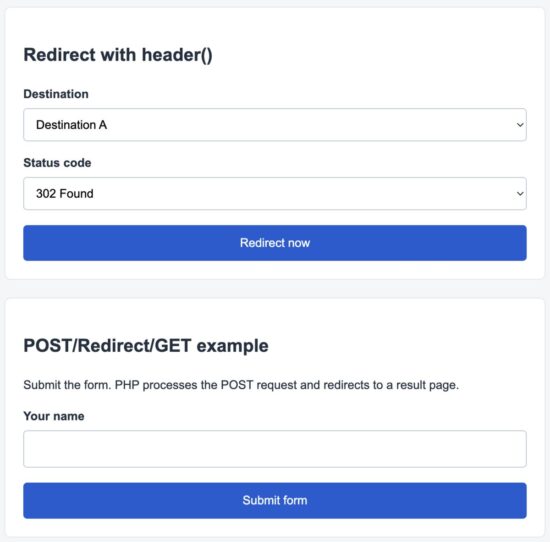
Demo application used to test PHP redirects with different HTTP status codes
Create a Reusable Redirect Function
If your application performs redirects in multiple places, consider creating a helper function. It avoids repeating the same code and keeps your application consistent.
<?php

function redirect(string $url, int $statusCode = 302): never
{
    header('Location: ' . $url, true, $statusCode);
    exit;
}
You can then redirect with a single function call.
<?php

redirect('dashboard.php');

redirect('login.php', 303);

redirect('/new-page.php', 301);
This approach also makes it easier to centralize redirect behavior if your application grows larger.
Common Errors and How to Fix Them
Redirects in PHP are simple once you understand how HTTP headers work. Most redirect problems are caused by a few common mistakes.
Cannot modify header information – Headers already sent
This is the error developers encounter most often. It occurs when PHP has already sent output to the browser before calling header().
For example, the following code will fail because HTML is sent before the redirect.
<p>Welcome</p>

<?php

header('Location: dashboard.php');
exit;
?>
Move the redirect before any HTML output.
<?php

header('Location: dashboard.php');
exit;
Other causes include:
- Blank lines before the opening
<?phptag. - Whitespace after the closing
?>tag. - Debug statements such as
echo,print, orvar_dump()before the redirect. - PHP warnings or notices displayed before
header()is called.
As a best practice, many PHP projects omit the closing ?> tag in pure PHP files to avoid accidentally outputting whitespace.
Forgetting to call exit()
Calling header() does not stop PHP execution. The remaining code continues to run unless you explicitly terminate the script.
Avoid this:
<?php

header('Location: dashboard.php');

// This code still executes.
deleteTemporaryFiles();
sendEmail();
Instead, stop execution immediately.
<?php

header('Location: dashboard.php');
exit;
Using an invalid status code
Choose a redirect status code that matches your use case. For example:
- Use 301 when the URL has permanently changed.
- Use 302 for temporary redirects.
- Use 303 after processing a form submission.
- Use 307 or 308 when the original HTTP method must be preserved.
Using relative and absolute URLs
Both relative and absolute URLs work with the Location header.
<?php

// Relative URL
header('Location: dashboard.php');
exit;
<?php

// Absolute URL
header('Location: https://example.com/dashboard.php');
exit;
For redirects within the same application, relative URLs are usually shorter and easier to maintain. Absolute URLs are useful when redirecting to another domain.
Security Considerations
Redirects are straightforward to implement, but they should always be handled carefully. A poorly implemented redirect can introduce security issues or unexpected application behavior.
Validate redirect destinations
Do not redirect users to a URL received directly from $_GET or $_POST without validation.
For example, this code is unsafe because an attacker can control the destination.
<?php

header('Location: ' . $_GET['url']);
exit;
A better approach is to redirect only to destinations from an allowlist.
<?php

$allowedPages = [
    'home' => 'index.php',
    'profile' => 'profile.php',
    'dashboard' => 'dashboard.php'
];

$page = $_GET['page'] ?? 'home';

if (!isset($allowedPages[$page])) {
    $page = 'home';
}

header('Location: ' . $allowedPages[$page]);
exit;
This prevents users from being redirected to untrusted websites.
Prefer POST/Redirect/GET for forms
After processing a form, redirect the user instead of rendering the result on the same POST request. This avoids accidental duplicate submissions when the page is refreshed.
The downloadable project included with this tutorial demonstrates this pattern using a 303 See Other response.
Never rely on redirects for authorization
A redirect improves the user experience, but it should not be your only security check. Always verify permissions on the destination page as well.
For example, if a user manually enters the URL of an admin page, the page itself should verify that the user has sufficient privileges before displaying any protected content.
Avoid output buffering as a workaround
Some developers enable output buffering to hide the “Headers already sent” error. While output buffering has valid use cases, it should not be used to compensate for incorrect program flow.
The better solution is to organize your application so that redirects occur before any output is generated.
For more details about HTTP redirects and status codes, see the MDN guide to HTTP redirections.
Frequently Asked Questions
Can I redirect to another website?
Yes. Pass the full URL to the Location header.
<?php

header('Location: https://example.com/');
exit;
Only redirect to trusted websites that you control or explicitly allow.
Can I redirect after HTML has been displayed?
No. The Location header must be sent before any output reaches the browser. If HTML, whitespace, or an error message has already been sent, PHP cannot modify the response headers.
Should I use exit() after header()?
Yes. Although the browser receives the redirect instruction, PHP continues executing the remaining code unless you stop the script.
What is the difference between 301 and 302 redirects?
A 301 redirect indicates that a page has permanently moved to a new location. A 302 redirect indicates that the move is temporary.
If the URL change is permanent, use 301. Otherwise, 302 is usually the appropriate choice.
When should I use a 303 redirect?
Use 303 See Other after processing a POST request. It tells the browser to request the next page using GET, preventing duplicate form submissions when the user refreshes the page.
Do 307 and 308 preserve the HTTP request method?
Yes. Unlike 301 and 302, both 307 Temporary Redirect and 308 Permanent Redirect preserve the original HTTP method. If the client sends a POST request, the redirected request also uses POST.
Conclusion
PHP redirects are implemented using the header() function together with the Location response header. While the basic syntax is simple, choosing the correct HTTP status code and stopping script execution with exit are equally important.
For production applications, validate redirect destinations, follow the POST/Redirect/GET pattern after form submissions, and avoid common mistakes such as sending output before calling header().
The downloadable example project demonstrates these best practices, including safe redirects, multiple HTTP status codes, and a complete POST/Redirect/GET workflow that you can use as the foundation for your own applications.
Download the Source Code
Download the complete example project used in this tutorial to see different PHP redirect techniques in action.



Hi this is Vinita, excellent tutorial. Better than any found in the Internet. This is the number one resource. Has helped me a lot. Thanks.
Welcome Vinita. So happy!