PHP provides the client IP address through the $_SERVER superglobal. For a website that receives requests directly from visitors, the usual value is $_SERVER['REMOTE_ADDR'].
The following one line is enough for the basic case:
<?php

$clientIp = $_SERVER['REMOTE_ADDR'] ?? '';

echo htmlspecialchars($clientIp, ENT_QUOTES, 'UTF-8');
This value represents the IP address of the system that connected directly to your web server. It may be the visitor, but it may also be a reverse proxy, load balancer, CDN, or another network gateway.
This distinction matters because request headers such as X-Forwarded-For can be sent or modified by the visitor. They should not automatically take priority over REMOTE_ADDR.
Quick answer
Use REMOTE_ADDR when your server receives requests directly:
<?php

function getClientIp(): string
{
    $ipAddress = $_SERVER['REMOTE_ADDR'] ?? '';

    if (filter_var($ipAddress, FILTER_VALIDATE_IP) === false) {
        return '';
    }

    return $ipAddress;
}

echo htmlspecialchars(getClientIp(), ENT_QUOTES, 'UTF-8');
The null coalescing operator prevents an undefined array key warning if REMOTE_ADDR is unavailable. The filter_var() call confirms that the returned value is a valid IPv4 or IPv6 address.
When you run this example locally, the detected address will usually be 127.0.0.1 or ::1. Both represent your own computer. The value ::1 is the IPv6 loopback address.
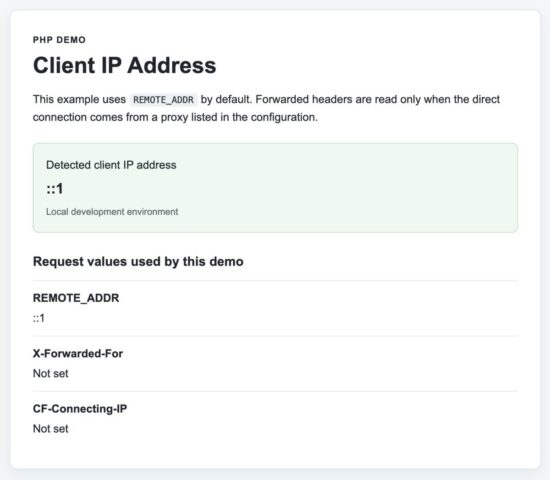
The PHP client IP address demo running locally. The value ::1 is the IPv6 loopback address.
You can learn more about the values supplied by the web server in this guide to the PHP $_SERVER variable. The PHP manual also documents the available server variables.
If your application is behind a trusted proxy or CDN, you need an additional step. You must first confirm that REMOTE_ADDR belongs to that trusted service. Only then should you inspect the forwarding header configured by that service.
Which method should you use?
The correct way to get the client IP address depends on how your PHP application is deployed.
| Hosting environment | Recommended method | Reason |
|---|---|---|
| Directly on Apache or Nginx | $_SERVER['REMOTE_ADDR'] |
The client connects directly to your web server. |
| Behind a reverse proxy or load balancer | REMOTE_ADDR + trusted forwarding header |
The proxy becomes the direct client, so forwarded headers must be used carefully. |
| Behind Cloudflare | CF-Connecting-IP after verifying the request came from Cloudflare |
Cloudflare replaces the client connection and provides the original visitor IP. |
If you are unsure which environment your application runs in, start with REMOTE_ADDR. Only add support for forwarded headers when your infrastructure requires it.
Get the client IP address behind a proxy or CDN
If your application is behind a reverse proxy, load balancer, or CDN, REMOTE_ADDR may contain the proxy’s IP address instead of the visitor’s. In this case, the proxy usually adds another header that contains the original client IP.
Examples include:
X-Forwarded-ForCF-Connecting-IP(Cloudflare)X-Real-IP
However, these headers should not be trusted automatically. A visitor can send these headers in a direct request unless your web server is behind a trusted proxy that removes or replaces them.
A safe approach is:
- Read
REMOTE_ADDR. - Check whether that IP belongs to one of your trusted proxies.
- Only then read the forwarded header configured by that proxy.
The following example demonstrates this approach.
<?php

class ClientIpResolver
{
    private array $trustedProxies = [
        // Add your trusted proxy IPs or CIDR ranges here.
        // '203.0.113.10',
    ];

    public function getClientIp(): string
    {
        $remoteAddr = $_SERVER['REMOTE_ADDR'] ?? '';

        if (!$this->isValidIp($remoteAddr)) {
            return '';
        }

        if (!$this->isTrustedProxy($remoteAddr)) {
            return $remoteAddr;
        }

        if (!empty($_SERVER['HTTP_CF_CONNECTING_IP'])) {
            return $this->validatedIp($_SERVER['HTTP_CF_CONNECTING_IP']) ?? $remoteAddr;
        }

        if (!empty($_SERVER['HTTP_X_FORWARDED_FOR'])) {
            $addresses = explode(',', $_SERVER['HTTP_X_FORWARDED_FOR']);

            foreach ($addresses as $address) {
                $address = trim($address);

                if ($this->isValidIp($address)) {
                    return $address;
                }
            }
        }

        return $remoteAddr;
    }

    private function isValidIp(string $ip): bool
    {
        return filter_var($ip, FILTER_VALIDATE_IP) !== false;
    }

    private function validatedIp(string $ip): ?string
    {
        return $this->isValidIp($ip) ? $ip : null;
    }

    private function isTrustedProxy(string $ip): bool
    {
        return in_array($ip, $this->trustedProxies, true);
    }
}

$resolver = new ClientIpResolver();

echo $resolver->getClientIp();
This example keeps the logic simple for learning purposes. In a production application, your trusted proxy list should match the infrastructure in front of your web server. For example, if you use Cloudflare, keep its published IP ranges up to date and use the CF-Connecting-IP header only after confirming that the request came from Cloudflare.
For more details about the X-Forwarded-For header and its security considerations, see the MDN documentation.
Common mistakes when getting the client IP address
Most examples on the internet work for simple cases but overlook important details. Here are the mistakes you should avoid.
1. Trusting X-Forwarded-For without verifying the proxy
This is the most common mistake.
The X-Forwarded-For header is just another HTTP request header. If your application is directly accessible from the internet, a visitor can send any value they want.
Never use this code:
<?php

$clientIp = $_SERVER['HTTP_X_FORWARDED_FOR'];
Instead, read this header only after confirming that REMOTE_ADDR belongs to one of your trusted proxies.
2. Ignoring IPv6 addresses
Modern web servers may receive either IPv4 or IPv6 connections. Always validate the IP address instead of assuming it is IPv4.
<?php

if (filter_var($ipAddress, FILTER_VALIDATE_IP) !== false) {
    echo "Valid IP address";
}
FILTER_VALIDATE_IP supports both IPv4 and IPv6.
3. Assuming localhost always uses 127.0.0.1
When running PHP locally, you may see either of these values:
127.0.0.1(IPv4)::1(IPv6 localhost)
Both are valid localhost addresses.
4. Storing the IP address in a column that is too small
An IPv6 address is much longer than an IPv4 address.
If you save IP addresses in a database, use a column large enough for both formats.
A common choice is:
VARCHAR(45)This accommodates both IPv4 and IPv6 addresses.
Security considerations
- Do not trust
X-Forwarded-Foror similar headers unless the request came through a trusted reverse proxy. - Always validate the detected IP address with
filter_var()before using or storing it. - Support both IPv4 and IPv6 addresses instead of assuming IPv4.
- If you store IP addresses in a database, use a column large enough for IPv6, such as
VARCHAR(45). - A client IP address should not be used as the sole authentication or authorization mechanism because users may share IP addresses or access your application through VPNs, proxies, or mobile networks.
Frequently asked questions
Does REMOTE_ADDR always contain the client’s IP?
No. If your application is behind a reverse proxy, CDN, or load balancer, REMOTE_ADDR usually contains the address of that intermediate server.
Can a user fake X-Forwarded-For?
Yes. A client can send any value unless the request passes through a trusted proxy that overwrites the header before forwarding the request.
Can PHP detect a user’s exact location from the IP address?
No. An IP address only identifies the network connection. If you need approximate geographic information, use an IP geolocation service. Keep in mind that VPNs, mobile networks, and corporate gateways can affect the reported location.
Why do I see different IP addresses during development?
If you use Docker, WAMP, XAMPP, Nginx Proxy Manager, Cloudflare Tunnel, or another proxy, your request may pass through additional network layers before reaching PHP. In these cases, configure your trusted proxies correctly instead of relying solely on REMOTE_ADDR.
Conclusion
For most PHP applications, getting the client IP address is as simple as reading $_SERVER['REMOTE_ADDR']. This is the correct and safest approach when your web server receives requests directly from visitors.
If your application is behind a reverse proxy, load balancer, or CDN, the process requires one additional step. First, verify that REMOTE_ADDR belongs to a trusted proxy. Only then should you read the forwarding header configured by that proxy.
By validating the IP address and trusting forwarded headers only from known infrastructure, you can avoid spoofed values while supporting modern deployment environments.
Download the source code
Download the complete example project used in this tutorial to see a production-friendly implementation of client IP detection in PHP.
Download PHP Client IP Address Source Code
The project includes:
- A reusable
ClientIpResolverclass. - A configurable trusted proxy list.
- Support for IPv4 and IPv6 validation.
- A clean demo page to display the detected client IP address.
- Step-by-step setup instructions.

Thanks for the informative write up.
Welcome Francis.
And if a user uses a VPN do we than get the IP-address set by the VPN?
Hi Ralph,
Yes, when a user uses a VPN service to browse the site, then you cannot predict the result.
I use almost same class but i integrated isset($_SERVER[“HTTP_CF_CONNECTING_IP”]) within the class then use ELSE .. coz most websites use Cloudflare . :)
Hi MalluCafe,
Thank you for sharing the information. It will help for Cloudflare hosted websites. Thanks.
Hello! such a good knowledge!
If i want to use this code on the real web server and shows my client ip address and save it in the database, how to do it? is it possible?
Hi Nana,
Thank you. Sure, you can store the client IP address in the database. You need to use MySQLi or PDO to create a connection and insert it in a table. https://phppot.com/php/php-crud-with-mysql/ refer this article for insert part.
Thanks for this
Welcome Octagon.
HELP!!
Hii. i want to get an ip addres of my clients and show them ip.
but i always get ipv6 like 2400:610:425:1a28::1000
but i want to get an ipv4 like 13.17.7.232 im triying with
$_SERVER[‘HTTP_X_FORWARDED’]
$_SERVER[‘HTTP_X_FORWARDED_FOR’]
$_SERVER[‘HTTP_FORWARDED’]
$_SERVER[‘HTTP_FORWARDED_FOR’]
$_SERVER[‘REMOTE_ADDR’]
but i always get ipv6 how to get ipv4 or converti ipv6 yo ipv4 or something please help thanks for read :)
Sorry for my very bad english…
Hi,
The IPv6 address you are receiving is valid. If the visitor connects to your website over IPv6, PHP cannot automatically convert it into the visitor’s IPv4 address.
IPv4 and IPv6 are separate addresses. An IPv6 address such as:
2400:610:425:1a28::1000
does not contain an IPv4 address that can be converted into:
13.17.7.232
You should accept and display both IPv4 and IPv6 addresses. Use $_SERVER[‘REMOTE_ADDR’] as the default value:
Do not rely on headers such as HTTP_X_FORWARDED_FOR unless your website is behind a trusted proxy or CDN that sets them correctly.
If you specifically require an IPv4 address, the visitor must connect through IPv4. Your PHP code cannot force an IPv6 connection to become IPv4.
Hi Vincy, how could I know the user’s city knowing their IP? THANK YOU.
Hi Alberto,
An IP address alone doesn’t contain location information. To estimate a user’s city, you need to look up the IP address using an IP geolocation database or API.
Many services provide this, such as MaxMind GeoLite2 (free), MaxMind GeoIP2 (commercial), and IPinfo. They can return details like the country, region, city, time zone, and ISP.
Keep in mind that IP geolocation is only an estimate. The reported city may not always be accurate, especially if the user is connected through a VPN, mobile network, corporate network, or proxy.
I may write a tutorial on PHP IP geolocation in the future. Thanks for the suggestion!
May I know how can i change this
into a field to let people fill in their website and check their IP address
Hi Alex,
The IP address is determined by the device that makes the request to your PHP page. It isn’t something the user enters in a form.
If you add a text field for users to enter their website URL, you’ll only receive that URL as input. The visitor’s IP address will still be available through $_SERVER[‘REMOTE_ADDR’] (or through a trusted proxy if your server is behind one).
If your goal is for visitors to check their own IP address, simply have them visit the PHP page. The script can automatically detect and display their IP address without requiring them to enter anything.
If you meant something different, such as checking the IP address of a website or domain name, let me know and I’ll be happy to help.
Hi is use this code(file) it show the proper ipaddress but when i try to embadded with email and sent to the user and store that user ipaddress its showing me my own server ipaddress
Hi, the code shows the correct IP when you open the file directly because the request comes from your browser.
When the file is embedded in an email, the request may not come directly from the recipient. Email providers often download, scan, cache, or proxy remote images. In that case, your tracking file receives the IP address of the email provider, proxy, scanner, or sometimes your own server, instead of the recipient’s real IP address.
Also, make sure you are embedding the public URL of the tracking file in the email, not executing or requesting that file from your server while generating the email.
For example:
<img src=“https://example.com/email-open.php?id=123” width=“1” height=“1” alt=””>The PHP file should record the IP only when that URL is requested.
Even with the correct setup, email tracking pixels cannot reliably capture the recipient’s actual IP address because modern email services hide it for privacy and security. You can use the pixel as an approximate open event, but not as a reliable way to identify the user’s IP address.
I had use smtp phpmailer for send the emails with that mail i had embedded the file which show if the mal is open or not (if had pass the file url in img with 1px so whenever the user open the email it will get the user had open the mail ) and its work
But when i try to track the ipaddress too when the user open the file i can get the ipaddress that time I m just getting the server ipaddress if any have the solution on it please let me know
The IP address you receive is the IP address of the system that requests the tracking image, not necessarily the recipient’s device.
If you’re seeing your own server’s IP, it’s likely that the image is being fetched by an email service or security scanner instead of the recipient’s email client. Many providers such as Gmail and Outlook proxy or cache remote images for privacy and security, so your server may receive the proxy’s IP address rather than the user’s real IP.
Because of these privacy protections, there is no reliable way to determine the recipient’s actual IP address from an email tracking pixel alone. The tracking pixel is suitable for detecting that an email was opened (subject to image loading), but not for identifying the recipient’s real IP address.
Where is download button
At the bottom (end) of the article.
Nice Article
Thank you Kumar.
thanks allot Vincy
Welcome Kelvin