Quick Answer
To prevent SQL injection in PHP, do not concatenate user input directly into SQL queries. Use MySQLi prepared statements, bind user values as parameters, validate input format, and allowlist any dynamic SQL parts like column names or sort direction.
In simple terms, the SQL query structure should stay fixed. Only the data should change.
<?php
$keyword = $_GET['keyword'] ?? '';

$sql = "SELECT id, name, category FROM products WHERE name LIKE ?";
$stmt = $connection->prepare($sql);

$searchValue = '%' . $keyword . '%';
$stmt->bind_param('s', $searchValue);
$stmt->execute();

$result = $stmt->get_result();
?>
This works because the user input is sent as data, not as part of the SQL command itself.
Introduction
SQL injection is one of the most important security problems to fix in a PHP application. It happens when user input is mixed into a SQL query in an unsafe way. Once that happens, an attacker may read data they should not see, modify records, or delete data.
The good news is that the fix is usually simple. In most PHP projects, the right solution is to use prepared statements for database queries and avoid building SQL with raw string concatenation.
In this tutorial, we will build a small PHP and MySQLi example that shows the safe pattern clearly. We will also cover one detail that many tutorials skip. Prepared statements protect data values, but parts like ORDER BY, table names, and column names still need a strict allowlist.
If you want to strengthen input checks before the database step, see PHP Input Filtering. If you want a larger working example that uses prepared statements across create, read, update, and delete operations, see CRUD with MySQLi Prepared Statement using PHP.
What This Example Covers
- A searchable product list built with PHP 8, MySQL, and MySQLi
- A prepared statement for the search keyword
- A safe allowlist for the sort option
- Escaped HTML output for displaying database results
- A small project structure that is easy to run locally
This keeps the example practical and focused on the real goal: preventing SQL injection in everyday PHP code.
How SQL Injection Happens
SQL injection happens when user input is joined directly into a SQL string. In that case, the input is no longer treated as plain data. It can change the meaning of the query itself.
Here is a simple unsafe example:
<?php
$keyword = $_GET['keyword'] ?? '';

$sql = "SELECT id, name, category FROM products WHERE name LIKE '%$keyword%'";
$result = $connection->query($sql);
?>
This looks small, but it is dangerous. A crafted value can break out of the string and alter the query logic.
The safe version uses a prepared statement:
<?php
$keyword = $_GET['keyword'] ?? '';

$sql = "SELECT id, name, category FROM products WHERE name LIKE ?";
$stmt = $connection->prepare($sql);

$searchValue = '%' . $keyword . '%';
$stmt->bind_param('s', $searchValue);
$stmt->execute();

$result = $stmt->get_result();
?>
In this version, the SQL command is prepared first. The user input is sent separately as a bound value. That means the input is treated as data, not as executable SQL.
One Important Limitation to Understand
Prepared statements protect values. They do not directly protect SQL identifiers or query keywords.
That means parts like these should never come straight from user input:
- column names
- table names
- sort direction such as ASC or DESC
- raw SQL fragments
For example, this is not safe:
<?php
$sort = $_GET['sort'] ?? 'name';
$sql = "SELECT id, name, category FROM products ORDER BY $sort";
$result = $connection->query($sql);
?>
Instead, validate the value against a small list of known safe options.
<?php
$allowedSortColumns = ['name', 'category'];
$sort = $_GET['sort'] ?? 'name';

if (!in_array($sort, $allowedSortColumns, true)) {
    $sort = 'name';
}

$sql = "SELECT id, name, category FROM products ORDER BY $sort";
$result = $connection->query($sql);
?>
This is called allowlisting. It is the right approach when a query part cannot be bound as a parameter.
Project Files
The downloadable project keeps the example small and practical. These are the main files:
index.phpfor the search form and product listingconfig.phpfor the database connectiondatabase.sqlfor the sample schema and dataREADME.mdfor local setup steps
The example uses MySQLi prepared statements for the search input and an allowlist for sorting. That gives a realistic pattern you can reuse in your own PHP projects.
Complete Example Project
Now let us look at the working example. This project shows a safe product search page built with PHP, MySQL, and MySQLi.
It protects the search keyword with a prepared statement. It also protects the sort option with a strict allowlist.
config.php
<?php
declare(strict_types=1);

$host = '127.0.0.1';
$dbname = 'phppot_sql_injection_demo';
$username = 'root';
$password = '';
$port = 3306;

$connection = new mysqli($host, $username, $password, $dbname, $port);

if ($connection->connect_error) {
    die('Database connection failed: ' . $connection->connect_error);
}

$connection->set_charset('utf8mb4');
index.php
<?php
declare(strict_types=1);

require_once __DIR__ . '/config.php';

$keyword = trim($_GET['keyword'] ?? '');
$sort = $_GET['sort'] ?? 'name';

$allowedSortColumns = [
    'name' => 'name',
    'category' => 'category',
    'price' => 'price'
];

if (!array_key_exists($sort, $allowedSortColumns)) {
    $sort = 'name';
}

$sql = "SELECT id, name, category, price FROM products";
$params = [];
$types = '';

if ($keyword !== '') {
    $sql .= " WHERE name LIKE ? OR category LIKE ?";
    $searchValue = '%' . $keyword . '%';
    $params[] = $searchValue;
    $params[] = $searchValue;
    $types .= 'ss';
}

$sql .= " ORDER BY " . $allowedSortColumns[$sort] . " ASC";

$stmt = $connection->prepare($sql);

if (!$stmt) {
    die('Failed to prepare statement.');
}

if ($types !== '') {
    $stmt->bind_param($types, ...$params);
}

$stmt->execute();
$result = $stmt->get_result();
$products = $result ? $result->fetch_all(MYSQLI_ASSOC) : [];

$stmt->close();
?>
<!DOCTYPE html>
<html lang="en">
<head>
    <meta charset="UTF-8">
    <meta name="viewport" content="width=device-width, initial-scale=1.0">
    <title>Prevent SQL Injection in PHP Demo</title>
    <link rel="stylesheet" href="styles.css">
</head>
<body>
    <div class="page-wrap">
        <h1>Safe Product Search</h1>
        <p class="intro">This demo uses MySQLi prepared statements for search input and an allowlist for sorting.</p>

        <form method="get" class="search-form">
            <div class="form-row">
                <label for="keyword">Search keyword</label>
                <input type="text" name="keyword" id="keyword" value="<?= htmlspecialchars($keyword, ENT_QUOTES, 'UTF-8'); ?>" placeholder="Search by name or category">
            </div>

            <div class="form-row">
                <label for="sort">Sort by</label>
                <select name="sort" id="sort">
                    <option value="name" <?= $sort === 'name' ? 'selected' : ''; ?>>Name</option>
                    <option value="category" <?= $sort === 'category' ? 'selected' : ''; ?>>Category</option>
                    <option value="price" <?= $sort === 'price' ? 'selected' : ''; ?>>Price</option>
                </select>
            </div>

            <div class="form-actions">
                <button type="submit">Search</button>
                <a href="index.php" class="reset-link">Reset</a>
            </div>
        </form>

        <?php if ($products): ?>
            <table>
                <thead>
                    <tr>
                        <th>ID</th>
                        <th>Name</th>
                        <th>Category</th>
                        <th>Price</th>
                    </tr>
                </thead>
                <tbody>
                    <?php foreach ($products as $product): ?>
                        <tr>
                            <td><?= (int) $product['id']; ?></td>
                            <td><?= htmlspecialchars($product['name'], ENT_QUOTES, 'UTF-8'); ?></td>
                            <td><?= htmlspecialchars($product['category'], ENT_QUOTES, 'UTF-8'); ?></td>
                            <td>$<?= number_format((float) $product['price'], 2); ?></td>
                        </tr>
                    <?php endforeach; ?>
                </tbody>
            </table>
        <?php else: ?>
            <div class="message-box">No products found.</div>
        <?php endif; ?>
    </div>
</body>
</html>
styles.css
body {
    font-family: Arial, sans-serif;
    background: #f6f7fb;
    color: #1f2937;
    margin: 0;
    padding: 32px 16px;
}

.page-wrap {
    max-width: 900px;
    margin: 0 auto;
    background: #ffffff;
    padding: 24px;
    border: 1px solid #dbe1ea;
    border-radius: 8px;
}

h1 {
    margin-top: 0;
    font-size: 30px;
}

.intro {
    margin-bottom: 20px;
    color: #4b5563;
}

.search-form {
    display: grid;
    gap: 16px;
    margin-bottom: 24px;
}

.form-row {
    display: grid;
    gap: 8px;
}

label {
    font-weight: 600;
}

input[type="text"],
select {
    width: 100%;
    max-width: 420px;
    padding: 10px 12px;
    border: 1px solid #cbd5e1;
    border-radius: 6px;
    font-size: 15px;
    box-sizing: border-box;
}

.form-actions {
    display: flex;
    gap: 12px;
    align-items: center;
}

button {
    background: #2563eb;
    color: #ffffff;
    border: 0;
    border-radius: 6px;
    padding: 10px 18px;
    cursor: pointer;
    font-size: 15px;
}

button:hover {
    opacity: 0.95;
}

.reset-link {
    color: #2563eb;
    text-decoration: none;
}

table {
    width: 100%;
    border-collapse: collapse;
    background: #ffffff;
}

th,
td {
    border: 1px solid #dbe1ea;
    text-align: left;
    padding: 12px;
}

th {
    background: #f1f5f9;
}

.message-box {
    padding: 14px 16px;
    border: 1px solid #dbe1ea;
    background: #f8fafc;
    border-radius: 6px;
}
database.sql
CREATE DATABASE IF NOT EXISTS phppot_sql_injection_demo CHARACTER SET utf8mb4 COLLATE utf8mb4_unicode_ci;

USE phppot_sql_injection_demo;

CREATE TABLE products (
    id INT UNSIGNED NOT NULL AUTO_INCREMENT,
    name VARCHAR(150) NOT NULL,
    category VARCHAR(100) NOT NULL,
    price DECIMAL(10,2) NOT NULL,
    PRIMARY KEY (id)
);

INSERT INTO products (name, category, price) VALUES
('Mechanical Keyboard', 'Accessories', 89.00),
('USB-C Hub', 'Accessories', 49.00),
('27 Inch Monitor', 'Displays', 229.00),
('Wireless Mouse', 'Accessories', 35.00),
('Laptop Stand', 'Office', 42.00),
('Noise Cancelling Headphones', 'Audio', 159.00);
How the Protection Works in This Code
- The SQL query is prepared before user values are attached.
- The search keyword is passed through
bind_param()as data. - The sort field is never taken directly from the request. It must match one of the allowed keys.
- Output is escaped with
htmlspecialchars()before printing into the page. - The database connection uses
utf8mb4so text handling stays consistent.
This is the core pattern most PHP applications need. Keep the query structure controlled by your code. Pass user values only through parameters. For the small parts that cannot be parameterized, use strict allowlisting.
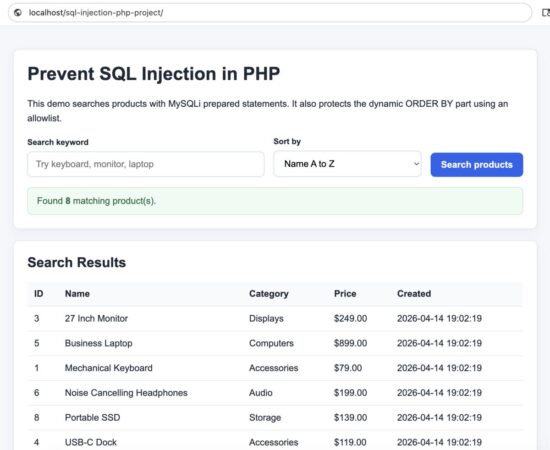
Demo page that prevents SQL injection using prepared statements in PHP
Security Considerations
Prepared statements are the main protection here, but a secure PHP application should not stop at that.
- Use prepared statements for all user-supplied values. Do not fall back to string concatenation for inserts, updates, deletes, or search filters.
- Allowlist dynamic query parts. If the user can affect
ORDER BY, column names, or sort direction, only allow known safe values from a fixed list. - Escape output in HTML. SQL injection and XSS are different issues. A query may be safe, but output can still become dangerous if you print database content without
htmlspecialchars(). - Use a low-privilege database user. Your application should connect with only the permissions it really needs. For example, a read-only page should not use an account that can drop tables.
- Validate input for format and size. Prepared statements protect the query, but validation still improves data quality and reduces abuse.
- Set the connection charset properly. Using
utf8mb4helps keep input handling consistent and avoids encoding surprises.
A good habit is to think in layers. Prepared statements protect the query. Validation protects the application flow. Output escaping protects the browser output.
Common Errors and Fixes
1. Concatenating input into SQL
Problem: User input is inserted directly into the SQL string.
<?php
$sql = "SELECT * FROM users WHERE email = '$email'";
?>
Fix: Use a prepared statement and bind the value.
<?php
$sql = "SELECT * FROM users WHERE email = ?";
$stmt = $connection->prepare($sql);
$stmt->bind_param('s', $email);
?>
2. Trying to bind a column name or sort direction
Problem: Developers sometimes assume every query part can be parameterized.
<?php
$sql = "SELECT * FROM products ORDER BY ?";
?>
Fix: Use an allowlist and insert only a known safe value.
<?php
$allowedSort = ['name', 'price'];
$sort = $_GET['sort'] ?? 'name';

if (!in_array($sort, $allowedSort, true)) {
    $sort = 'name';
}

$sql = "SELECT * FROM products ORDER BY $sort";
?>
3. Forgetting output escaping
Problem: Data is fetched safely from the database but printed into HTML without escaping.
<?php
echo $row['name'];
?>
Fix: Escape before output.
<?php
echo htmlspecialchars($row['name'], ENT_QUOTES, 'UTF-8');
?>
4. Using broad database permissions
Problem: The application connects with a database user that has more access than required.
Fix: Create a dedicated database user for the application and grant only the needed privileges for that project.
For broader database work with parameterized queries, you can also see this MySQLi prepared statement CRUD example. If you want a basic refresher on filtering request data before using it in your application flow, see this PHP input filtering guide.
Does PDO Also Prevent SQL Injection?
Yes. PDO can also prevent SQL injection when you use prepared statements correctly. The main protection does not come from choosing PDO or MySQLi by itself. It comes from keeping SQL query structure fixed and sending user input as bound parameters.
In this tutorial, I used MySQLi because it keeps the example straightforward for PHP and MySQL projects. But the same principle applies to PDO.
<?php
$sql = "SELECT id, name, category FROM products WHERE name LIKE :keyword";
$stmt = $pdo->prepare($sql);
$stmt->execute([
    'keyword' => '%' . $keyword . '%'
]);
?>
Whether you use MySQLi or PDO, avoid direct SQL string concatenation with user input. For dynamic parts like column names or sort direction, use a strict allowlist instead of parameters.
Developer FAQ
Is mysqli_real_escape_string() enough to prevent SQL injection?
No. Prepared statements are the safer and preferred solution for user-supplied values. Escaping alone is easier to misuse and is not the first choice for modern PHP code.
Do I still need validation if I use prepared statements?
Yes. Prepared statements protect the SQL query structure, but validation is still useful for checking required fields, length, format, and allowed values.
Can prepared statements protect table names and column names?
No. Those parts should be controlled by your code and validated with a strict allowlist when they need to vary.
Should I use MySQLi or PDO?
Both support prepared statements. This tutorial uses MySQLi because it matches the project example and keeps the code straightforward for PHP developers already working with MySQL.
Is SQL injection still possible if I use prepared statements everywhere?
It becomes much harder, but mistakes can still happen around dynamic SQL parts, unsafe admin tools, weak permissions, or output handling. That is why it helps to treat security as a set of layers, not a single fix.
How to Run the Example Locally
You can run this project on a simple local PHP and MySQL setup such as XAMPP, MAMP, WAMP, or a custom Apache and MySQL environment.
Step 1: Create the database
Open your MySQL client and run the database.sql file included in the download.
CREATE DATABASE IF NOT EXISTS phppot_sql_injection_demo CHARACTER SET utf8mb4 COLLATE utf8mb4_unicode_ci;

USE phppot_sql_injection_demo;

CREATE TABLE products (
    id INT UNSIGNED NOT NULL AUTO_INCREMENT,
    name VARCHAR(150) NOT NULL,
    category VARCHAR(100) NOT NULL,
    price DECIMAL(10,2) NOT NULL,
    PRIMARY KEY (id)
);
This creates the sample database and product table used by the demo.
Step 2: Update the database connection
Open config.php and adjust the connection details for your local system.
<?php
$host = '127.0.0.1';
$dbname = 'phppot_sql_injection_demo';
$username = 'root';
$password = '';
$port = 3306;
Step 3: Place the project inside your web root
Copy the project folder into your local server document root.
- For XAMPP, this is usually
htdocs - For MAMP, this is usually
htdocs - For WAMP, this is usually
www
Step 4: Open the project in the browser
After that, open the project URL in your browser.
http://localhost/prevent-sql-injection-php-project/You should now see the product search form and the sample result table.
What to Test
Once the project is running, try these quick checks.
- Search for a normal keyword such as
mouseoraudio - Change the sort option between name, category, and price
- Try an unusual input value and confirm the page still works normally
- Review the code and notice that the SQL structure stays fixed while the values are bound safely
This is the main learning point. The application does not trust user input as SQL. It treats user input only as data.
Conclusion
Preventing SQL injection in PHP is mostly about one core habit. Do not build SQL queries by joining raw input into the query string. Use prepared statements for values, and use a strict allowlist for query parts that cannot be parameterized.
That one change removes a major class of security problems from your PHP code.
In this example, we used MySQLi prepared statements for the search input, validated the sort field with an allowlist, and escaped output before printing it into HTML. This is a practical pattern you can reuse in many real projects.
If you are reviewing older PHP code, this is one of the best upgrades you can make first. It improves security immediately and also makes the code easier to reason about.
Download the Source Code
You can download the complete working example from the link below.
Download the prevent-sql-injection-php project source code
The zip includes the PHP files, CSS, sample database schema, seed data, and setup steps for local testing.

Hey, Vincy!
Thanks for the article!
Great article, and I can’t wait for the upcoming ones!
Thanks!
Andrew
Welcome Andrew
Thanks so much for this.
Welcome Adejare.
This is the best written article on SQL injection prevention. Thanks Vincy.
Welcome Sam