PHP has a built-in mail() function for sending email from a script. It is useful for simple messages when the web server already has a working mail system.
The function is easy to call, but successful delivery depends on the server configuration. A true return value only means that the server accepted the message. It does not confirm that the email reached the recipient’s inbox.
This tutorial explains how PHP mail() works, how to set the required headers, and how to handle form data safely. It also covers common errors and the cases where authenticated SMTP is a better choice.
Quick answer
Pass the recipient, subject, message, and headers to mail(). The following example sends a plain-text email:
<?php
$to = 'recipient@example.com';
$subject = 'Test email from PHP';
$message = "Hello,\r\n\r\nThis email was sent with PHP mail().";

$headers = [
    'From' => 'Website <no-reply@example.com>',
    'Reply-To' => 'support@example.com',
    'Content-Type' => 'text/plain; charset=UTF-8'
];

$mailAccepted = mail($to, $subject, $message, $headers);

if ($mailAccepted) {
    echo 'The server accepted the email for delivery.';
} else {
    echo 'The server could not accept the email.';
}
?>
According to the PHP mail() documentation, acceptance for delivery does not guarantee that the message will arrive.
If you need a formatted message, see how to send an HTML email with PHP.
How the PHP mail() function works
The mail() function does not deliver an email by itself. It passes the message to the mail system configured on the server.
On Linux servers, PHP commonly passes the message to a local mail transfer agent such as Sendmail, Postfix, or Exim. On Windows, PHP can use the SMTP settings defined in php.ini.
The function has the following syntax:
mail(
    string $to,
    string $subject,
    string $message,
    array|string $additional_headers = [],
    string $additional_params = ""
): bool
PHP mail() parameters
$to: The recipient’s email address. Separate multiple addresses with commas.$subject: The email subject. It must not contain line breaks.$message: The plain-text or HTML email body.$additional_headers: Optional headers such asFrom,Reply-To,Cc,Bcc, andContent-Type.$additional_params: Optional command-line parameters passed to the configured mail program. Most applications do not need this argument.
The first three parameters are required. Headers and additional parameters are optional, although a valid From header is normally needed.
What does mail() return?
The function returns true when the server accepts the message for delivery. It returns false when PHP cannot hand the message to the configured mail system.
A true result is not a delivery receipt. The message can still be rejected later, placed in spam, or returned because of a DNS or mailbox problem.
Server requirements for PHP mail()
The mail() function works only when PHP can access a configured mail system. Installing PHP alone is not enough.
On most Linux servers, PHP uses the program configured by the sendmail_path setting. This is often Sendmail, Postfix, or Exim. On Windows, PHP can use the SMTP, smtp_port, and sendmail_from settings in php.ini.
You can inspect the active configuration with this script:
<?php
echo 'Operating system: ' . PHP_OS_FAMILY . '<br>';
echo 'sendmail_path: ' . (ini_get('sendmail_path') ?: 'Not configured') . '<br>';
echo 'SMTP: ' . (ini_get('SMTP') ?: 'Not configured') . '<br>';
echo 'smtp_port: ' . (ini_get('smtp_port') ?: 'Not configured');
?>
You can also open a page containing phpinfo() and find the mail function section. Remove that page after checking the configuration because it exposes detailed server information.
Why mail() often fails on localhost
Local PHP installations usually do not include a working mail transfer agent. As a result, the script may return false, display a configuration warning, or accept the message without delivering it.
The PHP development server started with php -S serves the application only. It does not provide an email server.
If you need to send email from localhost, use a local mail testing tool or connect through authenticated SMTP. PHP mail() cannot authenticate directly with services such as Gmail or Microsoft 365.
Use an address from your own domain
Set the From header to an address on a domain you control. Do not place a visitor’s address in From. Doing that can fail SPF or DMARC checks and make the message look forged.
For a contact form, keep your website address in From and place the visitor’s validated address in Reply-To.
Build a practical PHP mail() contact form
The following project sends a plain-text contact message to a fixed recipient. It keeps the mail logic in a small service class and stores the sender settings in a separate configuration file.
The project has this structure:
php-mail-function-example/
├── assets/
│   └── style.css
├── config.php
├── index.php
└── MailService.php
A database is not needed because the project sends the submitted message without storing it.
Create the mail configuration
Create config.php and add your sender and recipient addresses:
<?php

declare(strict_types=1);

return [
    'from_email' => 'no-reply@example.com',
    'from_name' => 'PHP Mail Demo',
    'recipient_email' => 'owner@example.com',
];
Replace the example addresses before running the project. The sender should be an address on a domain configured to send email from your server.
Keep the recipient in the server-side configuration. Do not accept it from a form field. Otherwise, someone could misuse the form to send messages to arbitrary addresses.
Create the mail service
Create MailService.php with the following class:
<?php

declare(strict_types=1);

final class MailService
{
    public function __construct(private array $config)
    {
    }

    public function sendContactMessage(
        string $name,
        string $email,
        string $message
    ): bool {
        $subject = 'Website message from ' . $name;
        $body = $this->buildBody($name, $email, $message);

        $headers = [
            'From' => $this->formatAddress(
                $this->config['from_email'],
                $this->config['from_name']
            ),
            'Reply-To' => $email,
            'Content-Type' => 'text/plain; charset=UTF-8',
            'X-Mailer' => 'PHP/' . PHP_VERSION,
        ];

        return mail(
            $this->config['recipient_email'],
            $subject,
            $body,
            $headers
        );
    }

    private function buildBody(
        string $name,
        string $email,
        string $message
    ): string {
        return implode("\r\n", [
            'A new message was submitted from the website.',
            '',
            'Name: ' . $name,
            'Email: ' . $email,
            '',
            'Message:',
            wordwrap($message, 70, "\r\n"),
        ]);
    }

    private function formatAddress(string $email, string $name): string
    {
        $safeName = str_replace(
            ['"', "\r", "\n"],
            ['', '', ''],
            $name
        );

        return sprintf('"%s" <%s>', $safeName, $email);
    }
}
PHP accepts an associative array for additional headers in PHP 7.2 and newer. This is easier to read than manually joining header lines with \r\n.
The visitor’s validated email address will be used as Reply-To. The fixed website address remains in From.
Validate the form and send the email
Create index.php. This file displays the form, validates the submitted values, and calls the mail service.
<?php

declare(strict_types=1);

session_start();

require_once __DIR__ . '/MailService.php';

$config = require __DIR__ . '/config.php';

if (empty($_SESSION['csrf_token'])) {
    $_SESSION['csrf_token'] = bin2hex(random_bytes(32));
}

$values = [
    'name' => '',
    'email' => '',
    'message' => '',
];

$errors = [];
$status = null;

if ($_SERVER['REQUEST_METHOD'] === 'POST') {
    $values['name'] = trim((string) ($_POST['name'] ?? ''));
    $values['email'] = trim((string) ($_POST['email'] ?? ''));
    $values['message'] = trim((string) ($_POST['message'] ?? ''));
    $submittedToken = (string) ($_POST['csrf_token'] ?? '');

    if (!hash_equals($_SESSION['csrf_token'], $submittedToken)) {
        $errors[] = 'The form session expired. Refresh the page and try again.';
    }

    if (
        $values['name'] === ''
        || mb_strlen($values['name']) > 80
        || preg_match('/[\r\n]/', $values['name']) === 1
    ) {
        $errors[] = 'Enter a name with no more than 80 characters.';
    }

    if (!filter_var($values['email'], FILTER_VALIDATE_EMAIL)) {
        $errors[] = 'Enter a valid email address.';
    }

    if (
        $values['message'] === ''
        || mb_strlen($values['message']) > 3000
    ) {
        $errors[] = 'Enter a message with no more than 3,000 characters.';
    }

    $lastSentAt = (int) ($_SESSION['last_sent_at'] ?? 0);

    if (time() - $lastSentAt < 30) {
        $errors[] = 'Please wait 30 seconds before sending another message.';
    }

    if ($errors === []) {
        $mailService = new MailService($config);

        $mailAccepted = $mailService->sendContactMessage(
            $values['name'],
            $values['email'],
            $values['message']
        );

        if ($mailAccepted) {
            $_SESSION['last_sent_at'] = time();
            $_SESSION['csrf_token'] = bin2hex(random_bytes(32));

            $values = [
                'name' => '',
                'email' => '',
                'message' => '',
            ];

            $status = 'The server accepted the email for delivery.';
        } else {
            $errors[] = 'The server could not accept the email. Check the PHP mail configuration.';
        }
    }
}

function escape(string $value): string
{
    return htmlspecialchars(
        $value,
        ENT_QUOTES | ENT_SUBSTITUTE,
        'UTF-8'
    );
}
?>
<!doctype html>
<html lang="en">
<head>
    <meta charset="utf-8">
    <meta name="viewport" content="width=device-width, initial-scale=1">
    <title>PHP Mail Function Demo</title>
    <link rel="stylesheet" href="assets/style.css">
</head>
<body>
<main class="card">
    <h1>Send a message</h1>
    <p class="intro">
        This form sends a plain-text email with PHP
        <code>mail()</code>.
    </p>

    <?php if ($status !== null): ?>
        <div class="notice success" role="status">
            <?= escape($status) ?>
        </div>
    <?php endif; ?>

    <?php if ($errors !== []): ?>
        <div class="notice error" role="alert">
            <strong>Please correct the following:</strong>
            <ul>
                <?php foreach ($errors as $error): ?>
                    <li><?= escape($error) ?></li>
                <?php endforeach; ?>
            </ul>
        </div>
    <?php endif; ?>

    <form method="post" action="">
        <input
            type="hidden"
            name="csrf_token"
            value="<?= escape($_SESSION['csrf_token']) ?>"
        >

        <label for="name">Name</label>
        <input
            id="name"
            name="name"
            type="text"
            maxlength="80"
            autocomplete="name"
            value="<?= escape($values['name']) ?>"
            required
        >

        <label for="email">Email</label>
        <input
            id="email"
            name="email"
            type="email"
            maxlength="254"
            autocomplete="email"
            value="<?= escape($values['email']) ?>"
            required
        >

        <label for="message">Message</label>
        <textarea
            id="message"
            name="message"
            rows="7"
            maxlength="3000"
            required
        ><?= escape($values['message']) ?></textarea>

        <button type="submit">Send message</button>
    </form>
</main>
</body>
</html>
The recipient address is never read from $_POST. The script also validates the reply address and rejects line breaks in the name before using it in the subject.
The CSRF token prevents another website from submitting the form through a visitor’s active session. The 30-second session cooldown also reduces repeated submissions. For a public form, add server-level rate limiting or CAPTCHA because a session-only cooldown can be bypassed.
Every submitted value is escaped before it is displayed in the page. This prevents form values from being interpreted as HTML.
Add the form styling
Create assets/style.css. The CSS keeps the form clear and usable without adding unnecessary design elements.
:root {
    color-scheme: light;
    font-family: Arial, sans-serif;
    color: #1f2937;
    background: #f3f4f6;
}

* {
    box-sizing: border-box;
}

body {
    margin: 0;
    padding: 40px 16px;
}

.card {
    width: min(100%, 620px);
    margin: 0 auto;
    padding: 32px;
    border: 1px solid #d1d5db;
    border-radius: 10px;
    background: #ffffff;
    box-shadow: 0 8px 24px rgba(31, 41, 55, 0.08);
}

h1 {
    margin: 0 0 8px;
    font-size: 1.8rem;
}

.intro {
    margin: 0 0 24px;
    color: #4b5563;
}

label {
    display: block;
    margin: 18px 0 6px;
    font-weight: 700;
}

input,
textarea {
    width: 100%;
    padding: 11px 12px;
    border: 1px solid #9ca3af;
    border-radius: 6px;
    font: inherit;
}

input:focus,
textarea:focus {
    border-color: #1d4ed8;
    outline: 3px solid rgba(29, 78, 216, 0.15);
}

button {
    margin-top: 22px;
    padding: 11px 18px;
    border: 0;
    border-radius: 6px;
    background: #1d4ed8;
    color: #ffffff;
    font: inherit;
    font-weight: 700;
    cursor: pointer;
}

button:hover {
    background: #1e40af;
}

.notice {
    margin: 18px 0;
    padding: 12px 14px;
    border-radius: 6px;
}

.notice ul {
    margin: 8px 0 0;
    padding-left: 20px;
}

.success {
    border: 1px solid #86efac;
    background: #f0fdf4;
    color: #166534;
}

.error {
    border: 1px solid #fca5a5;
    background: #fef2f2;
    color: #991b1b;
}

@media (max-width: 520px) {
    body {
        padding: 20px 12px;
    }

    .card {
        padding: 22px;
    }
}
Run the project
Update the addresses in config.php. Then place the project on a web server where PHP email delivery is configured.
You can start PHP’s local development server from the project directory with this command:
php -S localhost:8000Open http://localhost:8000 in a browser. Remember that this command starts a web server only. Your computer still needs a configured mail transfer agent for mail() to deliver the message.
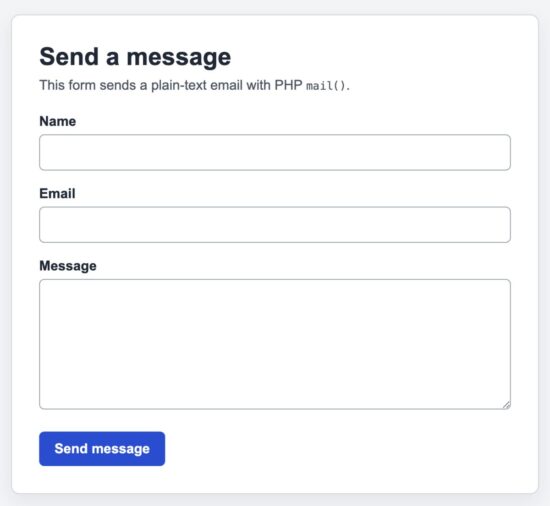
Contact form that sends a plain-text message with the PHP mail() function.
Security considerations
An email form accepts data from an untrusted visitor. Validate every value before using it in the subject, headers, message, or page output.
Prevent email header injection
Email headers use line breaks to separate fields. An attacker may try to insert \r or \n into a name, subject, or address to create extra headers such as Cc or Bcc.
Use filter_var() to validate email addresses. Reject line breaks in any form value used in the subject or headers.
<?php
$email = trim((string) ($_POST['email'] ?? ''));
$subject = trim((string) ($_POST['subject'] ?? ''));

if (!filter_var($email, FILTER_VALIDATE_EMAIL)) {
    throw new InvalidArgumentException('Invalid email address.');
}

if (preg_match('/[\r\n]/', $subject) === 1) {
    throw new InvalidArgumentException('Invalid email subject.');
}
?>
Using an array for $additional_headers makes the code clearer, but it does not make untrusted header values safe automatically. Validation is still required.
Do not accept the recipient from the form
Keep the destination address in a server-side configuration file. If visitors can submit the recipient address, the script can become an open mail relay and be abused to send spam.
Do not pass user input to additional parameters
The fifth mail() argument can be passed to the server’s mail command. Never build this value from form input. On systems that invoke a command-line mail program, unsafe values can create a command injection risk.
Most web applications do not need the fifth argument. Leave it out unless you control the value and understand the server configuration.
Control automated submissions
A CSRF token protects the form from cross-site submissions, but it does not stop a bot that visits the page directly. A public form should also use server-level rate limiting. Add CAPTCHA when automated abuse remains a problem.
Escape values displayed in the page
Validate data before using it in email headers. Escape it separately before displaying it in HTML.
<?php
echo htmlspecialchars(
    $submittedValue,
    ENT_QUOTES | ENT_SUBSTITUTE,
    'UTF-8'
);
?>
These are different protections. Email validation does not prevent cross-site scripting, and HTML escaping does not prevent email header injection.
Keep detailed errors private
Do not show mail server paths, command output, credentials, or configuration details to visitors. Log technical errors on the server and display a short message in the page.
Common PHP mail() errors and fixes
Most mail() problems come from the server configuration, invalid headers, or email authentication records. The code can be correct even when the message does not arrive.
| Problem | Likely cause | What to check |
|---|---|---|
mail() returns false |
PHP could not hand the message to the configured mail system. | Check sendmail_path, the Windows SMTP settings, the PHP error log, and the mail server log. |
mail() returns true, but nothing arrives |
The server accepted the message, but delivery failed later. | Check the spam folder, bounce mailbox, mail queue, server log, and recipient address. |
sendmail_from is not set |
The Windows mail configuration has no default sender and the message has no valid From header. |
Add a valid From header or configure sendmail_from in php.ini. |
| The message goes to spam | The sender domain is not aligned with the server, or its email authentication is incomplete. | Use your own domain in From. Verify SPF, DKIM, DMARC, reverse DNS, and the server’s sending reputation. |
| The script works on hosting but not on localhost | The local computer has no configured mail transfer agent. | Use a local email testing tool, configure an MTA, or send through an authenticated SMTP library. |
| Headers appear inside the message body | The header string has missing or incorrect line breaks. | On PHP 7.2 and newer, use an associative header array. If using a string, separate header lines with \r\n. |
Check the PHP error log
Do not depend only on the boolean returned by mail(). Configuration warnings are normally written to the PHP error log.
You can log the immediate result without exposing technical details to the visitor:
<?php
$mailAccepted = mail($to, $subject, $message, $headers);

if (!$mailAccepted) {
    error_log('PHP mail() could not submit the message.');
}
?>
For delivery failures after submission, inspect the mail transfer agent log or the dashboard provided by your hosting company. PHP cannot report what happens after the local mail system accepts the message.
Check the correct php.ini file
A server can use different configuration files for the command line and the web server. Running php --ini in a terminal may show a different file from the one used by Apache or PHP-FPM.
Check php_ini_loaded_file() from a web page served by the same application:
<?php
echo htmlspecialchars(
    php_ini_loaded_file() ?: 'No php.ini file is loaded.',
    ENT_QUOTES,
    'UTF-8'
);
?>
When to use mail() and when to use SMTP
Use mail() when the server already has a reliable mail transfer agent and the application sends a small number of simple messages. It can work well for internal alerts, development exercises, and basic notifications on managed hosting.
Use an SMTP mail library when the application needs authentication, attachments, HTML with a plain-text alternative, detailed error messages, or consistent behavior across different servers.
| Requirement | PHP mail() | SMTP library |
|---|---|---|
| No external PHP dependency | Yes | No |
| Requires a configured local mail system | Usually | No |
| SMTP authentication | No | Yes |
| Useful delivery diagnostics | Limited | Yes |
| Attachments and multipart messages | Possible, but difficult to build safely | Built-in support |
| Suitable for sending many messages in a loop | No | Better suited |
PHPMailer supports authenticated SMTP, attachments, UTF-8 messages, HTML content, and detailed error reporting. It also avoids the need to construct complex MIME messages by hand.
If the application must send through Gmail, Microsoft 365, or another external mail provider, use the provider’s supported SMTP or API authentication method. Do not place SMTP credentials in mail() headers because the function cannot use them to authenticate.
For a local development environment, follow the PHPpot guide to send email from localhost with PHPMailer and SMTP.
Developer FAQ
Does PHP mail() work without an SMTP server?
PHP needs access to a working mail system. On Linux, this is commonly a local mail transfer agent. On Windows, PHP can use an SMTP server configured in php.ini. The function cannot authenticate directly with an external SMTP account.
Why does mail() return true when the email is not received?
true means the configured mail system accepted the message from PHP. Delivery can still fail later because of an invalid recipient, spam filtering, server reputation, or missing domain authentication.
Can PHP mail() send to multiple recipients?
Yes. Separate recipient addresses with commas in the first argument:
<?php
$to = 'first@example.com, second@example.com';

mail($to, $subject, $message, $headers);
?>
Use Cc or Bcc headers when those behaviors are more appropriate. Do not use mail() in a large loop because it starts a separate delivery process for each call.
Can mail() send HTML email?
Yes. Set the content type to text/html; charset=UTF-8 and pass HTML as the message body. For production HTML email, a mail library is safer because it can create a multipart message with both HTML and plain-text versions.
Can mail() send attachments?
Yes, but the script must construct the MIME boundaries, encodings, and headers correctly. A mail library is a better choice because it handles attachment names, content types, encoding, and multipart formatting.
Can I use Gmail credentials with mail()?
No. The mail() arguments do not accept an SMTP username or password. Use a library that supports Gmail’s current authentication requirements, or configure a local mail transfer agent to relay messages through an approved provider.
Is the PHP mail() function secure?
The function can be used safely for simple messages when all header values are validated and the server is configured correctly. The main application risks are header injection, arbitrary recipient input, automated form abuse, and exposed error details.
Should the visitor’s email be used in the From header?
No. Use an address from your own sending domain in From. Put the visitor’s validated address in Reply-To. This keeps the sender aligned with SPF and DMARC checks while allowing you to reply to the visitor.
Download the PHP mail() example project
The downloadable project contains the complete contact form, mail service, configuration file, CSS, and local setup instructions.
Before running it, update the sender and recipient addresses in config.php. The server must also have a working mail transfer agent. If email delivery is not configured, the form cannot send messages even when the PHP code is correct.

It’s working great, thanks for helping.
Welcome Yash
Hello Vincy, thanks for the excellent tutorial.
Welcome Ahmed.
The best detailed tutorial I found on PHP mail, thanks a lot.
Welcome Mathew.