PHP applications often fail to send email from localhost because a local development server does not include a configured mail service. Starting Apache, XAMPP, WAMP, MAMP, or PHP’s built-in server does not automatically provide email delivery.
The simplest solution is to use PHPMailer and connect directly to an SMTP server. This avoids configuring Sendmail or Postfix on the development computer and provides useful error information when the connection fails.
This tutorial creates a plain-text SMTP test tool for localhost. It covers PHPMailer setup, secure credential storage, SMTP debugging, and the most common connection and authentication errors.
Quick answer
Install PHPMailer with Composer, configure the SMTP host and credentials, then call isSMTP() before sending the message.
composer require phpmailer/phpmailer:^7.1<?php
use PHPMailer\PHPMailer\Exception;
use PHPMailer\PHPMailer\PHPMailer;
require __DIR__ . '/vendor/autoload.php';
$mail = new PHPMailer(true);
try {
$mail->isSMTP();
$mail->Host = 'smtp.example.com';
$mail->Port = 587;
$mail->SMTPAuth = true;
$mail->Username = 'smtp-user@example.com';
$mail->Password = 'replace-with-smtp-password';
$mail->SMTPSecure = PHPMailer::ENCRYPTION_STARTTLS;
$mail->setFrom(
'no-reply@example.com',
'Local PHP Test'
);
$mail->addAddress(
'developer@example.com',
'Developer'
);
$mail->isHTML(false);
$mail->Subject = 'PHP localhost SMTP test';
$mail->Body = 'This email was sent from a local PHP environment.';
$mail->send();
echo 'The SMTP server accepted the test email.';
} catch (Exception $exception) {
error_log($exception->getMessage());
echo 'The SMTP test failed. Check the PHP error log.';
}
?>Replace the example settings with the values supplied by your SMTP provider. Use port 587 with STARTTLS or port 465 with implicit TLS only when that combination matches the provider’s instructions.
The official PHPMailer project supports authenticated SMTP without requiring a local mail server.
If you specifically want to configure and use PHP’s native function, see the PHPpot guide to the PHP mail() function. The rest of this tutorial stays focused on SMTP from localhost.
Why PHP email often fails on localhost
A local web server and a mail server are different services. Apache, Nginx, XAMPP, WAMP, MAMP, and PHP’s built-in server can run PHP code, but they do not automatically deliver email.
PHP’s native mail() function normally hands a message to a mail transfer agent installed on the same computer. Many development computers do not have one. Windows installations also require working mail settings in php.ini.
As a result, mail() may return false, produce a configuration warning, or accept the message without delivering it.
How PHPMailer solves the problem
PHPMailer can connect directly to an SMTP server over the network. It does not depend on the local mail() configuration when isSMTP() is enabled.
The local PHP application connects to the SMTP host using these values:
- SMTP hostname
- Port number
- Encryption method
- Username
- Password or another supported credential
The SMTP server authenticates the application and accepts the message for delivery. This is close to how the application can send email after deployment, so it is useful for testing configuration and application flow.
Choose how local email should be tested
There are two useful approaches:
- Use a real SMTP provider: The message is delivered to an actual inbox. This tests authentication, network access, and delivery through that provider.
- Use a local or hosted email testing inbox: The message is captured for inspection instead of being delivered to a real user. This is safer when testing application email repeatedly.
This tutorial works with either option. Enter the SMTP settings supplied by the service you choose.
Do not use real customer addresses during development. A code error, test loop, or repeated form submission can send unintended messages.
Install PHPMailer and create the project
The example requires PHP 8.1 or newer, Composer, the OpenSSL extension, and SMTP credentials. It also uses mbstring to validate text length.
Check the PHP version and required extensions:
php -v
php -m
Confirm that openssl and mbstring appear in the extension list.
Create a project directory and install PHPMailer:
composer require phpmailer/phpmailer:^7.1Use the following project structure:
php-send-email-localhost/
├── public/
│   ├── assets/
│   │   └── style.css
│   └── index.php
├── src/
│   └── MailService.php
├── vendor/
├── config.php
├── composer.json
└── README.md
A database is not required. The tool sends a test message without storing it.
Only the public directory should be accessible through the local web server. The SMTP configuration and application class remain outside it.
The project follows this flow:
- The developer enters a test subject and message.
index.phpvalidates the values.MailService.phpconnects to the configured SMTP server.- PHPMailer submits the plain-text message.
- The page reports success or directs the developer to the error log.
Configure the SMTP server
Create config.php in the project root. Add the connection values supplied by your SMTP provider or email testing service.
<?php

declare(strict_types=1);

return [
    'smtp' => [
        'host' => 'smtp.example.com',
        'port' => 587,
        'username' => 'smtp-user@example.com',
        'password' => 'replace-with-smtp-password',
        'encryption' => 'tls',
        'debug' => true,
    ],
    'sender' => [
        'email' => 'no-reply@example.com',
        'name' => 'Local PHP Test',
    ],
    'recipient' => [
        'email' => 'developer@example.com',
        'name' => 'Developer',
    ],
];
Replace every example value. The sender address should be accepted by the authenticated SMTP account. Some providers require it to match the username or a verified domain.
Choose the correct port and encryption
- Use
tlswith port587for STARTTLS. - Use
sslwith port465for implicit TLS. - Use no encryption only when a local testing server explicitly requires an unencrypted connection.
The port and encryption values must match. Changing ports at random will not fix an authentication or firewall problem.
Use the authentication method supported by the provider
Some providers accept an SMTP password. Others require an application password, OAuth, or an administrator-enabled SMTP setting. A normal mailbox password may be rejected even when it works for signing in through a browser.
Follow the current SMTP instructions for the account type you are using. Do not weaken the account’s security settings just to make an old tutorial work.
Keep the configuration private
Add the configuration and Composer dependencies to .gitignore:
/config.php
/vendor/
Do not commit SMTP credentials to a repository. Use a dedicated development credential when the provider supports it.
The debug option is enabled for local development. The project writes SMTP diagnostic messages to the PHP error log instead of displaying them in the browser. Set it to false after the connection works.
Create the PHPMailer SMTP service
Create src/MailService.php. This class configures PHPMailer and sends a plain-text test message through the selected SMTP server.
<?php

declare(strict_types=1);

namespace Phppot\LocalMail;

use PHPMailer\PHPMailer\Exception;
use PHPMailer\PHPMailer\PHPMailer;
use PHPMailer\PHPMailer\SMTP;

final class MailService
{
    public function __construct(private array $config)
    {
    }

    /**
     * @throws Exception
     */
    public function sendTestMessage(
        string $subject,
        string $message
    ): void {
        $mail = new PHPMailer(true);
        $smtp = $this->config['smtp'];

        $mail->isSMTP();
        $mail->Host = $smtp['host'];
        $mail->Port = (int) $smtp['port'];
        $mail->SMTPAuth = (bool) ($smtp['auth'] ?? true);

        if ($mail->SMTPAuth) {
            $mail->Username = $smtp['username'];
            $mail->Password = $smtp['password'];
        }

        $mail->Timeout = 15;

        if ($smtp['encryption'] === 'tls') {
            $mail->SMTPSecure = PHPMailer::ENCRYPTION_STARTTLS;
        } elseif ($smtp['encryption'] === 'ssl') {
            $mail->SMTPSecure = PHPMailer::ENCRYPTION_SMTPS;
        }

        $mail->SMTPDebug = !empty($smtp['debug'])
            ? SMTP::DEBUG_SERVER
            : SMTP::DEBUG_OFF;

        $mail->Debugoutput = static function (
            string $line,
            int $level
        ): void {
            error_log(
                'PHPMailer debug level '
                . $level
                . ': '
                . $line
            );
        };

        $mail->CharSet = PHPMailer::CHARSET_UTF8;

        $mail->setFrom(
            $this->config['sender']['email'],
            $this->config['sender']['name']
        );

        $mail->addAddress(
            $this->config['recipient']['email'],
            $this->config['recipient']['name']
        );

        $mail->isHTML(false);
        $mail->Subject = $subject;
        $mail->Body = $message;

        $mail->send();
    }
}
The call to isSMTP() is important. It tells PHPMailer to connect directly to the configured SMTP server instead of using PHP’s local mail setup.
The 15-second timeout prevents a failed connection from making the test page wait indefinitely. A timeout is not a substitute for fixing DNS, firewall, host, or port problems.
When debugging is enabled, SMTP::DEBUG_SERVER records the SMTP conversation in the PHP error log. It provides enough information for most connection and authentication problems without using the more revealing low-level debug mode.
The example sends plain text intentionally. HTML formatting is not needed to confirm that SMTP works. After the local connection succeeds, use the separate PHP HTML email tutorial when the application requires formatted messages.
Most external SMTP providers require authentication. If a local email testing server does not require credentials, add 'auth' => false to the smtp configuration and set encryption to an empty string.
Create the localhost test form
Create public/index.php. The page accepts a test subject and message, validates them, and calls the SMTP service.
<?php

declare(strict_types=1);

use PHPMailer\PHPMailer\Exception;
use Phppot\LocalMail\MailService;

session_start();

require dirname(__DIR__) . '/vendor/autoload.php';

$configFile = dirname(__DIR__) . '/config.php';

if (!is_file($configFile)) {
    http_response_code(500);

    exit(
        'Copy config.example.php to config.php '
        . 'and add your SMTP settings.'
    );
}

$config = require $configFile;

if (empty($_SESSION['csrf_token'])) {
    $_SESSION['csrf_token'] = bin2hex(random_bytes(32));
}

$values = [
    'subject' => 'PHP localhost SMTP test',
    'message' => 'This email was sent from a local PHP environment.',
];

$errors = [];
$success = null;

if ($_SERVER['REQUEST_METHOD'] === 'POST') {
    $values['subject'] = trim(
        (string) ($_POST['subject'] ?? '')
    );

    $values['message'] = trim(
        (string) ($_POST['message'] ?? '')
    );

    $token = (string) ($_POST['csrf_token'] ?? '');

    if (!hash_equals($_SESSION['csrf_token'], $token)) {
        $errors[] = 'The form session expired. Refresh the page and try again.';
    }

    if (
        $values['subject'] === ''
        || mb_strlen($values['subject']) > 150
        || preg_match('/[\r\n]/', $values['subject']) === 1
    ) {
        $errors[] = 'Enter a subject with no more than 150 characters.';
    }

    if (
        $values['message'] === ''
        || mb_strlen($values['message']) > 3000
    ) {
        $errors[] = 'Enter a message with no more than 3,000 characters.';
    }

    $lastSentAt = (int) ($_SESSION['last_sent_at'] ?? 0);

    if (time() - $lastSentAt < 10) {
        $errors[] = 'Please wait 10 seconds before running another test.';
    }

    if ($errors === []) {
        try {
            $mailService = new MailService($config);

            $mailService->sendTestMessage(
                $values['subject'],
                $values['message']
            );

            $_SESSION['last_sent_at'] = time();
            $_SESSION['csrf_token'] = bin2hex(random_bytes(32));

            $success = 'The SMTP server accepted the test email.';
        } catch (Exception $exception) {
            error_log(
                'Local SMTP test failed: '
                . $exception->getMessage()
            );

            $errors[] = 'The SMTP test failed. Check the PHP error log for details.';
        }
    }
}

function escape(string $value): string
{
    return htmlspecialchars(
        $value,
        ENT_QUOTES | ENT_SUBSTITUTE,
        'UTF-8'
    );
}
?>
<!doctype html>
<html lang="en">
<head>
    <meta charset="utf-8">
    <meta
        name="viewport"
        content="width=device-width, initial-scale=1"
    >
    <title>PHP Localhost SMTP Test</title>
    <link rel="stylesheet" href="assets/style.css">
</head>
<body>
<main class="card">
    <h1>Localhost SMTP test</h1>

    <p class="intro">
        Send a plain-text test email with PHP and PHPMailer.
    </p>

    <?php if ($success !== null): ?>
        <div class="notice success" role="status">
            <?= escape($success) ?>
        </div>
    <?php endif; ?>

    <?php if ($errors !== []): ?>
        <div class="notice error" role="alert">
            <strong>The test could not be completed:</strong>

            <ul>
                <?php foreach ($errors as $error): ?>
                    <li><?= escape($error) ?></li>
                <?php endforeach; ?>
            </ul>
        </div>
    <?php endif; ?>

    <form method="post" action="">
        <input
            type="hidden"
            name="csrf_token"
            value="<?= escape($_SESSION['csrf_token']) ?>"
        >

        <label for="subject">Subject</label>
        <input
            id="subject"
            name="subject"
            type="text"
            maxlength="150"
            value="<?= escape($values['subject']) ?>"
            required
        >

        <label for="message">Message</label>
        <textarea
            id="message"
            name="message"
            rows="7"
            maxlength="3000"
            required
        ><?= escape($values['message']) ?></textarea>

        <button type="submit">Send test email</button>
    </form>
</main>
</body>
</html>
The subject rejects carriage returns and line feeds before it is passed to an email header. The page also escapes submitted values before displaying them.
The CSRF token protects the form from cross-site submission. The short cooldown prevents repeated clicks from sending several test messages in quick succession.
The success message says that the SMTP server accepted the email. It does not guarantee final delivery to the inbox. Check the recipient inbox, spam folder, bounce messages, and SMTP provider log when necessary.
Add the form styling and run the test
Create public/assets/style.css. The CSS keeps the SMTP test form clear and easy to capture in a screenshot.
:root {
    color-scheme: light;
    font-family: Arial, sans-serif;
    color: #1f2937;
    background: #f3f4f6;
}

* {
    box-sizing: border-box;
}

body {
    margin: 0;
    padding: 40px 16px;
}

.card {
    width: min(100%, 620px);
    margin: 0 auto;
    padding: 32px;
    border: 1px solid #d1d5db;
    border-radius: 10px;
    background: #ffffff;
    box-shadow: 0 8px 24px rgba(31, 41, 55, 0.08);
}

h1 {
    margin: 0 0 8px;
    font-size: 1.8rem;
}

.intro {
    margin: 0 0 24px;
    color: #4b5563;
}

label {
    display: block;
    margin: 18px 0 6px;
    font-weight: 700;
}

input,
textarea {
    width: 100%;
    padding: 11px 12px;
    border: 1px solid #9ca3af;
    border-radius: 6px;
    font: inherit;
}

input:focus,
textarea:focus {
    border-color: #1d4ed8;
    outline: 3px solid rgba(29, 78, 216, 0.15);
}

button {
    margin-top: 22px;
    padding: 11px 18px;
    border: 0;
    border-radius: 6px;
    background: #1d4ed8;
    color: #ffffff;
    font: inherit;
    font-weight: 700;
    cursor: pointer;
}

button:hover {
    background: #1e40af;
}

.notice {
    margin: 18px 0;
    padding: 12px 14px;
    border-radius: 6px;
}

.notice ul {
    margin: 8px 0 0;
    padding-left: 20px;
}

.success {
    border: 1px solid #86efac;
    background: #f0fdf4;
    color: #166534;
}

.error {
    border: 1px solid #fca5a5;
    background: #fef2f2;
    color: #991b1b;
}

@media (max-width: 520px) {
    body {
        padding: 20px 12px;
    }

    .card {
        padding: 22px;
    }
}
Start the local PHP server
Open a terminal in the project directory and install the Composer dependencies:
composer installCopy config.example.php to config.php and enter the SMTP settings. Then start PHP’s built-in development server with the public directory as its document root:
php -S localhost:8000 -t publicOpen http://localhost:8000 in a browser. Send the default test message and check the recipient inbox or email testing dashboard.
If the page reports a failure, read the PHP error log before changing the code. The SMTP debug output usually identifies whether the failure occurred during connection, encryption, or authentication.
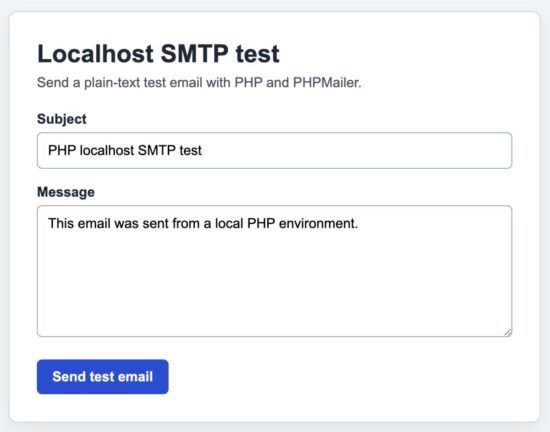
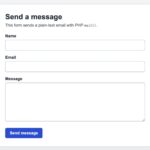
PHPMailer test email accepted by the SMTP server from a local PHP environment.
- Image filename: php-localhost-smtp-test-success.png
- Alt text: Successful PHP localhost SMTP email test
- Caption: PHPMailer test email accepted by the SMTP server from a local PHP environment.
- Capture: Submit the default test message and capture the complete form card with the green success message, subject, message, and Send test email button visible. Do not include the browser toolbar or any SMTP credentials.
Common localhost SMTP errors and fixes
Most localhost email failures come from the SMTP configuration, local network, PHP extensions, or account authentication. Use the error message to narrow the problem before changing several settings at once.
| Error or symptom | Likely cause | What to check |
|---|---|---|
SMTP connect() failed |
The SMTP host cannot be reached. | Check the hostname, port, DNS, firewall, antivirus software, VPN, and internet connection. |
Could not authenticate |
The username, password, or account authentication method is incorrect. | Use the complete SMTP username. Check whether the provider requires an application password, OAuth, or an enabled SMTP setting. |
Connection timed out |
The network is dropping or blocking the connection. | Confirm that outbound traffic to the SMTP port is allowed. Test without a VPN or restrictive network when appropriate. |
Connection refused |
No SMTP service is listening at the selected host and port. | Check whether the local testing server is running and whether its SMTP port matches config.php. |
| TLS or certificate verification failed | The CA bundle is missing, outdated, or incorrectly configured. | Check the system clock, OpenSSL extension, PHP CA configuration, certificate hostname, and local antivirus TLS inspection. |
Class "PHPMailer\PHPMailer\PHPMailer" not found |
Composer dependencies are missing or the autoloader was not included. | Run composer install and require vendor/autoload.php. |
| The SMTP server accepts the message, but it does not arrive | The message was filtered, bounced, or rejected after submission. | Check spam, the provider activity log, bounce messages, recipient address, and sender-domain authentication. |
Confirm that OpenSSL is enabled
Run this command with the same PHP installation used by the project:
php -r "var_dump(extension_loaded('openssl'));"The output should be bool(true). If the command-line test and browser behave differently, they may be loading different PHP installations or configuration files.
Check the active php.ini file
Use this command to see the configuration loaded by command-line PHP:
php --iniApache in XAMPP or WAMP may load a different file. To check the web request, temporarily display the value returned by php_ini_loaded_file(). Remove the diagnostic output afterward.
Do not disable certificate verification
Some old examples set verify_peer and verify_peer_name to false. That hides the certificate error by removing an important security check.
Fix the CA bundle, hostname, system clock, or local network interception instead. The official PHPMailer troubleshooting guide covers common connection and certificate failures in more detail.
Security considerations
Local development does not make SMTP credentials or email data harmless. Development computers, repositories, logs, and shared networks can still expose sensitive information.
Keep SMTP credentials outside the public directory
Store config.php above the public directory. Do not commit it to version control or include it in a public source-code download.
Use a dedicated development credential when possible. Do not reuse the main mailbox password for an application.
Do not display SMTP debug output in the browser
SMTP debugging can reveal server names, account details, message addresses, and provider responses. Write it to the PHP error log and disable it after the connection works.
Avoid SMTP::DEBUG_LOWLEVEL unless a specific problem requires it. Low-level output can expose more information than normal server debugging.
Keep the recipient in server-side configuration
The project does not allow a visitor to choose the recipient. If a form accepts arbitrary destination addresses, it can be misused to send spam.
Change the recipient in config.php when you need to test another inbox.
Validate values used in email headers
The subject is an email header. The example rejects carriage returns and line feeds before sending it. This prevents submitted data from creating additional headers.
PHPMailer also validates addresses and header values, but input validation should still happen at the application boundary.
Do not send tests to real users
Use an inbox controlled by the developer or an email testing service. Keep production mailing lists and customer addresses out of the local configuration.
A loop, retry bug, or repeated form submission can generate more email than expected. The project includes a short cooldown, but provider-level limits and safe test recipients are still important.
Do not expose the development server publicly
PHP’s built-in server is intended for development. Bind it to localhost and do not use it as a public production server.
Only the public directory should be served. The SMTP configuration, Composer files, logs, and application classes should remain outside the document root.
Developer FAQ
Do I need to change php.ini to use PHPMailer on localhost?
Not for SMTP delivery. When isSMTP() is enabled, PHPMailer connects directly to the SMTP server. It does not use PHP’s native mail() transport.
PHP still needs required extensions such as OpenSSL for encrypted SMTP connections.
Does this work with XAMPP, WAMP, MAMP, and PHP’s local server?
Yes. PHPMailer works independently of the local web server package. The PHP installation must support the required extensions and the computer must be able to reach the SMTP host.
Which SMTP port should I use?
Use the values supplied by the provider. Port 587 commonly uses STARTTLS. Port 465 commonly uses implicit TLS. A local email testing server may use an unencrypted port such as 1025.
How do I use a local SMTP testing server without authentication?
Set auth to false, leave encryption empty, and enter the local host and port shown by the testing tool:
<?php

'smtp' => [
    'host' => '127.0.0.1',
    'port' => 1025,
    'auth' => false,
    'username' => '',
    'password' => '',
    'encryption' => '',
    'debug' => true,
],
Use the actual port configured by the local testing server. Port 1025 is common, but it is not guaranteed.
Can I use Gmail or Microsoft 365 SMTP?
Yes, when the account permits SMTP access and uses a supported authentication method. Depending on the provider and account type, this may require an application password, OAuth, or an administrator setting.
Why does the code work on localhost but fail after deployment?
The hosting provider may block outbound SMTP ports, use different DNS settings, lack a required CA bundle, or require its own SMTP relay. Run the same diagnostic checks in the deployed environment.
Does PHPMailer success mean the email reached the inbox?
No. It means the SMTP server accepted the message. Delivery can still fail later because of filtering, an invalid recipient, sender reputation, or domain authentication.
Can the test send HTML email?
Yes, but this project uses plain text to keep the localhost test focused. After SMTP works, follow the PHPpot tutorial on how to send HTML email in PHP.
Where can I find the PHPMailer debug output?
The project sends it to the PHP error log. The exact file depends on the PHP and web server configuration. Check error_log in the active php.ini file.
Should SMTP debugging stay enabled?
No. Enable it while diagnosing the local connection, then set debug to false. Leaving detailed SMTP logging enabled creates unnecessary log data and may expose account information.
Download the PHP localhost SMTP project
The downloadable project contains the complete PHPMailer SMTP service, localhost test form, configuration example, CSS, Composer file, and setup instructions.
After extracting it, run composer install. Copy config.example.php to config.php and add the SMTP settings supplied by your provider or email testing service.

I want a php mail sending function using SMTP for OUTLOOK365 MAILS
I have updated the PHP script presented in the tutorial and it will help you to send email using SMTP.
Is it possible to use this code to send to more than one email address at a time? I tried adding a comma and then another email address, but it would not work.
Hi Andrew,
Yes. Call `addAddress()` once for each recipient:
“
$mail->addAddress(‘first@example.com’, ‘First Recipient’);
$mail->addAddress(‘second@example.com’, ‘Second Recipient’);
“
You can also use `addCC()` or `addBCC()` when appropriate. Avoid combining multiple addresses into one comma-separated string because PHPMailer expects each address to be added separately.
Is there any system to activate mailsever in xampp to send mails in local intranet using localhost?
Yes Bindumol.
Yes, but XAMPP does not include a complete mail server by default. You need to install and configure an SMTP server on one computer in the local network.
Then configure PHPMailer to use that computer’s local IP address and SMTP port:
“
$mail->isSMTP();
$mail->Host = ‘192.168.1.10’;
$mail->Port = 25;
$mail->SMTPAuth = false;
$mail->SMTPAutoTLS = false;
“
Replace the IP and port with your mail server settings. If you only need to capture test emails, a local SMTP testing tool is enough. To deliver messages to real intranet mailboxes, you need a properly configured mail server with local user accounts and network access.
Hi Vincy, I am facing an issue with php mail function. The thing is mail function is working on localhost but not working on the live server.
Hi, this usually means the live server has not configured PHP `mail()` correctly, or the hosting provider has disabled it.
Check the PHP error log and ask your host whether `mail()` is supported. Also use a valid `From` address from your own domain.
For more reliable delivery and clearer error messages, use PHPMailer with the SMTP settings provided by your hosting company.
How do i send site visitor details they have filled on the form. To send from contact form to my email/database and copy the site visitor
Hi Kiki,
Validate the submitted details first, then save them to the database with a prepared statement. Use your domain address as `From` and the visitor’s validated address as `Reply-To`.
With PHPMailer:
“
$mail->setFrom(‘no-reply@example.com’, ‘Website’);
$mail->addAddress(‘admin@example.com’);
$mail->addReplyTo($visitorEmail, $visitorName);
“
To send the visitor a copy, it is better to send a separate confirmation email rather than use CC. This avoids exposing internal addresses and lets you provide a visitor-friendly message. Never place unvalidated form values directly in email headers or database queries.
Hi, how do I Send Email with Attachment in PHP using PHPMailer
I have written a tutorial for sending mail with attachments, check it out https://phppot.com/php/send-email-with-multiple-attachments-using-php/