PHP URL Encoding and Decoding
URL encoding converts unsafe characters in a URL into a safe format. This is needed when a URL contains spaces, special characters, search keywords, product names, redirect URLs, or query string values.
In PHP, the commonly used URL encoding and decoding functions are urlencode(), urldecode(), rawurlencode(), and rawurldecode(). PHP also provides http_build_query() to build query strings safely without joining parameters by hand.
This tutorial explains when to use each function with simple PHP examples.
Quick Answer
Use urlencode() for query string values. Use rawurlencode() for URL path segments.
urlencode()converts spaces to+.rawurlencode()converts spaces to%20.urldecode()reversesurlencode().rawurldecode()reversesrawurlencode().
Why URL Encoding Is Important
URLs support only a limited set of characters. Problems happen when a value contains spaces, symbols, Unicode text, or reserved URL characters.
For example, this URL is invalid because it contains spaces:
https://example.com/search.php?q=mobile phoneAfter encoding, the URL becomes safe:
https://example.com/search.php?q=mobile+phoneEncoding helps prevent broken links and malformed query strings.
According to the RFC 3986 URL specification, reserved characters inside URLs must be encoded correctly.
Using urlencode() in PHP
The urlencode() function encodes a string for use inside a query string.
<?php

$keyword = "mobile phone";

$encoded = urlencode($keyword);

echo $encoded;
?>
Output:
mobile+phoneNow let us build a full URL.
<?php

$keyword = "wireless mouse";
$category = "computer accessories";

$url =
    "https://example.com/search.php?q=" .
    urlencode($keyword) .
    "&category=" .
    urlencode($category);

echo $url;
?>
Output:
https://example.com/search.php?q=wireless+mouse&category=computer+accessoriesThis is useful when sending search keywords, form values, redirect URLs, or API parameters through a query string.
You can also read the related PHPpot tutorial on
getting URL parameters in PHP.
Using urldecode() in PHP
The urldecode() function converts an encoded URL value back to normal text.
<?php

$encoded = "mobile+phone";

$decoded = urldecode($encoded);

echo $decoded;
?>
Output:
mobile phoneThis is commonly used when reading query string values from a URL.
urlencode() vs rawurlencode()
Both functions encode URLs, but they are used for different purposes.
| Function | Space Encoding | Best Use Case |
|---|---|---|
urlencode() |
+ |
Query string values |
rawurlencode() |
%20 |
URL path segments |
Use rawurlencode() when encoding filenames, slugs, folder names, or URL paths.
<?php

$fileName = "annual report 2026.pdf";

echo rawurlencode($fileName);
?>
Output:
annual%20report%202026.pdfThis output is more suitable for clean URL paths.
Using rawurldecode()
The rawurldecode() function decodes values encoded using rawurlencode().
<?php

$encoded = "annual%20report%202026.pdf";

echo rawurldecode($encoded);
?>
Output:
annual report 2026.pdfBuilding Query Strings Safely with http_build_query()
Many developers manually concatenate query parameters. This can easily break when values contain spaces or special characters.
PHP provides http_build_query() to build query strings safely.
<?php

$params = [
    "q" => "wireless keyboard",
    "sort" => "price low to high",
    "page" => 2
];

$queryString = http_build_query($params);

echo $queryString;
?>
Output:
q=wireless+keyboard&sort=price+low+to+high&page=2You can append this query string to a URL.
<?php

$url = "https://example.com/products.php?" . $queryString;

echo $url;
?>
This approach is cleaner and safer than manually joining parameters.
PHP documentation for http_build_query() explains additional options and encoding behavior.
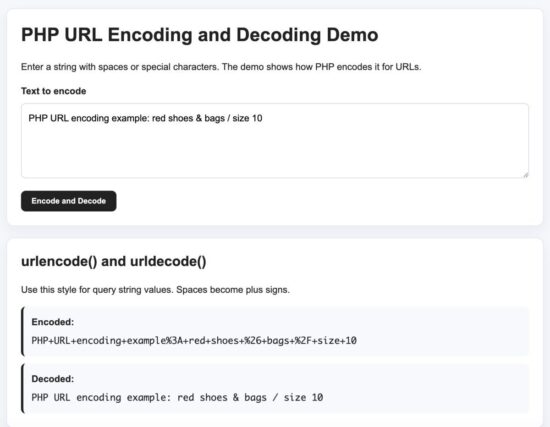
PHP urlencode and rawurlencode example output
PHP urlencode and rawurlencode example output
Common URL Encoding Examples
Encode Redirect URLs
When passing a redirect URL as a parameter, always encode it properly.
<?php

$redirectUrl = "https://example.com/account.php?tab=orders";

$loginUrl =
    "https://example.com/login.php?redirect=" .
    urlencode($redirectUrl);

echo $loginUrl;
?>
Output:
https://example.com/login.php?redirect=https%3A%2F%2Fexample.com%2Faccount.php%3Ftab%3DordersEncode User Input Before Sending to APIs
URL encoding is commonly used while sending search terms to APIs.
<?php

$city = "New York";

$apiUrl =
    "https://api.example.com/weather?city=" .
    urlencode($city);

echo $apiUrl;
?>
Encode Unicode Characters
PHP encoding functions also support Unicode characters.
<?php

$text = "தமிழ் language";

echo urlencode($text);
?>
Output:
%E0%AE%A4%E0%AE%AE%E0%AE%BF%E0%AE%B4%E0%AF%8D+languageCommon Mistakes and Fixes
Encoding the Full URL
This is a common mistake:
<?php

$url = "https://example.com/search.php?q=mobile phone";

echo urlencode($url);
?>
This encodes the entire URL including : and /, which is usually not correct.
Instead, encode only the parameter values.
Double Encoding
Do not encode the same value twice.
<?php

$value = "mobile phone";

$encoded = urlencode($value);

echo urlencode($encoded);
?>
Output:
mobile%2BphoneThe second encoding changes the + character into %2B.
Using urlencode() for URL Paths
For URL paths, prefer rawurlencode().
Good:
/files/annual%20report.pdfLess suitable:
/files/annual+report.pdfSecurity Considerations
URL encoding improves URL safety, but it is not a security protection by itself.
- Do not treat URL encoding as input validation.
- Validate and sanitize user input separately.
- Escape output correctly when displaying decoded values in HTML.
- Do not blindly trust redirect URLs from user input.
If you are working with form input, you can also read the PHPpot guide on
preventing SQL injection in PHP.
Developer FAQ
What is the difference between urlencode() and rawurlencode()?
urlencode() converts spaces into +. It is mainly used for query strings. rawurlencode() converts spaces into %20 and is better for URL paths.
Does PHP automatically decode query string values?
Yes. Values inside $_GET are automatically decoded by PHP.
Should I encode database values before storing them?
No. Store the original value in the database. Encode only when building URLs.
Can urlencode() encode special characters?
Yes. It encodes reserved characters like spaces, ampersands, slashes, question marks, and Unicode characters.
Download Source Code
The downloadable project contains:
- URL encoding examples
- URL decoding examples
- rawurlencode() examples
- http_build_query() demo
- Simple styled demo page
- Setup instructions
Download the PHP URL Encoding and Decoding Source Code
Function Reference Summary
| Function | Purpose | Space Encoding | Typical Use |
|---|---|---|---|
urlencode() |
Encode query string values | + |
Search keywords, filters, redirect parameters |
urldecode() |
Decode query string values | Converts + to space |
Reading encoded query values |
rawurlencode() |
Encode URL path segments | %20 |
Filenames, slugs, folders |
rawurldecode() |
Decode encoded URL paths | Converts %20 to space |
Reading encoded path values |
http_build_query() |
Build query strings safely | + |
Generating dynamic URLs |
Conclusion
PHP provides simple and reliable functions for URL encoding and decoding.
For most applications:
- Use
urlencode()for query parameters - Use
rawurlencode()for URL paths - Use
http_build_query()to safely build query strings - Use decoding functions only when required
Correct URL encoding prevents broken links, malformed requests, and query string issues. It also makes your PHP applications more reliable when handling user input, redirects, API requests, and multilingual text.


Hi Vincy, Ive been farming on your blog and i have found it interesting (php wise). A week back i started programming in php and I’m having fun with it. Now that i have found you i believe you can be a handy tutor as regards helping me understand this language. I’m looking forward to sharing more with you.
Hi Gideon,
You are welcome to contact me. Best wishes to you and hope you will enjoy PHP.