Introduction
PHP has more than one way to generate a random number. The right function depends on why you need the number.
For simple cases, like showing a random banner or picking a random demo value, rand() or mt_rand() can work. For secure cases, like OTP codes, verification numbers, password reset flows, or anything a user must not guess, use random_int().
This tutorial explains how to generate random numbers in PHP with practical examples. It also shows when to use random_int(), when mt_rand() is enough, and why old seeding examples are usually not needed in modern PHP.
Quick Answer
If you want a random number in PHP, use the right function based on your need:
- Use
random_int()for secure values like OTP, tokens, and verification codes. - Use
mt_rand()for fast, non-secure random numbers like UI demos or simple logic. - Avoid
rand()in new code. It is older and less reliable.
Examples
Secure random number (recommended)
<?php
echo random_int(1, 100);
?>
Generate a 6-digit OTP
<?php
$otp = random_int(100000, 999999);
echo $otp;
?>
Fast non-secure random number
<?php
echo mt_rand(1, 100);
?>
When to Use random_int(), mt_rand(), and rand()
All three functions generate random numbers, but they are not equal. The main difference is security and predictability.
1. random_int() – Best for secure use
This is the safest option. It uses a cryptographically secure generator. For more information, check the official documentation of this PHP function.
- Use for OTP, tokens, password reset links
- Not predictable
- Slightly slower, but safe
<?php
echo random_int(1, 100);
?>
2. mt_rand() – Fast but not secure
This uses the Mersenne Twister algorithm. It is fast and good for general-purpose randomness.
- Use for UI features, testing, random display
- Not safe for OTP or authentication
<?php
echo mt_rand(1, 100);
?>
3. rand() – Old method
This is the older function. In modern PHP versions, it is often an alias of mt_rand(), but it is still better to avoid it in new code.
- Kept for backward compatibility
- Not recommended for new projects
<?php
echo rand(1, 100);
?>
Summary
| Function | Use Case | Secure |
|---|---|---|
| random_int() | OTP, tokens | Yes |
| mt_rand() | General use | No |
| rand() | Legacy | No |
Example: Build a PHP Random Number Generator
This example is taken directly from the downloadable project. It contains a complete working form and backend logic in a single page.
The generator supports three modes:
- Secure – uses
random_int()with minimum and maximum - OTP – generates a numeric code based on digits
- MT – uses
mt_rand()for faster non-secure output
index.php (Complete File)
<?php
declare(strict_types=1);

require_once __DIR__ . '/src/RandomNumberService.php';

$service = new RandomNumberService();

$result = null;
$error = null;

if ($_SERVER['REQUEST_METHOD'] === 'POST') {
    $min = $_POST['min'] ?? '1';
    $max = $_POST['max'] ?? '100';
    $digits = $_POST['digits'] ?? '6';
    $mode = $_POST['mode'] ?? 'secure';

    try {
        if ($mode === 'secure') {
            $result = $service->secureRange((int) $min, (int) $max);
        } elseif ($mode === 'otp') {
            $result = $service->numericCode((int) $digits);
        } elseif ($mode === 'mt') {
            $result = $service->pseudoRange((int) $min, (int) $max);
        } else {
            throw new InvalidArgumentException('Choose a valid generator type.');
        }
    } catch (Throwable $exception) {
        $error = $exception->getMessage();
    }
}
?>

<!DOCTYPE html>
<html>
<head>
    <title>PHP Random Number Generator</title>
</head>
<body>

<h2>Random Number Generator</h2>

<form method="post">

    <label>Mode:</label>
    <select name="mode">
        <option value="secure" <?php if ($mode === 'secure') echo 'selected'; ?>>Secure (random_int)</option>
        <option value="otp" <?php if ($mode === 'otp') echo 'selected'; ?>>OTP (digits)</option>
        <option value="mt" <?php if ($mode === 'mt') echo 'selected'; ?>>Fast (mt_rand)</option>
    </select>

    <br><br>

    <label>Minimum:</label>
    <input type="number" name="min" value="<?php echo htmlspecialchars($min); ?>">

    <br><br>

    <label>Maximum:</label>
    <input type="number" name="max" value="<?php echo htmlspecialchars($max); ?>">

    <br><br>

    <label>Digits (OTP mode only):</label>
    <input type="number" name="digits" value="<?php echo htmlspecialchars($digits); ?>">

    <br><br>

    <button type="submit">Generate</button>

</form>

<?php if ($result !== null): ?>
    <p><strong>Result:</strong> <?php echo htmlspecialchars((string)$result); ?></p>
<?php endif; ?>

<?php if ($error): ?>
    <p style="color:red;"><?php echo htmlspecialchars($error); ?></p>
<?php endif; ?>

</body>
</html>
Important behavior
The generator does not combine all inputs together.
- Secure mode uses only minimum and maximum
- OTP mode uses only digits
- MT mode uses only minimum and maximum
This is why a value like 303 is valid when secure mode is selected, even if digits is set to 2.
The following screenshot shows the working random number generator form with all three modes.
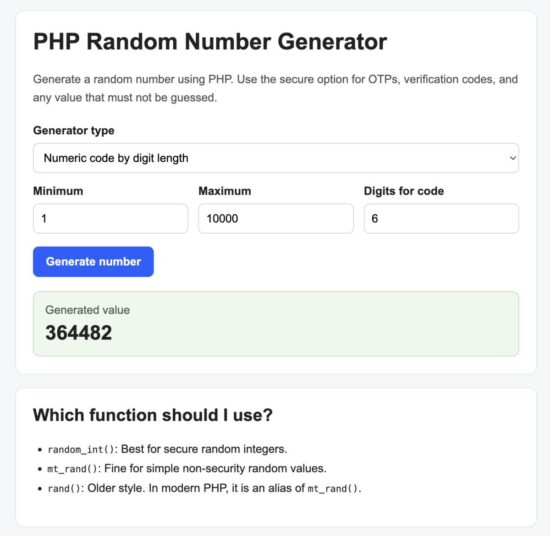
PHP random number generator form with mode selection and inputs
Security Considerations
Not all random number functions are safe for every use. Choosing the wrong function can make your application predictable and vulnerable.
Use random_int() for sensitive data
If the generated number is used in authentication or user verification, always use random_int().
- OTP codes
- Password reset tokens
- Email verification codes
- Session-related values
random_int() uses a cryptographically secure generator provided by the operating system. This makes it hard to predict or reproduce.
Avoid mt_rand() for security use
mt_rand() is fast, but it is not secure. It can be predicted if the internal state is known.
Do not use it for:
- Login verification
- Security tokens
- Any value that must remain secret
Do not rely on rand()
rand() is an older function and should be avoided in modern applications. It does not provide any security benefit.
Do not manually seed randomness
Functions like srand() or mt_srand() are not needed in modern PHP. The engine seeds automatically.
Manual seeding can reduce randomness and make output predictable.
Validate input ranges
Always validate user input before generating numbers.
- Ensure minimum is less than or equal to maximum
- Ensure digits are within a reasonable range
This prevents runtime errors and avoids unexpected behavior.
Developer FAQ
Why does digits not affect the result in secure or mt mode?
The generator uses inputs based on the selected mode. In secure and mt modes, only min and max are used. The digits input is used only in otp mode.
How do I generate a fixed-length number like a 6-digit OTP?
Use the digits-based method. It converts the digit count into a range internally.
<?php
$otp = $service->numericCode(6);
?>
Why does a 1-digit code sometimes return 0?
For 1 digit, the valid range is 0 to 9. So returning 0 is correct behavior.
Can I combine digits with min and max?
No. These represent two different ways to generate numbers.
- Digits controls the length of the number
- Min/Max controls the numeric range
Mixing them will lead to confusion or incorrect expectations.
What is the maximum safe digit length?
In this project, digits are limited to 18. This keeps the value within PHP integer limits and avoids overflow issues.
Why does random_int() throw an error?
This usually happens when the minimum value is greater than the maximum value.
<?php
// This will fail
random_int(100, 10);
?>
Always validate the range before calling the function.
Is mt_rand() faster than random_int()?
Yes, mt_rand() is faster. But it is not secure. Use it only when performance matters and security is not required.
For most modern applications, random_int() is the safer default choice.
Download Source Code
You can download the complete working project used in this tutorial from the link below.
Download PHP Random Number Generator Project
Project structure
php-random-number-generator/
│
├── index.php
├── src/
│   └── RandomNumberService.php
└── README.txt
How to run locally
- Download and extract the ZIP file.
- Place the folder inside your web server directory (for example,
htdocsin XAMPP). - Start Apache from your control panel.
- Open your browser and visit:
http://localhost/php-random-number-generator/
What you can try
- Generate random numbers using different ranges
- Switch between secure and non-secure modes
- Create OTP codes with different digit lengths
Common Errors and Fixes
Here are a few common issues you may face when using the generator from this project.
1. Getting unexpected values like 303 for 2 digits
Reason: You selected secure or mt mode. These modes use only min and max.
Fix: Select OTP (digits) mode to generate fixed-length numbers.
2. Empty result after submit
Reason: Required inputs are missing for the selected mode.
- Secure and MT modes require
minandmax - OTP mode requires
digits
Fix: Fill only the inputs needed for the selected mode.
3. Error: Minimum must be less than or equal to maximum
Reason: The minimum value is greater than the maximum value.
Fix: Ensure that min ≤ max before submitting the form.
4. Large digit values not working
Reason: The project limits digits to prevent overflow.
Fix: Use a value between 1 and 18.
5. Confusion between digits and range
Reason: Digits and range are different concepts.
- Digits controls how many numbers are in the output
- Min/Max controls the numeric range
Fix: Use the correct mode based on your requirement.
6. Using mt_rand() for secure features
Reason: mt_rand() is not secure.
Fix: Use random_int() for OTP, tokens, and authentication-related values.
How It Works
The project follows a simple flow. The form collects input, the mode decides the logic, and the service class generates the result.
Step 1: User submits the form
The form sends four values:
mode– selected generator typemin– minimum valuemax– maximum valuedigits– number of digits for OTP
Step 2: Mode decides which inputs to use
The controller logic checks the selected mode and calls the matching method.
<?php
if ($mode === 'secure') {
    $result = $service->secureRange((int) $min, (int) $max);
} elseif ($mode === 'otp') {
    $result = $service->numericCode((int) $digits);
} elseif ($mode === 'mt') {
    $result = $service->pseudoRange((int) $min, (int) $max);
}
?>
Step 3: Service class handles generation
The service class keeps the logic clean and reusable.
secureRange()→ usesrandom_int()numericCode()→ converts digits into a rangepseudoRange()→ usesmt_rand()
Step 4: Result is displayed
The generated value is returned to the page and displayed safely using htmlspecialchars().
Why this structure works well
- Clear separation between input handling and logic
- Easy to extend with new generator types
- Avoids mixing digits with range
- Safe output handling
This makes the code easier to maintain and reuse in real applications.
Generate Fixed-Length Codes (OTP)
In many applications, you need a number with a fixed number of digits. This is common in OTP, PIN, and verification flows.
The project handles this using the numericCode() method.
How it works
Instead of directly generating a number, the method converts the digit count into a numeric range.
- 2 digits → 10 to 99
- 4 digits → 1000 to 9999
- 6 digits → 100000 to 999999
This ensures the output always has the exact number of digits.
Example
<?php
$code = $service->numericCode(6);
echo $code;
?>
Why not use random_int(0, 999999)?
If you use:
<?php
random_int(0, 999999);
?>
You may get values like:
- 123 (3 digits)
- 45 (2 digits)
This breaks the fixed-length requirement.
Handling 1-digit codes
For 1 digit, the valid range is 0 to 9.
<?php
$code = $service->numericCode(1);
?>
This can return any value from 0 to 9.
Where to use this
- Login verification codes
- SMS OTP
- Email confirmation codes
- Temporary PIN generation
For all these cases, the project uses random_int() internally to ensure secure output.
Generate Random Numbers Within a Range
If you need a number between two values, use the range-based methods. This is useful for simulations, testing, and general application logic.
Secure range (recommended)
This uses random_int() and is safe for most use cases.
<?php
$number = $service->secureRange(1, 100);
echo $number;
?>
This will always return a number between 1 and 100, inclusive.
Fast range (non-secure)
This uses mt_rand(). It is faster but not suitable for security-sensitive features.
<?php
$number = $service->pseudoRange(1, 100);
echo $number;
?>
How range works
The generator picks a value between the given minimum and maximum values.
- Minimum is inclusive
- Maximum is inclusive
So this call:
<?php
random_int(1, 3);
?>
Can return:
- 1
- 2
- 3
Validation inside the project
The service class ensures the range is valid before generating the number.
<?php
if ($min > $max) {
    throw new InvalidArgumentException(
        'Minimum value must be less than or equal to maximum value.'
    );
}
?>
Where to use range-based generation
- Random IDs for demo data
- Game logic (dice, scores, levels)
- Random selection within limits
- Load testing and simulation
For most real-world cases, prefer secureRange() unless you have a specific need for faster non-secure output.
Input Validation and Error Handling
The project includes basic validation to prevent invalid inputs and runtime errors. This ensures the generator behaves predictably.
1. Range validation
For both secure and MT modes, the service checks that the minimum value is not greater than the maximum.
<?php
if ($min > $max) {
    throw new InvalidArgumentException(
        'Minimum value must be less than or equal to maximum value.'
    );
}
?>
2. Digits validation
For OTP mode, the service ensures the digit value is within a safe range.
<?php
if ($digits < 1 || $digits > 18) {
    throw new InvalidArgumentException(
        'Digits must be between 1 and 18.'
    );
}
?>
This prevents overflow and keeps the generated number within supported limits.
3. Exception handling
The main file catches all errors using a try-catch block.
<?php
try {
    // generation logic
} catch (Throwable $exception) {
    $error = $exception->getMessage();
}
?>
This avoids breaking the page and shows a user-friendly error message instead.
4. Safe output rendering
The result and error messages are displayed using htmlspecialchars().
<?php
echo htmlspecialchars((string)$result);
?>
This prevents HTML injection when displaying values on the page.
Why this matters
- Prevents invalid inputs from causing failures
- Keeps the application stable
- Improves user experience with clear error messages
- Protects output from injection issues
Even in small tools like this, proper validation and error handling make the code more reliable and production-ready.
UI Notes and Usage Tips
The form in this project is intentionally simple. It keeps all inputs visible, but the selected mode decides which values are used.
How to use the form correctly
- Select a mode first
- Fill only the inputs required for that mode
- Click Generate
Mode-wise input usage
| Mode | Uses Min | Uses Max | Uses Digits |
|---|---|---|---|
| Secure | Yes | Yes | No |
| OTP | No | No | Yes |
| MT | Yes | Yes | No |
Why all fields are shown
The form does not hide inputs based on mode. This keeps the UI simple and avoids JavaScript complexity.
Instead, the backend decides which values to use. This is why some fields may be ignored depending on the selected mode.
Example scenarios
- Secure random number: Mode = Secure, Min = 1, Max = 100
- 6-digit OTP: Mode = OTP, Digits = 6
- Fast random number: Mode = MT, Min = 10, Max = 50
Practical recommendation
- Use
random_int()by default - Use
mt_rand()only when you need speed and security is not a concern
Avoid premature optimization
Do not switch to mt_rand() just for speed unless you have measured performance needs.
Security and correctness should come first.
Next Steps and Improvements
This project is intentionally simple, but you can extend it for real-world use.
1. Disable unused inputs based on mode
You can improve the user experience by enabling only the required fields for the selected mode.
- Disable
minandmaxin OTP mode - Disable
digitsin Secure and MT modes
2. Add client-side validation
Use JavaScript to validate inputs before form submission.
- Ensure required fields are filled
- Show instant error messages
3. Format output
You can format the result for better readability.
- Add leading zeros for display (for OTP UI)
- Group large numbers if needed
4. Add alphanumeric codes
Extend the service class to generate random strings.
This is useful for:
- API keys
- Invite codes
- Short tokens
You can use random_bytes() or bin2hex() for this purpose.
5. Store generated values
If needed, you can store generated values in a database for tracking or verification.
This is useful for OTP verification process by storing values in a database.
6. Add expiry for OTP
For OTP use cases, always set an expiration time.
- Store timestamp along with the code
- Validate expiry during verification
7. Convert into API
You can expose this generator as an API endpoint.
- Accept JSON input
- Return generated value as JSON response
Conclusion
You now have a complete understanding of how random number generation works in PHP using a practical, mode-based approach.
The included project gives you a ready-to-use base with clean structure and clear logic separation. You can plug this into real applications without rewriting the core logic.
