PHP Arrays in PHP 8
PHP arrays are one of the most used parts of the language. You will use them while handling form data, database results, API responses, configuration values, and many other everyday tasks.
In simple terms, an array lets you store multiple values in one variable. In PHP, an array is more powerful than a basic list. It can work like a list, a dictionary, a map, or even a nested data structure depending on how you use the keys. The official PHP documentation describes it as an ordered map.
This tutorial focuses on the parts most developers actually need. We will start with the three main array forms you will use in real code.
- Indexed arrays
- Associative arrays
- Multidimensional arrays
We will also look at practical array functions like count(), implode(), explode(), array_intersect(), array_diff(), and a few more that show up often in PHP projects.
Quick answer
A PHP array stores multiple values in a single variable. In day-to-day PHP work, you will mostly use indexed arrays for simple lists, associative arrays for named values, and multidimensional arrays for grouped or nested data.
PHP arrays are especially useful because the same structure can hold both numeric keys and string keys. That flexibility is one reason arrays appear everywhere in PHP code.
In the next section, let us start with the basic array types and see how to create and read them clearly in PHP 8.
Types of PHP Arrays
PHP mainly uses three array forms in real work. Once you understand these three, most array-based code becomes much easier to read and write.
1. Indexed arrays
An indexed array stores values using numeric keys. This is the simplest form. It is useful when order matters more than names.
<?php
$colors = ["Red", "Green", "Blue"];

echo $colors[0] . PHP_EOL;
echo $colors[1] . PHP_EOL;
echo $colors[2] . PHP_EOL;
?>
Output:
Red
Green
Blue
PHP automatically assigns indexes starting from 0. So the first item is at index 0, the second at 1, and so on.
2. Associative arrays
An associative array stores values using named keys. This is very common in PHP because it makes the code more readable.
<?php
$user = [
    "name" => "Vincy",
    "email" => "vincy@example.com",
    "role" => "Admin"
];

echo $user["name"] . PHP_EOL;
echo $user["email"] . PHP_EOL;
echo $user["role"] . PHP_EOL;
?>
Output:
Vincy
vincy@example.com
Admin
This form is useful when each value has a clear label. You will often see associative arrays in form handling, settings, and database result processing.
3. Multidimensional arrays
A multidimensional array is simply an array that contains one or more arrays inside it. This is useful for grouped data.
<?php
$employees = [
    [
        "name" => "John",
        "department" => "Sales"
    ],
    [
        "name" => "Mira",
        "department" => "Support"
    ]
];

echo $employees[0]["name"] . " - " . $employees[0]["department"] . PHP_EOL;
echo $employees[1]["name"] . " - " . $employees[1]["department"] . PHP_EOL;
?>
Output:
John - Sales
Mira - Support
This pattern is common when working with rows of data from a database or API response.
Which array type should you use?
- Use indexed arrays for simple ordered lists.
- Use associative arrays when values need meaningful names.
- Use multidimensional arrays when you need to group related records.
In the next section, we will look at common PHP array operations like adding values, reading values, updating items, and counting elements.
Basic PHP Array Operations
After creating an array, the next step is knowing how to work with it. In real projects, you will often add values, update items, check whether a key exists, and count the total number of elements.
Create an array
In modern PHP, the short array syntax is the most common and easiest to read.
<?php
$fruits = ["Apple", "Orange", "Mango"];
print_r($fruits);
?>
You can still use array(), but the short syntax is cleaner.
<?php
$fruits = array("Apple", "Orange", "Mango");
print_r($fruits);
?>
Read an array value
You can access a value using its key or index.
<?php
$fruits = ["Apple", "Orange", "Mango"];
echo $fruits[1];
?>
Output:
OrangeAdd a new value
To add a new item to the end of an indexed array, use empty brackets.
<?php
$fruits = ["Apple", "Orange"];
$fruits[] = "Mango";

print_r($fruits);
?>
For associative arrays, assign the value to a named key.
<?php
$user = [
    "name" => "John"
];

$user["email"] = "john@example.com";

print_r($user);
?>
Update an existing value
You can change an existing value by assigning a new value to the same key.
<?php
$user = [
    "name" => "John",
    "role" => "Editor"
];

$user["role"] = "Admin";

print_r($user);
?>
Count array elements
Use count() to get the number of items in an array.
<?php
$fruits = ["Apple", "Orange", "Mango"];
echo count($fruits);
?>
Output:
3This is one of the most used array functions in PHP. It is helpful when looping through data or checking whether an array has any values.
Check whether a key exists
When working with associative arrays, it is often safer to check the key before reading it.
<?php
$user = [
    "name" => "John",
    "email" => "john@example.com"
];

if (array_key_exists("email", $user)) {
    echo $user["email"];
}
?>
This helps avoid undefined index warnings in your code.
Check whether an array is empty
Before processing an array, you may want to confirm it contains data.
<?php
$items = [];

if (empty($items)) {
    echo "The array is empty.";
}
?>
These simple operations cover a large part of day-to-day array handling in PHP. In the next section, we will move to common built-in array functions that help you join, split, compare, and transform array values.
Common PHP Array Functions with Examples
PHP comes with many built-in array functions. You do not need to memorize all of them. But a small set of functions appears often in real projects and saves a lot of time.
Join array values using implode()
The implode() function joins array values into a single string.
<?php
$skills = ["PHP", "MySQL", "JavaScript"];

echo implode(", ", $skills);
?>
Output:
PHP, MySQL, JavaScriptThis is useful when displaying tags, names, or comma-separated values on a page.
Split a string into an array using explode()
The explode() function does the opposite. It splits a string into an array based on a delimiter.
<?php
$csv = "Apple,Orange,Mango";
$fruits = explode(",", $csv);

print_r($fruits);
?>
Output:
Array
(
    [0] => Apple
    [1] => Orange
    [2] => Mango
)
This is handy when working with comma-separated values, simple settings, or imported text data.
Find common values using array_intersect()
The array_intersect() function returns the values that exist in both arrays.
<?php
$teamA = ["PHP", "MySQL", "React"];
$teamB = ["PHP", "Laravel", "React"];

$commonSkills = array_intersect($teamA, $teamB);

print_r($commonSkills);
?>
Output:
Array
(
    [0] => PHP
    [2] => React
)
Notice that the original keys are preserved. If you need a clean sequential index after comparison, you can wrap the result with array_values().
Find differences using array_diff()
The array_diff() function returns values that are present in the first array but not in the second.
<?php
$available = ["PHP", "MySQL", "JavaScript"];
$assigned = ["PHP", "JavaScript"];

$remaining = array_diff($available, $assigned);

print_r($remaining);
?>
Output:
Array
(
    [1] => MySQL
)
This is useful when filtering out processed items, selected options, or matched records.
Get only the values using array_values()
If an array has custom or preserved keys, array_values() resets the keys into a clean numeric sequence.
<?php
$remaining = [
    2 => "MySQL",
    5 => "Redis"
];

print_r(array_values($remaining));
?>
Get only the keys using array_keys()
Use array_keys() when you want the keys from an associative array.
<?php
$user = [
    "name" => "John",
    "email" => "john@example.com",
    "role" => "Admin"
];

print_r(array_keys($user));
?>
Check whether a value exists using in_array()
The in_array() function checks whether a value is present in an array.
<?php
$roles = ["Admin", "Editor", "Author"];

if (in_array("Editor", $roles, true)) {
    echo "Role found";
}
?>
The third argument is set to true for strict checking. That is safer because it also checks the value type. The PHP manual explains this behavior in detail for in_array().
Sort array values
PHP provides different sort functions depending on what you need.
sort()sorts indexed arrays by valuersort()sorts indexed arrays in reverse orderasort()sorts associative arrays by value and keeps keysksort()sorts associative arrays by key
<?php
$numbers = [30, 10, 20];
sort($numbers);

print_r($numbers);
?>
These functions cover many common array tasks without needing custom loops. In the next section, we will look at a practical example project that shows these array operations together on a single page.
Practical Example: PHP Array Operations Demo
To make the concepts easier to follow, I created a small demo project for this tutorial. It shows common PHP array operations on one page using simple examples and clean output blocks.
The demo covers:
- Indexed array examples
- Associative array examples
- Multidimensional array examples
count(),implode(), andexplode()array_intersect()andarray_diff()array_keys(),array_values(), andin_array()- Basic sorting functions
The goal is not to build a complex application. It is simply to give you a working reference that you can run locally and modify while learning.
Project structure
php-arrays-tutorial-project/
├── index.php
├── includes/
│   └── array-demo.php
└── README.md
Main page
The index.php file loads the example data and prints the results in a readable format. Since this topic does not need a database, the project stays small and easy to run.
<?php
declare(strict_types=1);

require __DIR__ . '/includes/array-demo.php';
?>
<!DOCTYPE html>
<html lang="en">
<head>
    <meta charset="UTF-8">
    <meta name="viewport" content="width=device-width, initial-scale=1.0">
    <title>PHP Arrays Demo</title>
</head>
<body>
    <h1>PHP Arrays Demo</h1>

    <h2>Indexed Array</h2>
    <pre><?= htmlspecialchars(print_r($indexedArray, true), ENT_QUOTES, 'UTF-8') ?></pre>

    <h2>Associative Array</h2>
    <pre><?= htmlspecialchars(print_r($associativeArray, true), ENT_QUOTES, 'UTF-8') ?></pre>

    <h2>Imploded Skills</h2>
    <p><?= htmlspecialchars($implodedSkills, ENT_QUOTES, 'UTF-8') ?></p>
</body>
</html>
Array logic file
The array logic is kept in a separate file so the main page stays clean. This also makes the tutorial easier to understand because the data and operations are grouped in one place.
<?php
declare(strict_types=1);

$indexedArray = ["Apple", "Orange", "Mango"];

$associativeArray = [
    "name" => "Vincy",
    "role" => "Developer",
    "location" => "Chennai"
];

$skills = ["PHP", "MySQL", "JavaScript"];
$implodedSkills = implode(", ", $skills);
This is a simple teaching setup, but it mirrors a good habit used in real projects. Keep display code and data logic separate where possible.
How to run the example locally
After downloading the zip, extract it into your local PHP environment and open the project folder in your browser. If you use the PHP built-in server, run this command from the project folder:
php -S localhostThen open http://localhost in your browser.
Since the project has no database dependency, setup is quick. That makes it a good sandbox for trying your own array experiments.
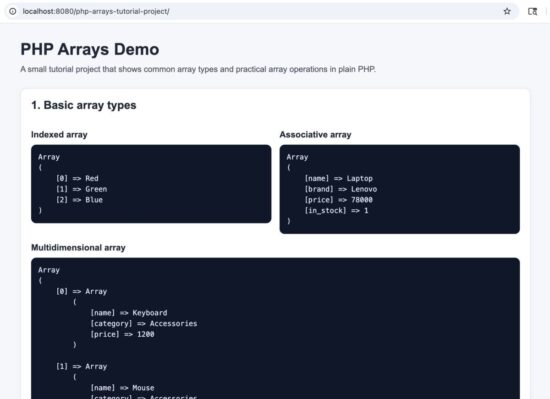
PHP arrays demo project output in local browser
In the next section, let us go deeper into a few important points that intermediate PHP developers should know while using arrays in real code.
Important Things to Know When Using PHP Arrays
Once you know the basics, a few practical details can save you from bugs and confusing output. These points are especially useful when arrays start getting bigger or more nested.
Array keys matter
PHP arrays can use both integer keys and string keys. This gives you flexibility, but it also means you should be careful when mixing styles in the same array.
<?php
$data = [
    0 => "First",
    "name" => "Vincy",
    1 => "Second"
];

print_r($data);
?>
This is valid PHP, but it can make the array harder to understand. In most cases, it is better to keep the structure consistent.
Use foreach for readable loops
When you want to read array values, foreach is usually the cleanest option.
<?php
$fruits = ["Apple", "Orange", "Mango"];

foreach ($fruits as $fruit) {
    echo $fruit . PHP_EOL;
}
?>
For associative arrays, you can read both the key and the value.
<?php
$user = [
    "name" => "Vincy",
    "role" => "Developer"
];

foreach ($user as $key => $value) {
    echo $key . ": " . $value . PHP_EOL;
}
?>
This is much easier to read than manual index handling in most situations.
Be careful with missing keys
A common mistake is trying to read a key that does not exist. That can cause warnings and unexpected behavior.
<?php
$user = [
    "name" => "Vincy"
];

echo $user["email"];
?>
It is safer to check first.
<?php
$user = [
    "name" => "Vincy"
];

if (array_key_exists("email", $user)) {
    echo $user["email"];
} else {
    echo "Email not found";
}
?>
If you are handling input data from forms or requests, this becomes even more important. For related input safety, you may also like to read Prevent SQL Injection in PHP.
Nested arrays need clearer access
With multidimensional arrays, it is easy to lose track of the path to the value you need. Keep the structure simple and use clear key names.
<?php
$employees = [
    [
        "name" => "John",
        "contact" => [
            "email" => "john@example.com",
            "phone" => "1234567890"
        ]
    ]
];

echo $employees[0]["contact"]["email"];
?>
As nesting grows, readability matters more. Deeply nested arrays are valid, but they are harder to debug.
print_r() is useful for learning and debugging
When you are not sure what an array contains, print_r() is one of the quickest ways to inspect it.
<?php
$settings = [
    "theme" => "light",
    "notifications" => true,
    "languages" => ["English", "Tamil"]
];

echo "<pre>";
print_r($settings);
echo "</pre>";
?>
For tutorials and debugging, this is simple and effective. In production code, you would usually log data instead of printing it directly.
Do not overuse extract()
Older PHP examples often show extract(). It converts array keys into variables.
<?php
$user = [
    "name" => "Vincy",
    "role" => "Developer"
];

extract($user);

echo $name;
echo $role;
?>
This works, but it can make code harder to follow because variables appear magically from array keys. In modern PHP code, direct array access is usually clearer and safer.
Prefer strict checks when possible
Functions like in_array() support strict mode. Use it when type differences matter.
<?php
$values = [1, 2, 3];

var_dump(in_array("1", $values));
var_dump(in_array("1", $values, true));
?>
The second check is stricter because it compares both value and type. This helps avoid subtle bugs.
These small habits make array code more reliable and easier to maintain. In the next section, we will look at common mistakes and simple fixes.
Common PHP Array Errors and Fixes
PHP arrays are easy to start with, but a few common mistakes show up again and again. Here are some practical fixes that help keep your code clean and predictable.
Undefined array key warning
This happens when you try to read a key that does not exist.
<?php
$user = [
    "name" => "Vincy"
];

echo $user["email"];
?>
A safer approach is to check the key first.
<?php
$user = [
    "name" => "Vincy"
];

echo array_key_exists("email", $user) ? $user["email"] : "Email not available";
?>
Mixing array types in one structure
PHP allows numeric and string keys in the same array, but that does not always mean it is a good idea.
<?php
$data = [
    0 => "Apple",
    "name" => "Mango",
    1 => "Orange"
];

print_r($data);
?>
This can be confusing to read and maintain. A better approach is to keep the structure consistent.
Forgetting that some functions preserve keys
Functions like array_intersect() and array_diff() keep the original keys. That can surprise you if you expect a clean sequential array.
<?php
$listA = ["PHP", "MySQL", "JavaScript"];
$listB = ["PHP", "JavaScript"];

$result = array_diff($listA, $listB);
print_r($result);
?>
The result may look like it has skipped indexes. If you want fresh numeric keys, wrap it with array_values().
<?php
$listA = ["PHP", "MySQL", "JavaScript"];
$listB = ["PHP", "JavaScript"];

$result = array_values(array_diff($listA, $listB));
print_r($result);
?>
Using loose comparisons by mistake
Some array checks can behave differently when types are not matched carefully.
<?php
$values = [1, 2, 3];

var_dump(in_array("1", $values));
var_dump(in_array("1", $values, true));
?>
The first check may return true because it uses loose comparison. The second one is stricter and safer.
Confusing print_r() output with actual display output
print_r() is useful for debugging, but it is not meant for final user-facing output.
<?php
$fruits = ["Apple", "Orange", "Mango"];
print_r($fruits);
?>
For cleaner display in HTML pages, loop through the array and output only what the user needs to see.
<?php
$fruits = ["Apple", "Orange", "Mango"];
?>
<ul>
    <?php foreach ($fruits as $fruit): ?>
        <li><?= htmlspecialchars($fruit, ENT_QUOTES, 'UTF-8') ?></li>
    <?php endforeach; ?>
</ul>
Using extract() in ways that reduce clarity
extract() may look convenient, but it can make code harder to understand because variables appear without a clear source.
<?php
$user = [
    "name" => "Vincy",
    "role" => "Developer"
];

extract($user);

echo $name;
?>
Direct array access is usually clearer.
<?php
$user = [
    "name" => "Vincy",
    "role" => "Developer"
];

echo $user["name"];
?>
Security Considerations When Working with Arrays
Arrays themselves are not a security risk. The risk comes from what the array contains and how you use those values.
- Do not trust data just because it is inside an array. Request data, form fields, cookies, and decoded JSON should still be validated.
- Escape output before printing array values into HTML. This helps prevent XSS issues.
- Check keys before reading them when handling user input.
- Use strict comparisons where type matters.
- Avoid dumping sensitive arrays directly on production pages, especially if they contain tokens, passwords, or private user data.
<?php
$postData = [
    "name" => $_POST["name"] ?? ""
];
?>
<p><?= htmlspecialchars($postData["name"], ENT_QUOTES, 'UTF-8') ?></p>
Even for a basic topic like arrays, this habit matters because arrays are often the structure that carries user input through your application.
In the next section, I will cover a short developer FAQ with practical questions that readers often have while learning PHP arrays.
Developer FAQ
What is the difference between indexed and associative arrays in PHP?
An indexed array uses numeric keys like 0, 1, and 2. An associative array uses named keys like name, email, and role. Indexed arrays are better for ordered lists. Associative arrays are better when each value needs a meaningful label.
Can a PHP array contain different data types?
Yes. A PHP array can hold strings, integers, booleans, null values, and even other arrays in the same structure.
<?php
$data = [
    "name" => "Vincy",
    "age" => 32,
    "active" => true,
    "skills" => ["PHP", "MySQL"]
];

print_r($data);
?>
How do I loop through a PHP array?
The most common way is to use foreach. It works well for both indexed and associative arrays.
<?php
$skills = ["PHP", "MySQL", "JavaScript"];

foreach ($skills as $skill) {
    echo $skill . PHP_EOL;
}
?>
How do I print a PHP array for debugging?
You can use print_r() or var_dump(). For quick learning and debugging, print_r() is usually easier to read.
<?php
$user = [
    "name" => "Vincy",
    "role" => "Developer"
];

echo "<pre>";
print_r($user);
echo "</pre>";
?>
How do I convert a string into an array in PHP?
Use explode(). It splits a string into an array based on a separator.
<?php
$tags = "php,mysql,javascript";
$tagArray = explode(",", $tags);

print_r($tagArray);
?>
How do I convert an array into a string in PHP?
Use implode(). It joins array values into a single string.
<?php
$tags = ["php", "mysql", "javascript"];
echo implode(", ", $tags);
?>
How do I check whether a value exists in a PHP array?
Use in_array(). When type matters, use strict mode by passing true as the third argument.
<?php
$roles = ["Admin", "Editor", "Author"];

if (in_array("Editor", $roles, true)) {
    echo "Value found";
}
?>
How do I check whether a key exists in a PHP array?
Use array_key_exists(). This is especially useful for associative arrays.
<?php
$user = [
    "name" => "Vincy",
    "email" => "vincy@example.com"
];

if (array_key_exists("email", $user)) {
    echo $user["email"];
}
?>
Should I use extract() with arrays?
It is better to avoid it in most cases. It works, but it can make your code harder to read and maintain. Direct array access is usually clearer.
Are PHP arrays used when working with JSON?
Yes. When you decode JSON into associative form, you will often work with nested PHP arrays. That is why arrays are important in API handling and modern PHP applications. If you want to go deeper into that part, read PHP JSON Encode and Decode with json_encode() and json_decode().
In the next section, I will wrap up the tutorial and add the source code download section.
Conclusion
PHP arrays are simple to start with, but they are powerful enough to handle many real development tasks. Once you understand indexed arrays, associative arrays, and multidimensional arrays, a large part of everyday PHP code becomes easier to read.
We also looked at useful built-in functions like count(), implode(), explode(), array_intersect(), array_diff(), array_keys(), array_values(), and in_array(). These are the functions you will keep using in practical work.
If you are learning PHP seriously, do not just read the examples. Run them, change the values, try nested arrays, and see how the output changes. That is the fastest way to get comfortable with arrays.
Download the Source Code
You can download the complete demo project used in this tutorial and run it locally.
Download the PHP arrays demo project
The zip includes:
- A ready-to-run PHP example project
- Clear examples for indexed, associative, and multidimensional arrays
- Common array functions in one simple demo
- A README file with setup instructions
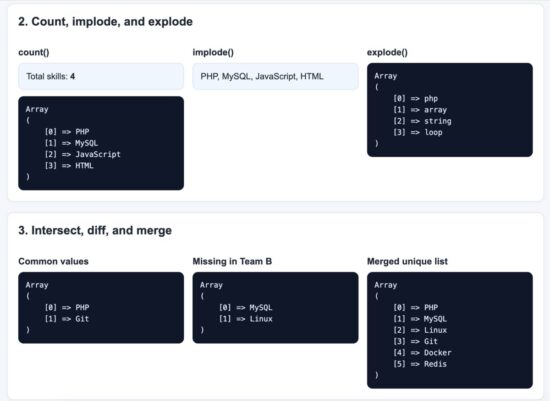
PHP array functions example output in browser
This makes a good starting point if you want to experiment further and build confidence with PHP arrays in real code.

I am learning PHP for work.
And starting with PHP 7 I see there is a renaissance of respect for the language.
But the logo for PHP is embarrasing (the oval).
If the favicon from your website were the logo for PHP I would be more proud to learn the language! Including the orange color.
Hi Evan,
It is a persona taste :-)
Best wishes for you to learn PHP.
Hi Vincy,
thank you for the wonderful article.
Welcome Akshay