This tutorial shows how to create a simple PHP poll script with MySQL and AJAX. The user can choose one option, submit the vote, and see the updated result without reloading the page.
The example uses PHP sessions to identify a visitor. It stores only one vote per visitor for the same poll. If the visitor votes again, the old vote is updated instead of adding a duplicate vote.
This is useful for small polls, feedback widgets, article voting, and simple opinion surveys.
View Demo
Quick answer
A PHP poll script needs three main parts:
- A MySQL table to store the poll question, options, and votes.
- A PHP page to display the poll and current result.
- An AJAX request to save the vote and refresh the result without page reload.
In this example, PHP uses MySQLi prepared statements to save the vote safely. JavaScript sends the selected option to PHP using the Fetch API.
About this PHP poll example
This example creates one active poll with four choices. The visitor selects an answer and clicks the vote button. The vote is saved in MySQL, and the result is shown as a percentage bar.
The project uses a small file structure to keep the code easy to read.
- index.php displays the poll form and result area.
- vote.php receives the AJAX vote request and saves it.
- Poll.php contains the database logic.
- db.php creates the MySQL connection.
- assets/poll.js sends the vote request and updates the result.
- assets/style.css adds simple styling for the poll box and result bars.
The database has separate tables for polls, poll options, and votes. This keeps the design flexible if you want to add more polls later.
For a basic PHP form example without AJAX, see this PHP contact form tutorial.
Database schema
Create the database and tables using the SQL below. This structure allows one poll with multiple options and stores each user vote.
CREATE DATABASE poll_db;

USE poll_db;

CREATE TABLE polls (
    id INT AUTO_INCREMENT PRIMARY KEY,
    question VARCHAR(255) NOT NULL
);

CREATE TABLE poll_options (
    id INT AUTO_INCREMENT PRIMARY KEY,
    poll_id INT NOT NULL,
    option_text VARCHAR(255) NOT NULL,
    votes INT DEFAULT 0,
    FOREIGN KEY (poll_id) REFERENCES polls(id) ON DELETE CASCADE
);

CREATE TABLE poll_votes (
    id INT AUTO_INCREMENT PRIMARY KEY,
    poll_id INT NOT NULL,
    option_id INT NOT NULL,
    session_id VARCHAR(255) NOT NULL,
    voted_at TIMESTAMP DEFAULT CURRENT_TIMESTAMP
);
Insert a sample poll:
INSERT INTO polls (question) VALUES ('What is your favorite programming language?');

INSERT INTO poll_options (poll_id, option_text) VALUES
(1, 'PHP'),
(1, 'JavaScript'),
(1, 'Python'),
(1, 'Java');
This setup keeps votes count inside the poll_options table for fast reading. The poll_votes table is used to track user sessions and prevent duplicate voting.
Database connection (db.php)
Create a database connection using MySQLi. This example uses simple configuration values. Update them based on your local setup.
<?php
$host = "localhost";
$user = "root";
$password = "";
$database = "poll_db";

$conn = new mysqli($host, $user, $password, $database);

if ($conn->connect_error) {
    die("Connection failed: " . $conn->connect_error);
}
?>
This file is included wherever database access is needed.
Poll logic class (Poll.php)
This class handles fetching the poll, saving votes, and calculating results.
<?php
class Poll {
    private $conn;

    public function __construct($db) {
        $this->conn = $db;
    }

    public function getPoll($pollId) {
        $stmt = $this->conn->prepare("SELECT * FROM polls WHERE id = ?");
        $stmt->bind_param("i", $pollId);
        $stmt->execute();
        return $stmt->get_result()->fetch_assoc();
    }

    public function getOptions($pollId) {
        $stmt = $this->conn->prepare("SELECT * FROM poll_options WHERE poll_id = ?");
        $stmt->bind_param("i", $pollId);
        $stmt->execute();
        return $stmt->get_result();
    }

    public function hasVoted($pollId, $sessionId) {
        $stmt = $this->conn->prepare("SELECT id FROM poll_votes WHERE poll_id = ? AND session_id = ?");
        $stmt->bind_param("is", $pollId, $sessionId);
        $stmt->execute();
        return $stmt->get_result()->num_rows > 0;
    }

    public function vote($pollId, $optionId, $sessionId) {
        if ($this->hasVoted($pollId, $sessionId)) {
            return false;
        }

        $stmt = $this->conn->prepare("INSERT INTO poll_votes (poll_id, option_id, session_id) VALUES (?, ?, ?)");
        $stmt->bind_param("iis", $pollId, $optionId, $sessionId);
        $stmt->execute();

        $stmt = $this->conn->prepare("UPDATE poll_options SET votes = votes + 1 WHERE id = ?");
        $stmt->bind_param("i", $optionId);
        $stmt->execute();

        return true;
    }

    public function getResults($pollId) {
        $options = $this->getOptions($pollId);

        $totalVotes = 0;
        $data = [];

        while ($row = $options->fetch_assoc()) {
            $totalVotes += $row['votes'];
            $data[] = $row;
        }

        foreach ($data as &$row) {
            $row['percentage'] = $totalVotes > 0
                ? round(($row['votes'] / $totalVotes) * 100, 2)
                : 0;
        }

        return $data;
    }
}
?>
This class uses prepared statements to prevent SQL injection and keeps the logic clean and reusable.
Frontend UI (index.php)
This file displays the poll question and options. It also shows the result after voting.
When the user submits the vote, JavaScript sends the selected option to vote.php and updates the result without refreshing the page.
<?php
session_start();
require_once "db.php";
require_once "Poll.php";

$poll = new Poll($conn);
$pollId = 1;

$pollData = $poll->getPoll($pollId);
$options = $poll->getOptions($pollId);
?>

<!DOCTYPE html>
<html>
<head>
    <title>PHP Poll Script</title>
    <link rel="stylesheet" href="assets/style.css">
</head>
<body>

<div class="poll-box">
    <h3><?php echo htmlspecialchars($pollData['question']); ?></h3>

    <form id="pollForm">
        <?php while ($row = $options->fetch_assoc()) { ?>
            <label>
                <input type="radio" name="option" value="<?php echo $row['id']; ?>">
                <?php echo htmlspecialchars($row['option_text']); ?>
            </label><br>
        <?php } ?>

        <button type="submit">Vote</button>
    </form>

    <div id="result"></div>
</div>

<script src="assets/poll.js"></script>

</body>
</html>
This keeps the HTML simple and focuses on functionality. The result area is updated dynamically after voting.
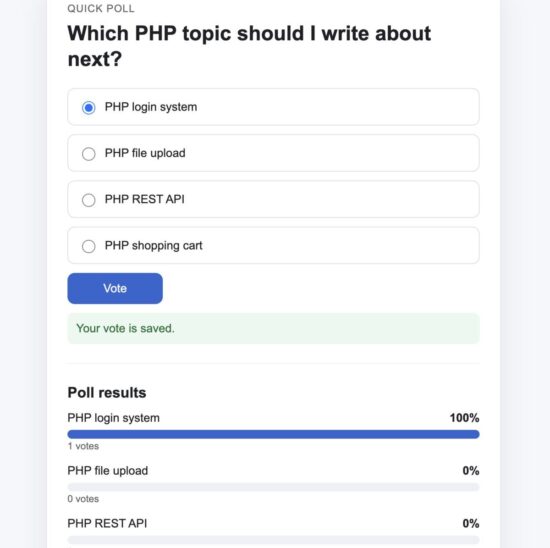
Poll form with selectable options before voting
What to capture: Open index.php in the browser and take a screenshot showing the poll question with radio button options and the vote button.
Handle vote request (vote.php)
This file receives the AJAX request, validates the input, saves the vote, and returns the updated results as JSON.
<?php
session_start();
header("Content-Type: application/json");

require_once "db.php";
require_once "Poll.php";

$poll = new Poll($conn);

$pollId = 1;
$sessionId = session_id();

if (!isset($_POST['option'])) {
    echo json_encode(["status" => "error", "message" => "No option selected"]);
    exit;
}

$optionId = (int) $_POST['option'];

$success = $poll->vote($pollId, $optionId, $sessionId);

if (!$success) {
    echo json_encode([
        "status" => "error",
        "message" => "You have already voted"
    ]);
    exit;
}

$results = $poll->getResults($pollId);

echo json_encode([
    "status" => "success",
    "data" => $results
]);
This script ensures:
- The user selects a valid option
- Only one vote per session is allowed
- Updated results are returned immediately
AJAX logic (assets/poll.js)
This JavaScript sends the selected option to the server and updates the result section.
document.getElementById("pollForm").addEventListener("submit", function(e) {
    e.preventDefault();

    const selected = document.querySelector('input[name="option"]:checked');

    if (!selected) {
        alert("Please select an option");
        return;
    }

    const formData = new FormData();
    formData.append("option", selected.value);

    fetch("vote.php", {
        method: "POST",
        body: formData
    })
    .then(response => response.json())
    .then(data => {
        if (data.status === "error") {
            alert(data.message);
            return;
        }

        let html = "<h4>Results</h4>";

        data.data.forEach(item => {
            html += `
                <div class="result-item">
                    <span>${item.option_text} (${item.votes} votes)</span>
                    <div class="bar">
                        <div class="fill" style="width:${item.percentage}%;"></div>
                    </div>
                </div>
            `;
        });

        document.getElementById("result").innerHTML = html;
    });
});
This approach uses the Fetch API to keep the page responsive and avoids a full reload.
Basic styling (assets/style.css)
This CSS keeps the poll clean and readable. It also highlights the result bars clearly.
body {
    font-family: Arial, sans-serif;
    background: #f5f5f5;
}

.poll-box {
    width: 400px;
    margin: 40px auto;
    background: #fff;
    padding: 20px;
    border: 1px solid #ddd;
}

.poll-box h3 {
    margin-bottom: 15px;
}

.poll-box label {
    display: block;
    margin-bottom: 8px;
}

button {
    margin-top: 10px;
    padding: 8px 12px;
    cursor: pointer;
}

.result-item {
    margin-top: 10px;
}

.bar {
    background: #eee;
    height: 10px;
    margin-top: 5px;
}

.fill {
    background: #4caf50;
    height: 10px;
}
This keeps the UI simple and focuses on clarity rather than design.
How it works
- The poll question and options are loaded from the database.
- The user selects an option and clicks the vote button.
- JavaScript sends the selected option to
vote.php. - PHP checks if the user has already voted using the session ID.
- If not voted, it inserts the vote and updates the count.
- The updated results are returned as JSON.
- The frontend displays the result using percentage bars.
This simple flow makes the poll fast and user-friendly.
For handling user sessions securely in PHP, refer to the official PHP session documentation at PHP Session Handling.
Security considerations
This example is simple, but a poll system can be abused if not protected. Below are important points to keep in mind.
- Prevent duplicate votes
This demo uses PHP sessions. It works for basic use, but users can clear cookies and vote again. For better control, store IP address or require login. - Validate input
Always cast option IDs to integers. Never trust user input directly. - Use prepared statements
This example uses MySQLi prepared queries to prevent SQL injection. - Rate limiting
Add a delay or limit repeated requests from the same user to prevent spam voting. - CSRF protection
For production, add a CSRF token in the form and validate it invote.php.
For a deeper understanding of web security basics, you can refer to the
OWASP Top 10 security risks.
Common errors and fixes
- Vote not saving
Check your database connection indb.php. Make sure the database name and credentials are correct. - Always shows “already voted”
This happens if the session is not working. Ensuresession_start()is called at the top of your PHP files. - No result displayed
Check the browser console for JavaScript errors. Also verify thatvote.phpreturns valid JSON. - Percentage always zero
This happens when there are no votes yet. The code already handles this, but confirm your database values.
Developer FAQ
Can I allow multiple polls?
Yes. Add more records to the polls table and pass the poll ID dynamically instead of hardcoding it.
Can I allow users to change their vote?
Yes. Instead of blocking duplicate votes, update the existing vote record and adjust the counts.
Can I use cookies instead of sessions?
Yes. Cookies can also track users, but they are easier to bypass. Sessions are slightly more reliable for simple cases.
Can I show results before voting?
Yes. You can call the getResults() method on page load and display the results immediately.
Download source code
You can download the complete working project from the link below. It includes all files, database schema, and setup steps.
How to run locally
- Extract the zip file into your web server folder (for example,
htdocsif you use XAMPP). - Create a MySQL database named
poll_db. - Import the SQL schema provided in the article.
- Update database credentials in
db.php. - Open your browser and run
http://localhost/php-poll-script/index.php.
You should now see the poll form. Select an option and submit your vote to see the live result.
Conclusion
You learned how to build a simple PHP poll script with MySQL and AJAX. This example keeps the logic clean and easy to extend.
You can improve it further by adding user login, multiple polls, admin panel, or real-time updates.
This type of small component is useful in blogs, product pages, and feedback systems.

I want to add polls to my political website. Can I use this?
Yes. you can use this. It’s free for all
It’s a great script. But how will $_SESSION[“member_id”] = 1 work on the site; Someone has already voted and 1 is already available. Will the others not be able to vote anymore?
The $_SESSION[“member_id”] = 1 is just for demo purposes. In a real setup, it should be a unique value per user (like a logged-in user ID or session_id()). Otherwise, yes, it would block others from voting.