Why File Uploads Are a High Risk Attack Surface
File uploads are one of the most common features in web applications. They are also one of the most exploited.
In PHP 8, securely handling file uploads requires far more than calling move_uploaded_file(). A production ready implementation must validate MIME types using finfo, restrict file size, whitelist allowed formats, generate cryptographically safe file names, store files outside the public directory, and enforce server level execution restrictions.
That is the technical summary. But the real story is deeper.
File uploads look harmless.
A resume upload field.
A profile picture form.
An assignment submission box in an LMS.
A document attachment in a billing system.
Years ago, a small business site was compromised. The attacker did not brute force passwords. They did not exploit SQL injection. They uploaded a file named invoice.pdf.php. The system trusted the extension, saved it inside the public folder, and allowed the web server to execute it.
Within minutes, the server was running malicious scripts.
The feature designed to collect documents became the entry point.
The problem was not PHP.
No programming language is insecure by default. Insecure assumptions create insecure systems.
Developers often:
- Trust file extensions
- Trust
$_FILES['type'] - Store uploads inside public directories
- Skip server hardening
- Focus on making it work instead of making it safe
File upload security is not about one validation check. It is about layered defense. Just like preventing SQL injection in PHP, file uploads require strict validation.
In this guide, we will design a production ready, security first file upload implementation in PHP 8. We will examine the attack surface, define strict validation rules, isolate storage, apply server level hardening, and build a clean, minimal uploader class suitable for real world backend systems.
Because in backend engineering, the most dangerous vulnerabilities are often hidden behind the simplest features. If you are looking for a basic file upload example, see this simple PHP file upload tutorial.
How PHP Handles File Uploads Internally
Before securing file uploads, we must understand how PHP handles them.
When a user submits a form with enctype="multipart/form-data", the browser sends the file to the server along with the other form fields.
PHP does not immediately store the file in your project folder.
Instead, it saves the file in a temporary directory on the server. This location is defined by the upload_tmp_dir setting in php.ini. If not defined, PHP uses the system default temp folder.
After the upload is complete, PHP creates an entry inside the $_FILES superglobal array.
A typical $_FILES structure looks like this:
Array
(
    [document] => Array
        (
            [name] => resume.pdf
            [type] => application/pdf
            [tmp_name] => /tmp/phpYzdqkD
            [error] => 0
            [size] => 124532
        )
)
Each key has a meaning:
name→ Original file name from the user. Do not trust this.type→ MIME type reported by the browser. Do not trust this.tmp_name→ Temporary file path created by PHP.error→ Upload status code. Must be checked.size→ File size in bytes. Should be validated.
It is important to understand this clearly.
The browser controls name and type. The user can manipulate them.
The original name and browser-reported type are user-controlled and should not be trusted. PHP creates the temporary upload path in tmp_name and provides the upload status and file size.
To permanently store the file, you must call:
move_uploaded_file($file['tmp_name'], $destination);You can read more in the official PHP documentation for move_uploaded_file().
This function moves the file from the temporary directory to your chosen location.
If you skip validation and directly move the file, you are trusting user input. That is where problems start.
There are also PHP configuration limits that affect uploads:
upload_max_filesizepost_max_sizemax_file_uploads
These directives are configured in the php.ini file. If you are unsure where the file is located, how to edit it, or how these settings affect your application, read our PHP php.ini File: Location, Important Settings, and Safe Configuration guide.
These limits are helpful, but they are not security controls. They only restrict size and quantity.
Understanding this upload lifecycle is important. Security mistakes usually happen between reading $_FILES and calling move_uploaded_file().
File upload forms should also be protected against CSRF attacks.
In the next section, we will see the common vulnerabilities that arise during this phase.
Common File Upload Vulnerabilities
File uploads fail not because of one mistake.
They fail because of small assumptions.
Here are the most common problems.
1. Trusting the File Extension
Many systems check only the extension.
Example:
resume.pdf
image.jpg
Looks safe.
But an attacker can upload:
shell.php
shell.php.jpg
invoice.pdf.php
If your system only checks .jpg or .pdf, it can be bypassed.
Extensions are easy to fake. They are just text.
Never trust extension alone.
2. Trusting $_FILES[‘type’]
Some developers check:
if ($_FILES['file']['type'] === 'image/jpeg')This is not safe.
The browser sends this value. The user can change it.
PHP provides the finfo extension for detecting the real MIME type. You must detect MIME type on the server using finfo.
We will see that later.
3. Storing Files Inside Public Directory
This is very common.
Example:
/var/www/html/uploads/
If someone uploads malicious.php and your server allows execution, the attacker can run:
https://example.com/uploads/malicious.php
Now your server runs attacker code. This is how many small sites get compromised. Uploads should not be executable.
4. No File Size Limit
If you do not restrict size:
Someone can upload 2GB file.
- Disk space gets full.
- Server becomes slow.
- Application crashes.
Size must be restricted:
- In php.ini
- In application logic
Both.
5. Path Traversal
If you build file paths like this:
$destination = 'uploads/' . $_FILES['file']['name'];An attacker may try:
../../config.php
This can overwrite important files. Always control the final file name yourself. Never use user file name directly.
6. Race Conditions
If you validate first and then move later, sometimes files can be swapped or replaced.
This is rare but possible in poorly designed systems. Validation and moving must be done carefully and quickly.
7. Allowing Dangerous File Types
Some file types should never be allowed:
- .php
- .phtml
- .phar
- .exe
- .sh
If your application does not need them, block them completely. Whitelist approach is safer than blacklist. Allow only what is required.
File upload security is not one rule. It is many small rules working together. In the next section, we will build a clear set of security principles.
Core Security Principles for Safe File Uploads
Security is not one check. It is layers.
We will apply rules in order. Do not skip steps.
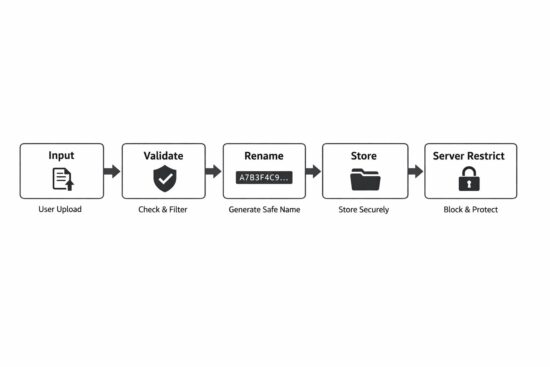
1. Always Check Upload Errors First
Before anything, check the error code.
if ($file['error'] !== UPLOAD_ERR_OK) {
    throw new RuntimeException('Upload failed.');
}
If there is an error:
- File may be incomplete
- File may not exist
- Size may exceed server limit
Do not continue if error is not zero.
2. Restrict File Size in Application Code
Do not depend only on php.ini.
Add your own limit.
$maxSize = 2 * 1024 * 1024; // 2MB

if ($file['size'] > $maxSize) {
    throw new RuntimeException('File too large.');
}
Even if server allows 10MB, your app may allow only 2MB. Control it at application level.
3. Detect MIME Type Using finfo
Do not trust $_FILES['type']. Use server side detection.
$finfo = new finfo(FILEINFO_MIME_TYPE);
$mime  = $finfo->file($file['tmp_name']);
This inspects the file content to determine its likely MIME type. It is more reliable than trusting the browser-provided MIME type.
4. Use a Whitelist of Allowed Types
Never allow everything except few types. Allow only what is required.
Example:
$allowed = [
    'image/jpeg'      => 'jpg',
    'image/png'       => 'png',
    'application/pdf' => 'pdf',
];
if (!array_key_exists($mime, $allowed)) {
    throw new RuntimeException('Invalid file type.');
}
Whitelist is safer. Blacklist can miss something.
5. Generate a Safe Random File Name
Never use original file name. User can manipulate it. Generate your own name.
$filename = bin2hex(random_bytes(16)) . '.' . $allowed[$mime];
This generates a cryptographically secure random filename while preserving the extension associated with the validated MIME type. It avoids trusting the original filename and greatly reduces the risk of filename collisions, path manipulation, and unsafe characters.
6. Store Files Outside Public Web Root
Do not store here:
/var/www/html/uploads
Better:
/var/www/storage/uploads
Files should not be directly accessible. If you need to serve them, use a controlled download script.
7. Use move_uploaded_file()
Use move_uploaded_file() when moving a newly uploaded file from PHP’s temporary directory. Unlike rename(), it verifies that the source was uploaded through PHP’s HTTP POST upload mechanism.
move_uploaded_file($file['tmp_name'], $destination);
This function verifies that the file came from PHP upload. Safer.
8. Disable Script Execution in Upload Folder
Even if you validate, add server protection. Disable execution using:
.htaccessfor Apachelocationrules for Nginx
Defense in depth.
These principles are simple. But many systems skip one or two. That is enough for compromise.
In the next section, we will combine everything and build a minimal SecureUploader class in PHP 8. Clean. Small. Production ready.
The OWASP File Upload Cheat Sheet also provides useful security recommendations.
Building a Minimal SecureUploader Class in PHP 8
Now we combine everything. The goal is simple:
- Validate
- Restrict
- Rename
- Store safely
No framework. No heavy abstraction. Just clear PHP 8 code.
<?php

declare(strict_types=1);

final class SecureUploader
{
    private string $uploadDir;
    private int $maxSize;
    private array $allowedMimeTypes;

    public function __construct(string $uploadDir, int $maxSize, array $allowedMimeTypes)
    {
        $this->uploadDir = rtrim($uploadDir, '/');
        $this->maxSize = $maxSize;
        $this->allowedMimeTypes = $allowedMimeTypes;
    }

    public function upload(array $file): string
    {
        $this->validateError($file);
        $this->validateSize($file);

        $mime = $this->detectMimeType($file['tmp_name']);
        $extension = $this->validateMime($mime);

        $filename = $this->generateFileName($extension);
        $destination = $this->uploadDir . '/' . $filename;

        if (!move_uploaded_file($file['tmp_name'], $destination)) {
            throw new RuntimeException('Failed to move uploaded file.');
        }

        return $filename;
    }

    private function validateError(array $file): void
    {
        if (!isset($file['error']) || $file['error'] !== UPLOAD_ERR_OK) {
            throw new RuntimeException('Upload error.');
        }
    }

    private function validateSize(array $file): void
    {
        if ($file['size'] > $this->maxSize) {
            throw new RuntimeException('File too large.');
        }
    }

    private function detectMimeType(string $tmpPath): string
    {
        $finfo = new finfo(FILEINFO_MIME_TYPE);
        $mime = $finfo->file($tmpPath);

        if ($mime === false) {
            throw new RuntimeException('Cannot detect MIME type.');
        }

        return $mime;
    }

    private function validateMime(string $mime): string
    {
        if (!array_key_exists($mime, $this->allowedMimeTypes)) {
            throw new RuntimeException('Invalid file type.');
        }

        return $this->allowedMimeTypes[$mime];
    }

    private function generateFileName(string $extension): string
    {
        return bin2hex(random_bytes(16)) . '.' . $extension;
    }
}
Example Usage
$uploader = new SecureUploader(
    __DIR__ . '/../storage/uploads',
    2 * 1024 * 1024,
    [
        'image/jpeg'      => 'jpg',
        'image/png'       => 'png',
        'application/pdf' => 'pdf',
    ]
);

$filename = $uploader->upload($_FILES['document']);
Why This Design Is Good
- Strict types enabled
- No global variables
- Clear separation of validation steps
- No original file name used
- No public directory storage
- No silent failure
Small class. Easy to maintain. Easy to test. You can extend later if needed.
Security should be simple. Complex security often fails.
Server-Level Hardening
Even if your PHP code is perfect, server configuration matters.
Defense should not depend on one layer only.
1. Apache Hardening (.htaccess)
If you use Apache and your uploads are inside a web-accessible folder, disable script execution.
Create a .htaccess file inside the upload directory:
php_flag engine off
Options -ExecCGI

<FilesMatch "\.(php|phtml|phar|php[0-9]*)$">
    Require all denied
</FilesMatch>

Options -Indexes -ExecCGI
This blocks access to common PHP script extensions and disables directory listing and CGI execution inside the upload directory. Apache configuration support can differ between hosting environments, so test the directives on your server.
2. Nginx Hardening
In Nginx, you usually configure this in your server block.
Example:
Block script execution:
location ~* ^/uploads/.*\.(php|phtml|phar)$ {
deny all;
}
This denies access to common PHP script extensions inside the upload directory.
3. Why This Matters
Many real attacks succeed because:
- Code validation failed once.
- Or developer made a mistake.
- Or a new file type was allowed accidentally.
Server-level restriction reduces damage. Even if application logic has a bug, server can stop execution. That is called defense in depth.
4. Best Practice
Best approach is:
- Store uploads outside public directory.
- If that is not possible, disable execution.
- Always use both application and server validation.
Never depend on one protection only.
Security is layers. Code layer. Server layer. Configuration layer.
Additional Safeguards for Production Systems
Basic validation is not enough for high traffic or sensitive systems. Here are extra protections you should consider.
1. Re-Encode Uploaded Images
If you allow images, do not store them directly. Attackers can hide malicious code inside image metadata.
Better approach:
- Open image using GD or Imagick
- Re-save it
- Discard original file
Example idea:
$image = imagecreatefromjpeg($tmpPath);
imagejpeg($image, $destination, 90);
imagedestroy($image);
Re-encoding rebuilds the image and usually removes metadata and unrelated data attached to the original file. This example is for JPEG images. PNG, WebP and other formats require their corresponding GD functions.
2. Virus Scanning
For document uploads like PDF or DOC files, consider scanning. You can use tools like ClamAV
Upload file.
Scan file.
If infected, reject it.
This is useful for:
- LMS platforms
- HR portals
- Customer document systems
3. Rate Limiting Uploads
If someone uploads 1000 files per minute, it can overload the system.
Add rate limits:
- Per user
- Per IP
- Per session
Even simple limits help.
4. Logging Upload Activity
Do not ignore uploads.
Log:
- User ID
- File name generated
- Timestamp
- IP address
If something goes wrong, logs help investigation. Security without logs is blind.
5. Limit Number of Files
If your form allows multiple files, control it. Do not allow unlimited uploads. Set clear limits.
6. Set Proper File Permissions
When storing files, ensure correct permissions.
Example:
- Files should not be executable
- Use minimal required permissions
Do not use full permissions like 777. Keep it restricted.
These safeguards are not complicated. But many systems skip them.
Security is habit. Not one time effort.
Secure File Upload Checklist
Use this checklist before deploying file upload to production.
Validation
- Check UPLOAD_ERR_OK before processing.
- Reject file if error code is not zero.
- Restrict file size in application code.
- Do not trust $_FILES[‘type’].
- Detect MIME type using finfo.
- Use whitelist of allowed MIME types only.
File Handling
- Never use original file name.
- Generate random file name using random_bytes.
- Store files outside public web root.
- Use move_uploaded_file() only.
- Use move_uploaded_file() for the initial upload move.
Server Configuration
- Disable script execution in upload folder.
- Block .php, .phtml, .phar in uploads.
- Set proper file permissions.
- Do not allow directory listing.
Production Safeguards
- Re-encode images before storing.
- Scan documents for malware if needed.
- Limit upload rate per user or IP.
- Log upload activity.
If your system follows all the above, risk is reduced significantly.
No system is 100 percent secure. But layered protection makes attacks much harder.
FAQ
Is move_uploaded_file() secure in PHP?
Yes, when used correctly. The function itself verifies that the file was uploaded through HTTP POST. But it does not validate file type, size, or safety. You must combine it with MIME validation, file size checks, and safe storage practices.
Is checking file extension enough for secure upload?
No. File extensions can be renamed easily. A file named image.jpg can actually contain PHP code. Always validate the real MIME type using finfo on the server.
Should uploaded files be stored inside the public folder?
It is not recommended. If stored inside a public directory, the file may become directly accessible through URL. Store files outside the web root when possible. If not possible, disable script execution in the upload folder.
What is the safest way to handle file uploads in PHP?
Use layered validation. Check upload errors. Restrict file size. Detect MIME type using finfo. Whitelist allowed types. Generate random file names. Store files outside the web root. Apply server-level restrictions.
Conclusion
File uploads look small. But they carry real risk. Many security problems do not come from advanced attacks. They come from simple assumptions. Trusting the file extension. Trusting the browser MIME type. Storing files inside a public folder. Skipping server restrictions. These small mistakes open the door.
Secure file upload is not about one function. It is about discipline. Check errors. Restrict size. Detect the real MIME type. Allow only required formats. Generate safe file names. Store files outside the web root. Disable execution at the server level. Each step is simple. Together, they make the system strong.
PHP is not insecure. Insecure design is. If you treat file uploads as an attack surface and not just a feature, your application becomes safer. Keep it simple. Keep it strict. Do not trust user input. That is enough.



Very nice and thorough explanations and clear code; however, one edit to suggest.
In the section titled “Core Security Principles for Safe File Uploads”, Step 5 is “Generate a Safe Random File Name”, but the code is listed as:
if (!array_key_exists($mime, $allowed)) {
throw new RuntimeException(‘Invalid file type.’);
}
This looks like a part of the Step 4 code and does not seem to actually do what is described.
Thanks for your wonderful tutorials.
Hi Keith,
Thank you very much for pointing this out. You are absolutely correct—the code under Step 5 was accidentally repeated from the MIME type validation in Step 4.
I have corrected it to generate a secure random filename using random_bytes().
I appreciate your careful reading and your kind words about the tutorials.