Your PHP application already knows useful things. It can find customers, check orders, read reports, and call APIs. The problem is that an AI agent cannot safely use any of that logic unless you give it a clear door to knock on.
An MCP server provides that door. MCP stands for Model Context Protocol. It gives AI agents a standard way to discover and call functions exposed by your application.
In this tutorial, we will build a framework-free PHP MCP server using the official PHP SDK. Our server will let an AI agent find a customer, retrieve recent orders, and read a store summary from MySQL.
The agent will not receive direct database access. That would be less like hiring an assistant and more like handing a stranger the office keys. Instead, it can use only the read-only tools that our PHP server deliberately exposes.
By the end, you will have a working project that communicates over STDIO and can be tested with MCP Inspector or connected to an MCP-compatible AI client.
Quick answer: What is a PHP MCP server?
A PHP MCP server is a PHP program that exposes selected application features to AI agents through the Model Context Protocol.
These features are published as MCP capabilities:
- Tools perform actions, such as finding a customer or retrieving recent orders.
- Resources provide readable data, such as a store summary or configuration.
- Prompts provide reusable instructions for common tasks.
For this project, the request flow looks like this:
- The AI agent receives a question from the user.
- The MCP client discovers the tools offered by our PHP server.
- The agent selects a suitable tool and supplies its arguments.
- PHP validates the arguments and runs a prepared MySQL query.
- The MCP server returns structured data to the agent.
- The agent uses that data to answer the user.
The AI model does not write SQL or connect directly to MySQL. Your PHP code remains in control of which operations are available and what data each operation returns.
What we will build
We will build a small MCP server for an online store. It uses plain PHP, the official MCP PHP SDK, and MySQLi. No application framework is required.
The server exposes these capabilities:
| Capability | Name | Purpose |
|---|---|---|
| Tool | get_customer |
Finds one customer by numeric ID |
| Tool | get_recent_orders |
Returns the newest orders for a customer |
| Resource | store://summary |
Provides read-only customer, order, and revenue totals |
The server uses STDIO transport. The MCP client starts the PHP script as a local process and communicates with it through standard input and output.
This approach is a good fit for local AI clients and coding agents. It also keeps the first project focused. We do not need a web server, public URL, or authentication layer just to understand the MCP flow.
Here is the project structure:
php-mcp-server/
├── config/
│   └── database.php
├── sql/
│   └── schema.sql
├── src/
│   ├── Database.php
│   ├── Environment.php
│   ├── StoreCapabilities.php
│   └── StoreRepository.php
├── tests/
│   └── smoke-test.php
├── .env.example
├── composer.json
├── composer.lock
├── mcp-client-config.example.json
├── README.md
└── server.php
The database and repository classes handle data access. The capability class contains the operations exposed through MCP. The server.php file connects those parts to the official SDK and starts the server.
Requirements and SDK installation
Before starting, make sure your local system has:
- PHP 8.1 or newer
- Composer
- MySQL 8 or MariaDB 10.5 or newer
- The PHP
mysqli,fileinfo, andjsonextensions
You can check the installed PHP version with this command:
php -vCreate the project directory and move into it:
mkdir php-mcp-server
cd php-mcp-server
Install the official MCP PHP SDK with Composer:
composer require mcp/sdk:^0.7The SDK is framework-agnostic. You can use it in a plain PHP project or connect it to an existing application.
At the time of writing, the official SDK is still below version 1.0. Its API may change between minor releases. Keep the generated composer.lock file in your project so that deployments and tutorial tests use the same dependency versions.
Add PSR-4 autoloading for our application classes in composer.json:
{
    "name": "phppot/php-mcp-server-demo",
    "description": "A framework-free PHP MCP server backed by MySQL.",
    "type": "project",
    "license": "MIT",
    "require": {
        "php": "^8.1",
        "ext-mysqli": "*",
        "mcp/sdk": "^0.7"
    },
    "autoload": {
        "psr-4": {
            "Phppot\\McpDemo\\": "src/"
        }
    },
    "config": {
        "allow-plugins": {
            "php-http/discovery": false,
            "phpdocumentor/shim": true
        },
        "sort-packages": true
    }
}
After saving the file, refresh Composer’s autoloader:
composer dump-autoloadCreate the MySQL database
Our MCP tools need some useful data to retrieve. Create a file named sql/schema.sql and add the following schema and sample records.
CREATE DATABASE IF NOT EXISTS php_mcp_demo
    CHARACTER SET utf8mb4
    COLLATE utf8mb4_unicode_ci;

USE php_mcp_demo;

DROP TABLE IF EXISTS orders;
DROP TABLE IF EXISTS customers;

CREATE TABLE customers (
    id INT UNSIGNED NOT NULL AUTO_INCREMENT,
    name VARCHAR(100) NOT NULL,
    email VARCHAR(190) NOT NULL,
    city VARCHAR(100) NOT NULL,
    PRIMARY KEY (id),
    UNIQUE KEY uq_customers_email (email)
) ENGINE=InnoDB;

CREATE TABLE orders (
    id INT UNSIGNED NOT NULL AUTO_INCREMENT,
    customer_id INT UNSIGNED NOT NULL,
    order_number VARCHAR(30) NOT NULL,
    status ENUM('pending', 'paid', 'shipped', 'cancelled') NOT NULL,
    total DECIMAL(10, 2) UNSIGNED NOT NULL,
    ordered_at DATETIME NOT NULL,
    PRIMARY KEY (id),
    UNIQUE KEY uq_orders_order_number (order_number),
    KEY idx_orders_customer_date (customer_id, ordered_at),
    CONSTRAINT fk_orders_customer
        FOREIGN KEY (customer_id) REFERENCES customers (id)
        ON UPDATE CASCADE
        ON DELETE RESTRICT
) ENGINE=InnoDB;

INSERT INTO customers (name, email, city) VALUES
    ('Anita Rao', 'anita@example.com', 'Chennai'),
    ('Marcus Lee', 'marcus@example.com', 'Singapore'),
    ('Sofia Martin', 'sofia@example.com', 'Madrid');

INSERT INTO orders (customer_id, order_number, status, total, ordered_at) VALUES
    (1, 'ORD-1001', 'shipped', 79.90, '2026-07-04 10:30:00'),
    (1, 'ORD-1004', 'paid', 149.50, '2026-08-02 14:15:00'),
    (1, 'ORD-1006', 'pending', 32.00, '2026-08-09 09:20:00'),
    (2, 'ORD-1002', 'shipped', 220.00, '2026-07-18 16:45:00'),
    (2, 'ORD-1005', 'cancelled', 45.75, '2026-08-07 11:05:00'),
    (3, 'ORD-1003', 'paid', 99.99, '2026-07-29 08:10:00');
Import the file from the project directory:
mysql -u root -p < sql/schema.sqlThe compound index on customer_id and ordered_at supports the query used by our recent-orders tool. MySQL can locate one customer’s orders and return the newest records without scanning the complete table.
The demo includes fixed dates so everyone receives predictable results. In a real application, these records would already exist in your database.
Configure the database connection
Database credentials should not be hard-coded in the server file. Create a file named .env.example in the project root:
DB_HOST=127.0.0.1
DB_PORT=3306
DB_NAME=php_mcp_demo
DB_USER=root
DB_PASSWORD=
Copy it to .env and enter the credentials for your local database:
cp .env.example .envDo not commit the real .env file. Add it to .gitignore:
/vendor/
/.env
/.DS_Store
Load the environment variables
Create src/Environment.php. This small loader reads the local .env file without adding another package.
<?php

declare(strict_types=1);

namespace Phppot\McpDemo;

final class Environment
{
    public static function load(string $file): void
    {
        if (!is_file($file) || !is_readable($file)) {
            return;
        }

        $lines = file($file, FILE_IGNORE_NEW_LINES | FILE_SKIP_EMPTY_LINES);

        if ($lines === false) {
            throw new \RuntimeException('Unable to read the environment file.');
        }

        foreach ($lines as $line) {
            $line = trim($line);

            if (
                $line === ''
                || str_starts_with($line, '#')
                || !str_contains($line, '=')
            ) {
                continue;
            }

            [$name, $value] = array_map(
                'trim',
                explode('=', $line, 2)
            );

            if (!preg_match('/^[A-Z_][A-Z0-9_]*$/', $name)) {
                continue;
            }

            if (strlen($value) >= 2) {
                $first = $value[0];
                $last = $value[strlen($value) - 1];

                if (
                    ($first === '"' && $last === '"')
                    || ($first === "'" && $last === "'")
                ) {
                    $value = substr($value, 1, -1);
                }
            }

            if (getenv($name) === false) {
                putenv($name . '=' . $value);
            }
        }
    }
}
Build the MySQLi connection
Create config/database.php to collect the database settings:
<?php

declare(strict_types=1);

return [
    'host' => getenv('DB_HOST') ?: '127.0.0.1',
    'port' => (int) (getenv('DB_PORT') ?: 3306),
    'name' => getenv('DB_NAME') ?: 'php_mcp_demo',
    'user' => getenv('DB_USER') ?: 'root',
    'password' => getenv('DB_PASSWORD') ?: '',
];
Then create src/Database.php:
<?php

declare(strict_types=1);

namespace Phppot\McpDemo;

use mysqli;
use mysqli_sql_exception;

final class Database
{
    /**
     * @param array{
     *     host: string,
     *     port: int,
     *     name: string,
     *     user: string,
     *     password: string
     * } $config
     */
    public static function connect(array $config): mysqli
    {
        mysqli_report(MYSQLI_REPORT_ERROR | MYSQLI_REPORT_STRICT);

        try {
            $database = new mysqli(
                $config['host'],
                $config['user'],
                $config['password'],
                $config['name'],
                $config['port']
            );

            $database->set_charset('utf8mb4');

            return $database;
        } catch (mysqli_sql_exception $exception) {
            throw new \RuntimeException(
                'Database connection failed. Check the values in .env.',
                previous: $exception
            );
        }
    }
}
The public error message does not include the database host, username, password, or raw MySQL error. The original exception remains available for private logging, but sensitive connection details are not sent to the MCP client.
Create the repository for safe MySQL queries
The repository is the only class that talks directly to MySQL. Keeping SQL out of the MCP tool methods makes the code easier to read, test, and reuse.
Create src/StoreRepository.php:
<?php

declare(strict_types=1);

namespace Phppot\McpDemo;

use mysqli;

final class StoreRepository
{
    public function __construct(
        private readonly mysqli $database
    ) {
    }

    /**
     * @return array{
     *     id: int,
     *     name: string,
     *     email: string,
     *     city: string
     * }|null
     */
    public function findCustomer(int $customerId): ?array
    {
        $statement = $this->database->prepare(
            'SELECT id, name, email, city
             FROM customers
             WHERE id = ?'
        );

        $statement->bind_param('i', $customerId);
        $statement->execute();

        $row = $statement->get_result()->fetch_assoc();
        $statement->close();

        if ($row === null) {
            return null;
        }

        return [
            'id' => (int) $row['id'],
            'name' => (string) $row['name'],
            'email' => (string) $row['email'],
            'city' => (string) $row['city'],
        ];
    }

    /**
     * @return list<array{
     *     id: int,
     *     order_number: string,
     *     status: string,
     *     total: float,
     *     ordered_at: string
     * }>
     */
    public function findRecentOrders(
        int $customerId,
        int $limit
    ): array {
        $statement = $this->database->prepare(
            'SELECT id, order_number, status, total, ordered_at
             FROM orders
             WHERE customer_id = ?
             ORDER BY ordered_at DESC, id DESC
             LIMIT ?'
        );

        $statement->bind_param(
            'ii',
            $customerId,
            $limit
        );

        $statement->execute();
        $result = $statement->get_result();
        $orders = [];

        while ($row = $result->fetch_assoc()) {
            $orders[] = [
                'id' => (int) $row['id'],
                'order_number' => (string) $row['order_number'],
                'status' => (string) $row['status'],
                'total' => (float) $row['total'],
                'ordered_at' => (string) $row['ordered_at'],
            ];
        }

        $statement->close();

        return $orders;
    }

    /**
     * @return array{
     *     customers: int,
     *     orders: int,
     *     revenue: float
     * }
     */
    public function getStoreSummary(): array
    {
        $result = $this->database->query(
            'SELECT
                (SELECT COUNT(*) FROM customers) AS customers,
                COUNT(*) AS orders,
                COALESCE(SUM(total), 0) AS revenue
             FROM orders'
        );

        $row = $result->fetch_assoc();

        return [
            'customers' => (int) ($row['customers'] ?? 0),
            'orders' => (int) ($row['orders'] ?? 0),
            'revenue' => (float) ($row['revenue'] ?? 0),
        ];
    }
}
The customer ID and result limit are bound as integers. They are never joined directly into the SQL string. This prevents SQL injection and also makes the expected input types clear.
The summary query does not require a prepared statement because it contains no user-controlled values. Prepared statements protect dynamic input. They are not a ceremonial hat that every query must wear.
Define the MCP tools and resource
The capability class decides what the AI agent is allowed to do. It receives normal PHP values, validates them, calls the repository, and returns structured arrays.
Create src/StoreCapabilities.php:
<?php

declare(strict_types=1);

namespace Phppot\McpDemo;

final class StoreCapabilities
{
    public function __construct(
        private readonly StoreRepository $repository
    ) {
    }

    /**
     * Find one customer by their numeric ID.
     *
     * @return array{
     *     found: bool,
     *     customer: array{
     *         id: int,
     *         name: string,
     *         email: string,
     *         city: string
     *     }|null
     * }
     */
    public function getCustomer(int $customerId): array
    {
        if ($customerId < 1) {
            throw new \InvalidArgumentException(
                'customerId must be a positive integer.'
            );
        }

        $customer = $this->repository->findCustomer(
            $customerId
        );

        return [
            'found' => $customer !== null,
            'customer' => $customer,
        ];
    }

    /**
     * List a customer's newest orders.
     * The limit can be from 1 to 20.
     *
     * @return array{
     *     customer_id: int,
     *     count: int,
     *     orders: list<array{
     *         id: int,
     *         order_number: string,
     *         status: string,
     *         total: float,
     *         ordered_at: string
     *     }>
     * }
     */
    public function getRecentOrders(
        int $customerId,
        int $limit = 5
    ): array {
        if ($customerId < 1) {
            throw new \InvalidArgumentException(
                'customerId must be a positive integer.'
            );
        }

        if ($limit < 1 || $limit > 20) {
            throw new \InvalidArgumentException(
                'limit must be between 1 and 20.'
            );
        }

        $orders = $this->repository->findRecentOrders(
            $customerId,
            $limit
        );

        return [
            'customer_id' => $customerId,
            'count' => count($orders),
            'orders' => $orders,
        ];
    }

    /**
     * Return a small, read-only summary of the demo store.
     *
     * @return array{
     *     customers: int,
     *     orders: int,
     *     revenue: float,
     *     currency: string
     * }
     */
    public function getStoreSummary(): array
    {
        return [
            ...$this->repository->getStoreSummary(),
            'currency' => 'USD',
        ];
    }
}
The method signatures are more than ordinary type hints. The MCP SDK can inspect them and build the input schema that an AI client uses to understand each tool.
For example, getRecentOrders() requires customerId and gives limit a default value of 5. The SDK turns that information into tool metadata instead of making us maintain a separate JSON schema by hand.
The code still validates values at runtime. A correct JSON type does not guarantee a sensible value. Without the upper limit, an agent could request thousands of orders and create a needlessly large response.
The methods return structured arrays instead of carefully worded sentences. This gives the AI client predictable fields while leaving the final explanation to the model.
Build and run the PHP MCP server
Now we can connect the database, repository, capabilities, and MCP SDK.
Create server.php in the project root:
<?php

declare(strict_types=1);

use Mcp\Server;
use Mcp\Server\Transport\StdioTransport;
use Phppot\McpDemo\Database;
use Phppot\McpDemo\Environment;
use Phppot\McpDemo\StoreCapabilities;
use Phppot\McpDemo\StoreRepository;

require __DIR__ . '/vendor/autoload.php';

Environment::load(__DIR__ . '/.env');

/**
 * @var array{
 *     host: string,
 *     port: int,
 *     name: string,
 *     user: string,
 *     password: string
 * } $databaseConfig
 */
$databaseConfig = require __DIR__
    . '/config/database.php';

try {
    $database = Database::connect($databaseConfig);

    $repository = new StoreRepository($database);
    $capabilities = new StoreCapabilities($repository);

    $server = Server::builder()
        ->setServerInfo(
            name: 'PHPpot Store MCP Server',
            version: '1.0.0',
            description: 'Read-only customer and order data '
                . 'for the PHP MCP tutorial.'
        )
        ->setInstructions(
            'Use get_customer to verify a customer. '
            . 'Use get_recent_orders for order history. '
            . 'Read store://summary only when a '
            . 'store-wide total is useful.'
        )
        ->addTool(
            handler: [$capabilities, 'getCustomer'],
            name: 'get_customer',
            title: 'Get customer',
            description: 'Find one customer by numeric ID. '
                . 'This tool never changes data.'
        )
        ->addTool(
            handler: [$capabilities, 'getRecentOrders'],
            name: 'get_recent_orders',
            title: 'Get recent orders',
            description: 'Return the newest orders for one '
                . 'customer. The limit must be from 1 to 20.'
        )
        ->addResource(
            handler: [$capabilities, 'getStoreSummary'],
            uri: 'store://summary',
            name: 'store_summary',
            title: 'Store summary',
            description: 'Read-only customer, order, and '
                . 'revenue totals for the demo store.',
            mimeType: 'application/json'
        )
        ->build();

    $server->run(new StdioTransport());
} catch (Throwable $exception) {
    fwrite(
        STDERR,
        '[PHP MCP Server] '
            . $exception->getMessage()
            . PHP_EOL
    );

    exit(1);
}
Server::builder() creates the server and registers each capability. We use manual registration because the capability object already contains a repository created at runtime.
The two addTool() calls publish executable operations. The addResource() call publishes a readable URI. Tools answer a request with arguments, while a static resource provides data through a known URI.
The instructions help the AI client choose the correct capability. Clear tool names and descriptions matter because the model uses this metadata when deciding whether and how to call a tool.
StdioTransport reads MCP messages from standard input and writes responses to standard output. Do not use echo, print_r(), or var_dump() for debugging in this server. Extra output can corrupt the JSON-RPC conversation. Write diagnostic messages to STDERR or a log file instead.
Test the PHP MCP server with MCP Inspector
The easiest way to test the server before connecting an AI client is with MCP Inspector.
Run this command from the project directory:
npx @modelcontextprotocol/inspector php server.phpThe command starts the PHP server and prints a local Inspector URL. Open that URL in your browser and connect to the server.
Open the Tools tab. You should see:
get_customerget_recent_orders
Select get_customer and call it with:
{
    "customerId": 1
}
The result should contain Anita Rao’s customer record.
Next, call get_recent_orders with:
{
    "customerId": 1,
    "limit": 3
}
The server should return the three newest orders for that customer. You can also open the Resources tab and read store://summary.
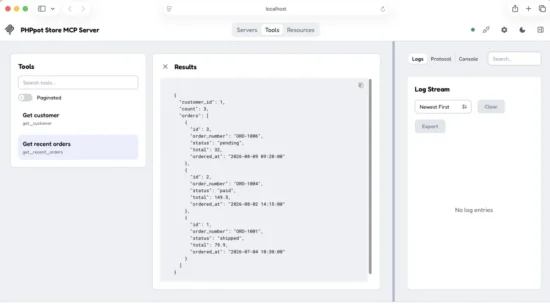
Testing the PHP MCP server and viewing structured order data in MCP Inspector.
If Inspector lists the tools and returns the sample records, the complete MCP path is working. The client discovered the server, read its tool schemas, sent a tool call, and received data produced by PHP and MySQL.
Connect the PHP server to an AI client
An MCP-compatible AI client can start the PHP process automatically. You only need to tell the client which command to run.
Create mcp-client-config.example.json with the following configuration:
{
    "mcpServers": {
        "phppot-store": {
            "command": "php",
            "args": [
                "/absolute/path/to/php-mcp-server/server.php"
            ]
        }
    }
}
Replace the example path with the real absolute path to server.php. Then add the phppot-store entry to your client’s MCP configuration and restart the client.
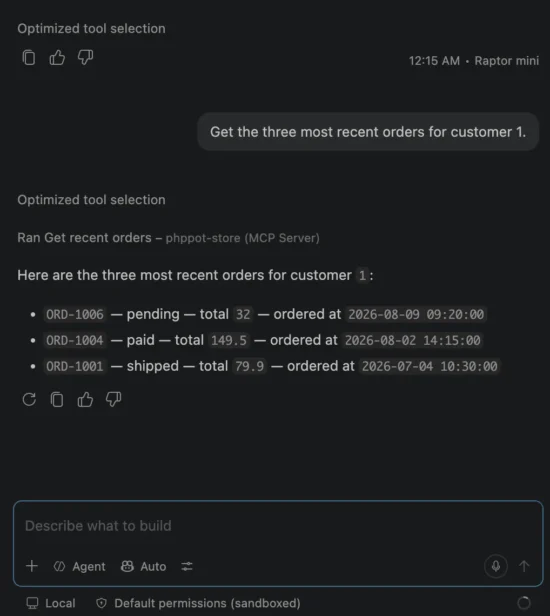
VS Code AI connecting to PHP App
The exact configuration file location varies between AI clients. Some clients also provide a settings screen where you can add the command and arguments without editing JSON.
You do not need to run php server.php in a separate terminal. With STDIO transport, the MCP client starts and manages the PHP process.
After the client connects, try questions such as:
- Find customer 1.
- Show the three most recent orders for customer 1.
- How many customers and orders are in the store?
The AI agent should select the matching tool or resource, supply the required values, and use the returned data in its answer.
If the client cannot find PHP, replace "command": "php" with the absolute path to the PHP executable. You can find it with:
which phpUsing absolute paths for both PHP and server.php avoids a common problem. Desktop AI clients may not inherit the same working directory or command path as your terminal.
Add an automated MCP smoke test
Inspector is useful when you want to explore the server by hand. An automated smoke test is better when you want to confirm that the server still works after changing the code.
Create tests/smoke-test.php:
<?php

declare(strict_types=1);

use Mcp\Client;
use Mcp\Client\Transport\StdioTransport;

require dirname(__DIR__) . '/vendor/autoload.php';

$projectDirectory = dirname(__DIR__);

$client = Client::builder()
    ->setClientInfo(
        'PHP MCP Demo Smoke Test',
        '1.0.0'
    )
    ->setInitTimeout(10)
    ->setRequestTimeout(10)
    ->build();

try {
    $client->connect(
        new StdioTransport(
            command: PHP_BINARY,
            args: [
                $projectDirectory . '/server.php'
            ],
            cwd: $projectDirectory,
            env: array_merge(
                $_ENV,
                [
                    'DB_HOST' => getenv('DB_HOST')
                        ?: '127.0.0.1',
                    'DB_PORT' => getenv('DB_PORT')
                        ?: '3306',
                    'DB_NAME' => getenv('DB_NAME')
                        ?: 'php_mcp_demo',
                    'DB_USER' => getenv('DB_USER')
                        ?: 'root',
                    'DB_PASSWORD' => getenv('DB_PASSWORD')
                        ?: '',
                ]
            )
        )
    );

    $toolNames = array_map(
        static fn ($tool): string => $tool->name,
        $client->listTools()->tools
    );

    assert(
        in_array(
            'get_customer',
            $toolNames,
            true
        )
    );

    assert(
        in_array(
            'get_recent_orders',
            $toolNames,
            true
        )
    );

    $customer = $client->callTool(
        'get_customer',
        [
            'customerId' => 1
        ]
    );

    assert($customer->isError === false);

    $orders = $client->callTool(
        'get_recent_orders',
        [
            'customerId' => 1,
            'limit' => 2,
        ]
    );

    assert($orders->isError === false);

    $resourceUris = array_map(
        static fn ($resource): string => $resource->uri,
        $client->listResources()->resources
    );

    assert(
        in_array(
            'store://summary',
            $resourceUris,
            true
        )
    );

    $summary = $client->readResource(
        'store://summary'
    );

    assert(count($summary->contents) === 1);

    fwrite(
        STDOUT,
        "Smoke test passed.\n"
    );
} finally {
    $client->disconnect();
}
Run the test with assertions enabled:
php -d zend.assertions=1 tests/smoke-test.phpA successful run prints:
Smoke test passed.This is not a mock test. It starts server.php as a child process, completes the MCP initialization, discovers the capabilities, calls both tools, reads the resource, and checks the responses.
That makes it useful for catching problems that an ordinary PHP unit test may miss, including broken server registration, transport errors, and invalid MCP result formatting.
Security considerations
An MCP tool is an application endpoint, even when it runs through STDIO. Treat every tool argument as untrusted input and expose only the operations an AI agent genuinely needs.
Keep the tool list small and explicit
This demo registers three read-only capabilities. The agent cannot send arbitrary SQL, choose a table, or call any PHP method it wants.
Do not create general tools such as run_sql, execute_command, or call_any_api. They may be convenient during development, but they remove the safety boundary that the MCP server is supposed to provide.
Use a restricted database account
The database user used by the MCP server should have only the permissions required by its tools. This demo needs SELECT permission only.
CREATE USER 'mcp_reader'@'localhost'
IDENTIFIED BY 'use-a-strong-password';

GRANT SELECT
ON php_mcp_demo.*
TO 'mcp_reader'@'localhost';

FLUSH PRIVILEGES;
Using a read-only account limits the damage if a future query contains a mistake or an unexpected tool call reaches the database.
Validate every argument
Prepared statements prevent SQL injection, but they do not decide whether a value is reasonable. The capability class checks that customer IDs are positive and limits each order response to 20 records.
Apply similar limits to dates, file sizes, search lengths, page numbers, and API request counts. A valid value can still be expensive or abusive.
Enforce authorization in PHP
Tool descriptions are instructions for the AI model. They are not access-control rules.
If one user should not see another user’s orders, enforce that rule inside PHP before running the query. Do not rely on a prompt such as “only access the current user’s data.” Prompts can guide model behavior, but your application must make the final authorization decision.
Return only the data the agent needs
The get_customer tool returns an email address because it helps demonstrate structured data. A production tool should omit personal information unless it is required for the task and the caller is authorized to receive it.
Avoid returning password hashes, access tokens, internal notes, raw exception traces, or complete database rows simply because they are available.
Protect HTTP deployments separately
STDIO usually runs locally under the same operating-system account as the AI client. If you later expose the server through HTTP, add proper authentication, authorization, TLS, origin validation, request limits, and audit logging.
Changing the transport from STDIO to HTTP does not automatically make the server safe for the public internet.
Keep STDOUT clean
STDOUT is reserved for MCP messages. Send application logs to STDERR or a protected log destination. Besides breaking the protocol, careless debug output can leak credentials or customer data into the client conversation.
Common errors and fixes
Composer cannot find the MCP classes
If you see a Class "Mcp\Server" not found error, install the dependencies and rebuild the autoloader:
composer install
composer dump-autoload
Also confirm that server.php loads vendor/autoload.php.
The database connection fails
Check that MySQL is running and that the values in .env are correct. You can test the credentials directly:
mysql -h 127.0.0.1 -u root -p php_mcp_demoIf your MySQL server uses a different port, update DB_PORT. On some systems, connecting to localhost uses a Unix socket while 127.0.0.1 uses TCP. Switching between them can explain why the same credentials work in one command but fail in another.
The AI client cannot start the server
Use absolute paths in the MCP configuration. Desktop applications may not use the same working directory or command path as your terminal.
{
    "mcpServers": {
        "phppot-store": {
            "command": "/absolute/path/to/php",
            "args": [
                "/absolute/path/to/php-mcp-server/server.php"
            ]
        }
    }
}
Restart the AI client after changing its MCP configuration.
The tools do not appear
Check the client logs or run the server through MCP Inspector. A startup error, missing dependency, or failed database connection can cause the PHP process to exit before capability discovery finishes.
Also confirm that the tool names in server.php are valid and that build() is called after all capabilities are registered.
The client reports malformed JSON or a transport error
Look for echo, print_r(), var_dump(), PHP warnings, or debug toolbar output. Any unexpected text written to STDOUT can mix with MCP’s JSON-RPC messages.
Send debug messages to STDERR:
fwrite(
    STDERR,
    'Customer lookup started' . PHP_EOL
);
A tool rejects the arguments
Use the exact argument names exposed by the tool schema. The demo expects customerId, not customer_id.
{
    "customerId": 1,
    "limit": 3
}
The limit must be between 1 and 20. Invalid values are rejected before the repository runs its query.
The Inspector command is unavailable
MCP Inspector requires Node.js and npm. Confirm that both commands are installed:
node -v
npm -v
You can still run the included PHP smoke test if you do not want to use Inspector.
Developer FAQ
Does an MCP server call an AI model?
Not necessarily. This PHP server exposes tools and resources. The MCP client and AI agent decide when to use them. The server itself does not need an AI API key for this example.
Is MCP the same as a REST API?
No. A REST API exposes HTTP endpoints for applications. MCP defines how AI clients discover capabilities, understand their input schemas, call tools, and read resources.
An MCP tool can call an existing REST API internally. You do not have to replace your current APIs to add MCP support.
Can I add MCP to an existing PHP application?
Yes. The official PHP SDK is framework-agnostic. You can register existing service methods as tools or create a thin capability class that calls your current application logic.
Avoid copying business rules into the MCP layer. Reuse the same services that your web controllers, scheduled jobs, or API endpoints already use.
What is the difference between a tool and a resource?
A tool performs an operation and usually accepts arguments. For example, get_recent_orders accepts a customer ID and a result limit.
A resource provides readable content through a URI. Our store://summary resource returns a fixed type of store-wide data without tool arguments.
Do I need MySQL to build a PHP MCP server?
No. An MCP tool can call any PHP logic. It may read a file, contact an API, search a document store, perform a calculation, or use data already available in your application.
MySQL is used here because it demonstrates a practical application while giving PHP clear control over validation and data access.
Should I use STDIO or HTTP transport?
Use STDIO when a local AI client starts the MCP server as a child process. It is simple and works well for local tools and coding agents.
Use streamable HTTP when clients must connect to a remotely hosted server. HTTP deployments need additional work, including authentication, authorization, TLS, session handling, and request limits.
Can an MCP tool update database records?
Yes, but write tools need stronger safeguards. Validate every field, enforce authorization, use transactions, record an audit trail, and consider requiring user confirmation before destructive or costly actions.
Starting with read-only tools is a safer way to learn the protocol and test how an agent selects capabilities.
Is the official PHP MCP SDK stable?
The SDK is official, but releases below version 1.0 are still considered experimental. Minor releases may contain API changes. Pin a compatible version, commit composer.lock, review release notes, and rerun the smoke test before upgrading.
Conclusion
We built a framework-free PHP MCP server that gives AI agents controlled access to application data.
The server exposes two tools and one resource. PHP validates every argument, MySQLi prepared statements protect the queries, and the agent receives structured results without getting direct database access.
The most important part is not the amount of code. It is the boundary we created:
- The AI agent can discover only the capabilities we register.
- PHP decides which inputs are valid.
- The repository controls which queries can run.
- MySQL returns only the selected fields.
- The MCP client receives a predictable result.
This pattern can be added to an existing PHP application without replacing its current APIs or business logic. Start with small, read-only tools. Once the permission model is clear, you can add operations for inventory checks, report generation, support lookups, or other tasks that fit your application.
MCP does not make an AI agent trustworthy by magic. It gives your PHP application a structured place to decide what the agent is allowed to do. That is the useful part.
Download the PHP MCP server source code
The downloadable project contains the complete framework-free PHP MCP server used in this tutorial.
- Official
mcp/sdkdependency configuration - Two read-only MCP tools
- One MCP resource
- MySQLi repository with prepared statements
- Sample MySQL schema and records
- MCP client configuration example
- Automated smoke test
- Local setup and troubleshooting instructions
Download the PHP MCP server demo ZIP
After extracting the ZIP, run composer install, import sql/schema.sql, copy .env.example to .env, and add your database credentials.
You can then test the complete project with:
php -d zend.assertions=1 tests/smoke-test.php