The PHP in_array() function checks whether a value exists in an array. It returns true if the value is found and false if it is not found.
This function is useful when you want to validate a value against a known list. For example, you can check if a user role is allowed, if a payment status is valid, or if a selected option exists in a predefined array.
This tutorial is a focused supporting guide for the main PHP arrays tutorial. Here, we will go deeper into in_array(), strict comparison, case sensitivity, common mistakes, and when to use related functions like array_search() and array_key_exists().
Quick Answer
Use in_array() when you want to check if a value exists in a PHP array.
<?php
$roles = ["admin", "editor", "author"];

if (in_array("editor", $roles, true)) {
    echo "Role is allowed.";
} else {
    echo "Role is not allowed.";
}
?>
The third argument true enables strict comparison. It checks both the value and the data type. In most real applications, this is the safer choice.
Syntax of in_array()
in_array(mixed $needle, array $haystack, bool $strict = false): bool- $needle – The value you are searching for
- $haystack – The array to search in
- $strict – Optional. If set to
true, it checks both value and data type
By default, $strict is false. That means PHP will do loose comparison. This can lead to unexpected results in some cases.
Basic Example
<?php
$colors = ["red", "green", "blue"];

if (in_array("green", $colors)) {
    echo "Color found";
} else {
    echo "Color not found";
}
?>
This checks if "green" exists in the array. Since it is present, the output will be Color found.
Strict vs Non-Strict Comparison
This is the most important part of using in_array() correctly.
Without strict mode, PHP compares values loosely. That means it may convert types internally.
<?php
$values = [0, 1, 2, 3];

var_dump(in_array("0", $values));      // true
var_dump(in_array("0", $values, true)); // false
?>
In the first case, "0" (string) is considered equal to 0 (integer). So it returns true.
In the second case, strict mode is enabled. Now PHP checks both value and type. Since string is not equal to integer, it returns false.
As explained in the official PHP documentation, using strict mode avoids unexpected matches.
Recommendation: Always use strict mode (true) unless you have a specific reason not to.
Check User Input Against Allowed Values
A common use of in_array() is to validate user input against a list of allowed values.
For example, assume your application accepts only a few payment statuses.
<?php
$allowedStatuses = ["pending", "paid", "failed", "refunded"];

$status = $_POST["status"] ?? "";

if (in_array($status, $allowedStatuses, true)) {
    echo "Valid payment status.";
} else {
    echo "Invalid payment status.";
}
?>
This is better than checking many conditions manually.
<?php
if ($status === "pending" || $status === "paid" || $status === "failed" || $status === "refunded") {
    echo "Valid payment status.";
}
?>
The in_array() version is shorter and easier to maintain. If you add a new status later, you only need to update the array.
Case-Sensitive Search
The in_array() function is case-sensitive when comparing strings.
<?php
$roles = ["Admin", "Editor", "Author"];

var_dump(in_array("admin", $roles, true)); // false
var_dump(in_array("Admin", $roles, true)); // true
?>
Here, "admin" and "Admin" are treated as different values.
If you want a case-insensitive check, normalize both the input and the array values before comparing.
<?php
$roles = ["Admin", "Editor", "Author"];
$inputRole = "admin";

$normalizedRoles = array_map("strtolower", $roles);

if (in_array(strtolower($inputRole), $normalizedRoles, true)) {
    echo "Role exists.";
} else {
    echo "Role does not exist.";
}
?>
This approach gives a clean case-insensitive match.
Search in an Associative Array
The in_array() function searches only in array values. It does not check array keys.
<?php
$user = [
    "id" => 101,
    "name" => "Vincy",
    "role" => "editor"
];

var_dump(in_array("editor", $user, true)); // true
var_dump(in_array("role", $user, true));   // false
?>
The first check returns true because "editor" is a value in the array.
The second check returns false because "role" is a key, not a value.
Check If an Array Key Exists
Use array_key_exists() when you want to check if a key exists in an array.
<?php
$user = [
    "id" => 101,
    "name" => "Vincy",
    "role" => "editor"
];

if (array_key_exists("role", $user)) {
    echo "Role key exists.";
}
?>
So the rule is simple:
- Use
in_array()to check array values. - Use
array_key_exists()to check array keys.
The PHP manual for array_key_exists() is useful when you need to understand the difference between a missing key and a key with a null value.
in_array() vs array_search()
Use in_array() when you only want to know whether a value exists.
Use array_search() when you also need the matching key.
<?php
$roles = [
    "a" => "admin",
    "e" => "editor",
    "u" => "user"
];

if (in_array("editor", $roles, true)) {
    echo "Role exists.";
}

$key = array_search("editor", $roles, true);

if ($key !== false) {
    echo "Role key is: " . $key;
}
?>
Notice the condition $key !== false. This is important because array_search() may return 0 or "0" as a valid key. A loose check can treat that as false.
For more array functions, you can also read the PHP array sort tutorial where different sorting functions are compared with examples.
Check Values in a Multidimensional Array
in_array() does not directly search inside nested arrays by a field name. For a multidimensional array, extract the required column first.
<?php
$users = [
    ["id" => 1, "email" => "vincy@example.com"],
    ["id" => 2, "email" => "joe@example.com"],
    ["id" => 3, "email" => "admin@example.com"]
];

$emailList = array_column($users, "email");

if (in_array("joe@example.com", $emailList, true)) {
    echo "Email already exists.";
} else {
    echo "Email is available.";
}
?>
This keeps the logic clear. First get the column you want to search. Then use in_array() on that simple list.
Common Mistakes and Fixes
1. Not using strict mode
This is the most common mistake. Without strict mode, PHP may match values after type conversion.
<?php
$ids = [10, 20, 30];

var_dump(in_array("10", $ids));       // true
var_dump(in_array("10", $ids, true)); // false
?>
Fix: Use the third argument as true when the data type matters.
2. Checking a key with in_array()
in_array() checks values, not keys.
<?php
$config = [
    "debug" => true,
    "cache" => false
];

var_dump(in_array("debug", $config, true)); // false
?>
Fix: Use array_key_exists() if you want to check whether a key exists.
3. Expecting case-insensitive matching
String comparison is case-sensitive. So "Admin" and "admin" are not the same.
Fix: Convert both values to the same case before checking.
Security Considerations
in_array() is often used for input validation. This is useful, but it should be used carefully.
- Use strict mode when checking user input against allowed values.
- Do not trust a value only because it passed
in_array(). Validate the format also if needed. - For database queries, still use prepared statements.
in_array()does not protect SQL queries. - For output, escape values before displaying them in HTML.
For example, checking whether a status is allowed is good. But if you use that value in a SQL query, use a prepared statement. If you print it on a page, escape it with htmlspecialchars().
Complete Example: Validate Selected User Role
This example uses in_array() to check whether a selected role is valid. It is a small practical example similar to what you may use in an admin form.
<?php
$allowedRoles = ["admin", "editor", "author", "subscriber"];

$selectedRole = $_POST["role"] ?? "";
$message = "";

if ($_SERVER["REQUEST_METHOD"] === "POST") {
    if (in_array($selectedRole, $allowedRoles, true)) {
        $message = "Valid role selected: " . htmlspecialchars($selectedRole);
    } else {
        $message = "Invalid role selected.";
    }
}
?>

<form method="post">
    <label for="role">Choose role</label>
    <select name="role" id="role">
        <option value="">Select</option>
        <option value="admin">Admin</option>
        <option value="editor">Editor</option>
        <option value="author">Author</option>
        <option value="subscriber">Subscriber</option>
    </select>

    <button type="submit">Validate</button>
</form>

<?php if ($message !== ""): ?>
    <p><?php echo $message; ?></p>
<?php endif; ?>
The important part is this line:
in_array($selectedRole, $allowedRoles, true)It checks whether the submitted role is available in the allowed list. Strict mode prevents loose type matching.
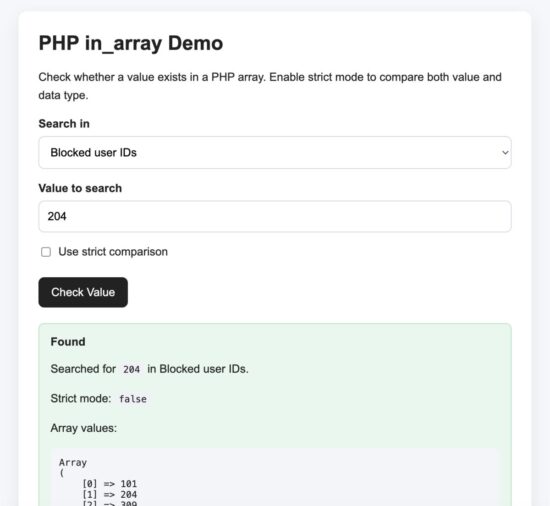
Demo output showing PHP in_array validating a selected user role.
Screenshot to capture: Run the downloadable demo project. Select a valid role like editor and capture the success message. One screenshot is enough for this tutorial.
Developer FAQ
Does in_array() check keys or values?
in_array() checks values only. To check keys, use array_key_exists().
Should I use strict mode with in_array()?
Yes, in most cases. Use in_array($value, $array, true). It avoids unexpected matches between strings, integers, booleans, and other types.
Is in_array() case-sensitive?
Yes. String matching is case-sensitive. Convert both values to the same case if you need case-insensitive matching.
Can I use in_array() with an associative array?
Yes. It will search inside the values of the associative array. It will not search the keys.
Can in_array() search inside a multidimensional array?
Not directly by a field name. Use array_column() to extract the needed column first, then use in_array().
What is the difference between in_array() and array_search()?
in_array() returns true or false. array_search() returns the matching key if the value is found.
Conclusion
The in_array() function is a simple and useful way to check if a value exists in a PHP array. It is especially helpful for validating selected options, allowed statuses, roles, and other known values.
The main thing to remember is strict mode. Use the third argument as true unless you clearly need loose comparison. This makes your code safer and easier to understand.
Use in_array() for values, array_key_exists() for keys, and array_search() when you need the matching key.
Download Source Code
Download the complete PHP in_array() demo project and run it locally.
Download the PHP in_array demo project
The project includes a simple role validation form, clean PHP code, light CSS, and setup instructions. No database is required for this example.





Hi Vincy,
I am following your blog daily and your tutorials are simplistic. Every tutorial has something new to learn.
You are covering the topics in-depth and complete. Thanks and keep writing.
Hi Princy,
Thanks for your comments.
Thanks. Easy to understand.
Welcome.
absolutely good tutorial
Thank you Luckmoshy.
Thanks, this article is very nice, simple but deeply.
Welcome Budiyono
If you would be sharing an example of using ‘in_array()’ to search into a multidimensional associative array , it would be really helpful.
Hi Yash,
I have given a complete example with project source code download at the end of the article.