Many web applications need a Forgot Password feature. Users forget passwords often. So the system must allow them to reset it safely.
The correct approach is not sending the password by email. Instead, the system generates a secure reset link.
When the user clicks the link, they can create a new password. In this tutorial, we build a secure password reset system in PHP and MySQL.
The example includes:
- Token based reset links
- Token expiry
- Password hashing
- Input validation
At the end, you will have a complete working example that you can use in your projects.
You may also read our guide on preventing SQL injection in PHP to further secure your application.
Quick Answer
A secure forgot password system in PHP should use a token based reset link. The server generates a random token, stores its hash in the database, and sends the reset link to the user by email. When the user clicks the link, the token is validated and the user can create a new password.
Key Features of This Implementation
- Secure token generation using random bytes
- Token expiry protection
- Password hashing using PHP password_hash
- Protection against email enumeration
- Single use reset tokens
Forgot Password Example Output
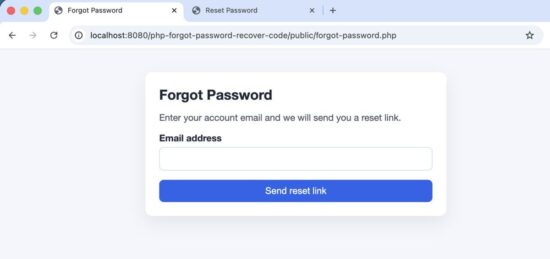
The user enters email to receive a password reset link.
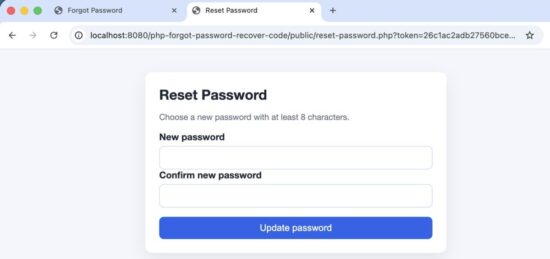
Reset password form in PHP
In this tutorial we will cover:
- How the forgot password flow works
- Database design
- Step-by-step implementation
- Security best practices
How the Forgot Password Flow Works
Users may forget their passwords. The system should allow them to reset it safely.
A common mistake is sending the password by email. That is not secure. Modern applications use a password reset token.
The basic flow is simple.
- User clicks Forgot Password
- User enters email address
- System generates a secure token
- Token is stored in the database
- Reset link is sent to the user
- User clicks the reset link
- Token is verified
- User creates a new password
The password is never sent by email. The user only receives a temporary reset link.
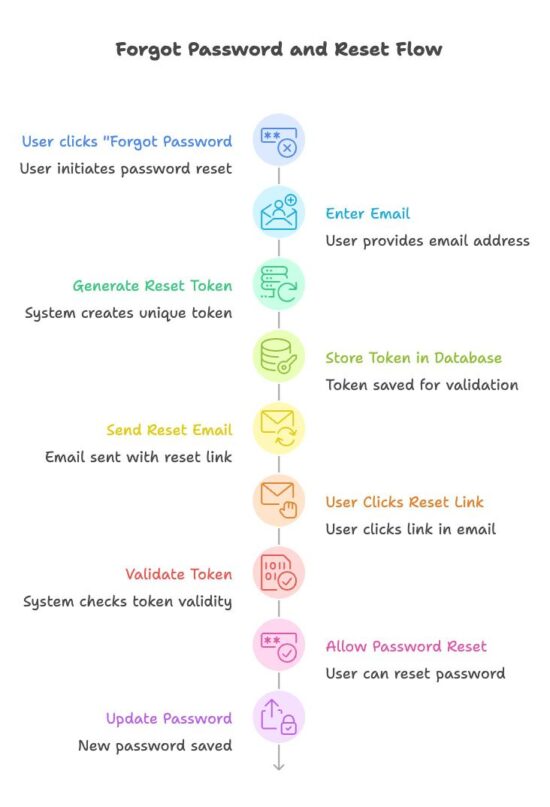
Password reset workflow used in modern web applications.
Next, let us look at the system architecture used in this example project.
System Architecture
This example project is kept simple. The goal is to make the logic easy to understand.
This example uses plain PHP and MySQL without any framework so that the core logic is easy to understand.
The project is divided into small PHP files. Each file handles one task.
For example:
- Showing the forgot password form
- Generating the reset token
- Sending the reset link
- Validating the token
- Updating the password
This separation keeps the code clean and easy to maintain.
project-root
│
├── config
│   └── database.php
│
├── classes
│   ├── User.php
│   └── PasswordReset.php
│
├── public
│   ├── forgot-password.php
│   ├── process-forgot.php
│   ├── reset-password.php
│   └── process-reset.php
│
└── templates
    ├── header.php
    └── footer.php
The files are grouped into logical folders.
- config contains database connection.
- classes contains reusable PHP classes.
- public contains the pages accessed by the user.
- templates contains layout files.
This structure makes the example easier to follow.
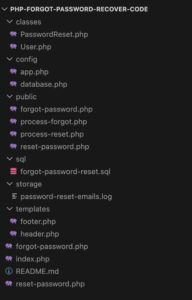
Project structure
Database Design
To implement the password reset feature, we need two tables.
The first table stores user accounts. The second table stores password reset tokens.
The reset token allows the system to verify that the password reset request is valid. The token is temporary and expires after a short time.
Users Table
The users table stores registered users.
CREATE TABLE users (
  id INT UNSIGNED NOT NULL AUTO_INCREMENT,
  email VARCHAR(255) NOT NULL,
  password_hash VARCHAR(255) NOT NULL,
  created_at TIMESTAMP NOT NULL DEFAULT CURRENT_TIMESTAMP,
  PRIMARY KEY (id),
  UNIQUE KEY uniq_users_email (email)
) ENGINE=InnoDB DEFAULT CHARSET=utf8mb4;
- email is used to identify the user.
- password_hash stores the hashed password.
Passwords are never stored in plain text.
Password Reset Table
The password_resets table stores reset tokens.
CREATE TABLE password_resets (
  id INT UNSIGNED NOT NULL AUTO_INCREMENT,
  user_id INT UNSIGNED NOT NULL,
  token_hash CHAR(64) NOT NULL,
  expires_at DATETIME NOT NULL,
  created_at TIMESTAMP NOT NULL DEFAULT CURRENT_TIMESTAMP,
  used TINYINT(1) NOT NULL DEFAULT 0,
  PRIMARY KEY (id),
  UNIQUE KEY uniq_password_resets_token_hash (token_hash),
  KEY idx_password_resets_user_id (user_id),
  CONSTRAINT fk_password_resets_user_id
    FOREIGN KEY (user_id) REFERENCES users(id) ON DELETE CASCADE
) ENGINE=InnoDB DEFAULT CHARSET=utf8mb4;
This table helps us track password reset requests.
Important columns
- token_hash stores the hashed reset token.
- expires_at defines when the token becomes invalid.
- used ensures the token can only be used once.
The raw token is never stored in the database.
The system sends the raw token to the user by email. But only the hash of the token is stored in the database.
When the user clicks the reset link, the system hashes the token again and compares it with the stored value. This prevents attackers from using the database to reset passwords.
Now let us build the password reset system step by step.
Step-by-Step Implementation
In this section we build the password reset feature step by step.
The process includes:
- Showing the forgot password form
- Generating a reset token
- Storing the token in the database
- Sending a reset link by email
- Validating the reset token
- Allowing the user to set a new password
Let us start with the forgot password form.
Forgot Password Form
The first step is to allow the user to enter their email address. If the email exists in the system, a password reset link will be sent.
If the email does not exist, the system will still show the same message. This prevents attackers from discovering valid email accounts.
forgot-password.php
<?php
declare(strict_types=1);

$pageTitle = 'Forgot Password';
require __DIR__ . '/../templates/header.php';

$status = isset($_GET['status']) ? (string) $_GET['status'] : '';
$error = isset($_GET['error']) ? (string) $_GET['error'] : '';

$messageType = '';
$messageText = '';

if ($error === 'invalid_email') {
    $messageType = 'error';
    $messageText = 'Please enter a valid email address.';
} elseif ($error === 'server') {
    $messageType = 'error';
    $messageText = 'Unable to process your request right now. Please try again later.';
} elseif ($status === 'sent') {
    $messageType = 'success';
    $messageText = 'If the email exists in our system, a password reset link has been sent.';
}

if ($messageText !== '') {
    echo '<div class="alert ' . $messageType . '">' . htmlspecialchars($messageText, ENT_QUOTES, 'UTF-8') . '</div>';
}
?>

<p>Enter your account email and we will send you a reset link.</p>

<form method="post" action="process-forgot.php" novalidate>
    <label for="email">Email address</label>
    <input type="email" name="email" id="email" autocomplete="email" required>
    <button type="submit">Send reset link</button>
</form>

<?php
require __DIR__ . '/../templates/footer.php';
This form sends the email address to process-forgot.php. The server will check whether the email exists and generate a reset token.
Next, we generate a secure reset token when the form is submitted.
Generate Reset Token
When the user submits the forgot password form, the server receives the email address. If the email exists, the system generates a secure reset token. This token is used to verify the password reset request.
The token must be cryptographically secure so that attackers cannot guess it. PHP provides a secure function for this.
$token = bin2hex(random_bytes(self::TOKEN_BYTES));
- random_bytes() generates cryptographically secure random data.
- bin2hex() converts it into a readable string.
This produces a long random token that is safe to use in password reset links.
$tokenHash = hash('sha256', $token);
The system stores only the hash of the token in the database. The raw token is sent to the user by email.
When the user clicks the reset link, the token will be hashed again and compared with the stored value. This approach protects the system even if the database is compromised.
$expiresAt = (new DateTimeImmutable('now', new DateTimeZone('UTC')))
            ->modify('+' . self::EXPIRES_MINUTES . ' minutes')
            ->format('Y-m-d H:i:s');
This sets the token to expire in 30 minutes. Expired tokens cannot be used to reset passwords.
After generating the token, we store it in the database.
Store Token in Database
After generating the token, store its hash in the database. The reset token should never be stored in plain text.
Next, we send the password reset link to the user.
Send Password Reset Email
[2026-03-07T08:40:22+00:00]
To: vincy@example.com
Subject: Reset your password

Hello,

We received a request to reset your password.
Use the link below to set a new password (valid for 30 minutes):
http://localhost:8080/php-forgot-password-recover-code/public/reset-password.php?token=26c1ac2adb27560bced32427df9ff42ba344fd00d8375d53a390f90461b70283

If you did not request this, you can ignore this email.
sendResetEmail function in the PasswordReset class acts as a placeholder. I am writing the email to a log file. You need to replace this with a SMTP based email sender may be using PHPMailer.
Validate Reset Token
When the user clicks the reset link from the email, the token is sent to the server.
The system must verify three things:
- The token exists in the database
- The token has not expired
- The token has not already been used
If all checks pass, the user is allowed to reset the password.
<?php
 public function findValidByToken(string $token): ?array
    {
        if (! $this->isTokenFormatValid($token)) {
            return null;
        }

        $tokenHash = hash('sha256', $token);
        $sql = 'SELECT id, user_id FROM password_resets WHERE token_hash = ? AND used = 0 AND expires_at >= UTC_TIMESTAMP() LIMIT 1';
        $stmt = $this->db->prepare($sql);
        if (! $stmt) {
            throw new RuntimeException('Failed to prepare reset lookup.');
        }

        $stmt->bind_param('s', $tokenHash);
        $stmt->execute();
        $stmt->bind_result($resetId, $userId);

        if ($stmt->fetch()) {
            $stmt->close();
            return [
                'id' => (int) $resetId,
                'user_id' => (int) $userId,
            ];
        }

        $stmt->close();
        return null;
    }
The token from the URL is hashed again and compared with the stored value. If a matching record is found, the reset request is valid.
After validating the token, the user can enter a new password.
Reset Password
After the reset link is validated, the user can enter a new password. The new password must be securely hashed before storing it in the database.
PHP provides a built-in function for this.
$newPassword = $_POST['password'];

$passwordHash = password_hash($newPassword, PASSWORD_DEFAULT);
The password_hash() function automatically uses a strong hashing algorithm. The raw password is never stored in the database.
Then update the new password in the database.
Then most importantly mark the token as used and show the final success message.
The previous sections showed the implementation step by step. Next, we look at the complete example code.
Complete Code Example (Modern PHP 8)
I have given the complete project source code for download below. Here I am listing key files for you to browse through.
process-forgot.php
<?php
declare(strict_types=1);

if ($_SERVER['REQUEST_METHOD'] !== 'POST') {
    header('Location: forgot-password.php');
    exit;
}

$email = trim((string) ($_POST['email'] ?? ''));

if ($email === '' || ! filter_var($email, FILTER_VALIDATE_EMAIL)) {
    header('Location: forgot-password.php?error=invalid_email');
    exit;
}

$mysqli = require __DIR__ . '/../config/database.php';
$appConfig = require __DIR__ . '/../config/app.php';
require_once __DIR__ . '/../classes/User.php';
require_once __DIR__ . '/../classes/PasswordReset.php';

try {
    $userModel = new User($mysqli);
    $resetModel = new PasswordReset($mysqli);

    $user = $userModel->findByEmail($email);

    if ($user) {
        $token = $resetModel->createForUser((int) $user['id']);

        $baseUrl = rtrim((string) ($appConfig['base_url'] ?? ''), '/');
        if ($baseUrl === '') {
            throw new RuntimeException('Missing base_url in config/app.php');
        }
        $resetLink = $baseUrl . '/reset-password.php?token=' . $token;

        $resetModel->sendResetEmail($user['email'], $resetLink);
    } else {
        // Keep response timing similar even when the email is not found.
        usleep(500000);
    }
} catch (Throwable $e) {
    header('Location: forgot-password.php?error=server');
    exit;
}

header('Location: forgot-password.php?status=sent');
exit;
process-reset.php
<?php
declare(strict_types=1);

if ($_SERVER['REQUEST_METHOD'] !== 'POST') {
    header('Location: forgot-password.php');
    exit;
}

$token = trim((string) ($_POST['token'] ?? ''));
$password = (string) ($_POST['password'] ?? '');
$confirmPassword = (string) ($_POST['confirm_password'] ?? '');

if ($token === '' || strlen($token) !== 64 || ! ctype_xdigit($token)) {
    header('Location: reset-password.php?error=invalid');
    exit;
}

$redirectBase = 'reset-password.php?token=' . urlencode($token);

if (strlen($password) < 8) {
    header('Location: ' . $redirectBase . '&error=password');
    exit;
}

if ($password !== $confirmPassword) {
    header('Location: ' . $redirectBase . '&error=mismatch');
    exit;
}

$mysqli = require __DIR__ . '/../config/database.php';
require_once __DIR__ . '/../classes/User.php';
require_once __DIR__ . '/../classes/PasswordReset.php';

try {
    $transactionStarted = false;
    $resetModel = new PasswordReset($mysqli);
    $userModel = new User($mysqli);

    $resetRecord = $resetModel->findValidByToken($token);
    if (! $resetRecord) {
        header('Location: reset-password.php?error=invalid');
        exit;
    }

    $user = $userModel->findById((int) $resetRecord['user_id']);
    if (! $user) {
        header('Location: reset-password.php?error=invalid');
        exit;
    }

    if ($user['password_hash'] !== null && $userModel->verifyPassword($password, $user['password_hash'])) {
        header('Location: ' . $redirectBase . '&error=reuse');
        exit;
    }

    $passwordHash = password_hash($password, PASSWORD_DEFAULT);
    if ($passwordHash === false) {
        header('Location: ' . $redirectBase . '&error=server');
        exit;
    }

    $mysqli->begin_transaction();
    $transactionStarted = true;
    $updated = $userModel->updatePasswordHash((int) $user['id'], $passwordHash);
    $marked = $resetModel->markUsed((int) $resetRecord['id']);
    if (! $updated || ! $marked) {
        throw new RuntimeException('Failed to update password reset state.');
    }
    $mysqli->commit();
    $transactionStarted = false;
} catch (Throwable $e) {
    if (isset($transactionStarted) && $transactionStarted) {
        $mysqli->rollback();
    }

    header('Location: ' . $redirectBase . '&error=server');
    exit;
}

$pageTitle = 'Password Updated';
require __DIR__ . '/../templates/header.php';
?>

<div class="alert success">Password updated successfully. You can now log in with your new password.</div>

<p class="helper-text">For security, reset links are single-use and expire after 30 minutes.</p>

<?php
require __DIR__ . '/../templates/footer.php';
classes/PasswordReset.php
<?php
declare(strict_types=1);

class PasswordReset
{
    private const TOKEN_BYTES = 32;
    private const EXPIRES_MINUTES = 30;

    private mysqli $db;

    public function __construct(mysqli $db)
    {
        $this->db = $db;
    }

    public function createForUser(int $userId): string
    {
        $this->invalidateExistingTokens($userId);

        $token = bin2hex(random_bytes(self::TOKEN_BYTES));
        $tokenHash = hash('sha256', $token);
        $expiresAt = (new DateTimeImmutable('now', new DateTimeZone('UTC')))
            ->modify('+' . self::EXPIRES_MINUTES . ' minutes')
            ->format('Y-m-d H:i:s');

        $sql = 'INSERT INTO password_resets (user_id, token_hash, expires_at, created_at, used) VALUES (?, ?, ?, UTC_TIMESTAMP(), 0)';
        $stmt = $this->db->prepare($sql);
        if (! $stmt) {
            throw new RuntimeException('Failed to prepare reset insert.');
        }

        $stmt->bind_param('iss', $userId, $tokenHash, $expiresAt);
        if (! $stmt->execute()) {
            $stmt->close();
            throw new RuntimeException('Failed to create reset token.');
        }
        $stmt->close();

        return $token;
    }

    public function findValidByToken(string $token): ?array
    {
        if (! $this->isTokenFormatValid($token)) {
            return null;
        }

        $tokenHash = hash('sha256', $token);
        $sql = 'SELECT id, user_id FROM password_resets WHERE token_hash = ? AND used = 0 AND expires_at >= UTC_TIMESTAMP() LIMIT 1';
        $stmt = $this->db->prepare($sql);
        if (! $stmt) {
            throw new RuntimeException('Failed to prepare reset lookup.');
        }

        $stmt->bind_param('s', $tokenHash);
        $stmt->execute();
        $stmt->bind_result($resetId, $userId);

        if ($stmt->fetch()) {
            $stmt->close();
            return [
                'id' => (int) $resetId,
                'user_id' => (int) $userId,
            ];
        }

        $stmt->close();
        return null;
    }

    public function markUsed(int $resetId): bool
    {
        $sql = 'UPDATE password_resets SET used = 1 WHERE id = ?';
        $stmt = $this->db->prepare($sql);
        if (! $stmt) {
            throw new RuntimeException('Failed to prepare reset update.');
        }

        $stmt->bind_param('i', $resetId);
        $ok = $stmt->execute();
        $stmt->close();

        return $ok;
    }

    public function sendResetEmail(string $toEmail, string $resetLink): void
    {
        $subject = 'Reset your password';
        $body = "Hello,\n\n" .
            "We received a request to reset your password.\n" .
            "Use the link below to set a new password (valid for 30 minutes):\n" .
            $resetLink . "\n\n" .
            "If you did not request this, you can ignore this email.\n";

        // Demo-only email delivery: write the email to a log file inside the project.
        $logDir = __DIR__ . '/../storage';
        if (! is_dir($logDir)) {
            mkdir($logDir, 0775, true);
        }
        $logFile = $logDir . '/password-reset-emails.log';
        $entry = sprintf(
            "[%s]\nTo: %s\nSubject: %s\n\n%s\n\n",
            (new DateTimeImmutable('now'))->format(DateTimeInterface::ATOM),
            $toEmail,
            $subject,
            $body
        );

        @file_put_contents($logFile, $entry, FILE_APPEND);
    }

    private function invalidateExistingTokens(int $userId): void
    {
        $sql = 'UPDATE password_resets SET used = 1 WHERE user_id = ? AND used = 0';
        $stmt = $this->db->prepare($sql);
        if (! $stmt) {
            throw new RuntimeException('Failed to prepare reset cleanup.');
        }

        $stmt->bind_param('i', $userId);
        if (! $stmt->execute()) {
            $stmt->close();
            throw new RuntimeException('Failed to expire existing reset tokens.');
        }
        $stmt->close();
    }

    private function isTokenFormatValid(string $token): bool
    {
        return strlen($token) === 64 && ctype_xdigit($token);
    }
}
Before using this system in production, there are a few important security practices to follow.
Security Best Practices
The forgot password feature must be implemented carefully. A weak implementation can expose user accounts to attackers.
Always generate reset tokens using a cryptographically secure method. Tokens must be long and unpredictable so they cannot be guessed.
Do not store the raw reset token in the database. Store only a hash of the token. When the reset link is used, hash the incoming token again and compare it with the stored value.
Reset tokens should also have an expiry time. A common practice is to allow the link to work for about 30 minutes.
The application should not reveal whether an email address exists in the system. When a user submits the forgot password form, always show the same message. This prevents attackers from discovering registered email accounts.
Passwords must always be stored using secure hashing. Never store plain text passwords.
Finally, reset tokens should be invalidated after use. Once the password has been updated, the same reset link must not work again.
These practices make the password reset system safer and closer to what modern web applications implement.
You can also implement CSRF protection for forms to improve application security.
Why This Approach Is Secure
Modern password reset systems use temporary reset tokens instead of sending passwords by email.
The reset token is randomly generated and sent only to the user’s email address. The server stores only a hash of the token, not the token itself.
When the reset link is used, the server verifies three things.
- The token exists
- The token has not expired
- The token has not already been used
Only after these checks can the user create a new password.
This approach protects the system even if the database is exposed or a reset link is intercepted.
Common Errors and Fixes
During development, a few common issues may appear when implementing password reset functionality.
Reset link always shows “Invalid or expired link”
This usually happens when the token comparison fails. Make sure the token from the URL is hashed before comparing it with the stored value in the database.
Reset link expires immediately
Check the server timezone and the expiry time calculation. If the server time and database time are different, the token may appear expired.
Email is not received
Many local development environments cannot send emails using the default mail configuration. In such cases, use an SMTP library such as PHPMailer or configure a local mail server.
Token can be reused
If the reset link works more than once, make sure the token is marked as used after the password update.
Password updated but login fails
Verify that the password is stored using secure hashing and that the login system uses password verification correctly.
Next, let us look at some common questions developers ask when implementing a password reset system.
Developer FAQ
How long should a password reset token be valid?
A common practice is to allow the reset link to work for about 30 minutes. Short expiry times reduce the risk of misuse.
Should the reset token be stored in plain text?
No. Only the hash of the token should be stored in the database. When the reset link is used, hash the incoming token and compare it with the stored value.
Can the reset link be used multiple times?
No. After the password is updated, the token should be marked as used so that the same link cannot reset the password again.
Is it safe to send passwords by email?
No. Passwords should never be sent by email. The system should only send a temporary reset link.
What should the system show if the email does not exist?
Always show the same response message. This prevents attackers from discovering which email addresses are registered in the system.
This implementation works well for:
- Custom PHP login systems
- Small to medium web applications
- Learning how password reset systems work
Large applications may integrate this feature with frameworks or authentication services.
Conclusion
In this tutorial, we built a secure forgot password system using PHP and MySQL.
The implementation uses token based reset links, password hashing, and token expiry to protect user accounts.
The reset process includes generating a secure token, sending a reset link, validating the token, and updating the password safely.
This approach is commonly used in modern web applications and can be integrated into any PHP login system.
You can download the complete working example from the link below and use it as a starting point for your own projects.
Download Source Code
The complete working example used in this tutorial can be downloaded below.
The project includes all files required to implement the password reset feature.
Download the source code and run it in your local PHP environment to explore the implementation.


Thank you for this code.
Welcome.
Hello, I have the User Registration in PHP with Login: Form with MySQL working but I don’t know how to link it today and how to create it database. I’m I going to create a separate DB for the forgot password?
Use the same database and create tables as described in the tutorial. If you need further help, please feel free to mail me.
Anyone example of this code with SMTP mail?
I have written a separate detailed article that helps to send email using SMTP https://phppot.com/php/send-email-localhost-php/
Hi, I want to learn backend by hard, for this I would like to thank you so much for being selfless. God bless.
Welcome!
Hi,
Do you actually send an email to user using this application?
Or do you send tokenized link in separate email and ask user to cut and paste into browser.
I am writing a similar program but it does not work. The link opens form but I cannot Post new password into user database
Thanks for your answer in advance
In this tutorial example, we are sending a link to the user. He can click the link and open a form to update the password.
THANK YOU
Welcome Raj
First thing, your code works. Second, it is simple to understand and use. Third, good focus on security..
For PHP, this is the best place in the whole Internet. Especially For learning, even better than AI tools. Vincy, you are the best.
Thank you for writing.
Thank you Corey.