PHP string interpolation lets you place variables directly inside a string. PHP reads the variable and replaces it with the actual value while building the final output.
This is one of those small PHP features that makes code easier to read. Instead of joining many string pieces with the dot operator, you can often write the final message in a more natural way.
In this tutorial, I will show how string interpolation works in PHP with simple examples. We will cover double-quoted strings, curly brace syntax, heredoc, common mistakes, and one important update for modern PHP versions.
The examples are written for intermediate PHP developers who already know basic variables and echo statements, but want to write cleaner and more reliable string output.
Quick Answer
PHP supports string interpolation mainly in double-quoted strings and heredoc strings. This means you can place a variable directly inside the string, and PHP will replace it with its value when the code runs.
For example:
<?php
$name = "Joe";

echo "Hello, $name";
?>
The output will be:
Hello, JoeIf the variable touches other characters, use curly braces to make the boundary clear:
<?php
$name = "Joe";

echo "Hello, {$name}!";
?>
This curly brace style is especially useful when working with array values, object properties, or variables placed next to plain text.
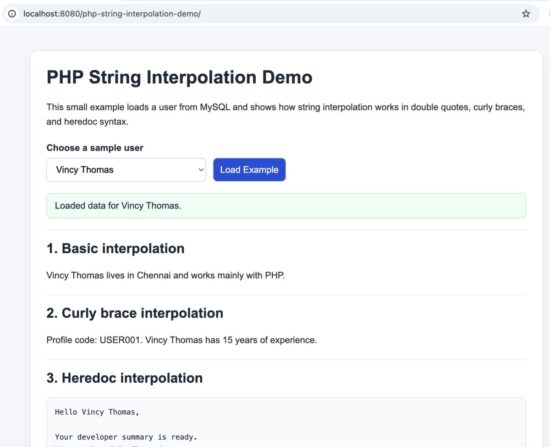
Output of the PHP string interpolation demo project
When PHP Interpolates Variables in Strings
PHP does not interpolate variables in every kind of string. This works mainly in double-quoted strings and heredoc strings.
For a broader refresher on PHP strings, heredoc, and nowdoc, you can also read PHP Data Types.
It does not work in single-quoted strings. In that case, PHP treats the variable name as plain text.
<?php
$name = "Joe";

echo "Hello, $name";
echo '<br>';
echo 'Hello, $name';
?>
The output will be:
Hello, Joe
Hello, $name
This is the first rule to remember. If you want PHP to replace a variable inside a string, use double quotes or heredoc.
Interpolation is helpful when the final output reads like a sentence. It keeps the code shorter and easier to scan. But when the string gets complex, curly braces make the code clearer and safer to read.
For the full language behavior, including how PHP treats different string types, see the official PHP manual on strings.
Basic String Interpolation in Double Quotes
The simplest form of interpolation is placing a variable directly inside a double-quoted string.
<?php
$language = "PHP";
$version = "8.3";

echo "This tutorial uses $language $version.";
?>
The output will be:
This tutorial uses PHP 8.3.This style works well when the variable stands alone and the string is easy to read. It is good for labels, messages, headings, and short output lines.
You can also interpolate more than one variable in the same string.
<?php
$name = "Joe";
$topic = "string interpolation";

echo "$name is learning $topic in PHP.";
?>
The output will be:
Joe is learning string interpolation in PHP.This is cleaner than breaking the line into many concatenated pieces. Still, once the variable is attached to other characters, the plain form can become unclear. That is where curly braces help.
Curly Brace Syntax for Clear Variable Boundaries
Curly braces help when a variable sits next to other characters. They make the variable boundary clear to PHP and to the reader.
<?php
$name = "Joe";

echo "Hello, {$name}!";
?>
The output will be:
Hello, Joe!This may look similar to the basic form, but curly braces become important in slightly more complex strings.
<?php
$item = "book";

echo "Selected: {$item}s";
?>
Without curly braces, PHP may try to read the wrong variable name. With curly braces, it is obvious that only $item is the variable, and the trailing s is plain text.
Curly braces also improve readability when you interpolate array values or object properties. In modern PHP code, this is usually the safer style when the string is not very simple.
Interpolating Arrays and Object Properties
Interpolation also works with array values and object properties. This is where curly braces become much more useful.
If you want to strengthen your PHP array basics, see PHP Arrays.
For arrays, write the array access inside curly braces:
<?php
$user = [
    "name" => "Joe",
    "role" => "Editor"
];

echo "Name: {$user['name']}";
echo "<br>";
echo "Role: {$user['role']}";
?>
The output will be:
Name: Joe
Role: Editor
For object properties, the same idea applies:
<?php
class Author
{
    public string $name = "Vincy";
    public string $site = "PHPpot";
}

$author = new Author();

echo "Author: {$author->name}";
echo "<br>";
echo "Website: {$author->site}";
?>
The output will be:
Author: Vincy
Website: PHPpot
This syntax is easier to trust when you come back to the code later. It avoids confusion and makes the variable part of the string very clear.
For a beginner-friendly refresher on classes and objects, read OOPS Features Supported by PHP.
As a simple rule, plain $variable is fine for basic strings, but for arrays and object properties, prefer the curly brace form.
Heredoc Interpolation Example
Heredoc is useful when you need a multi-line string. It behaves like a double-quoted string, so variable interpolation works here too.
<?php
$name = "Joe";
$topic = "PHP string interpolation";

$message = <<<TEXT
Hello, $name.

This example shows how heredoc supports
variables like {$topic} in multi-line output.
TEXT;

echo nl2br($message);
?>
The output will be:
Hello, Joe.

This example shows how heredoc supports
variables like PHP string interpolation in multi-line output.
This is handy when you build longer messages, email templates, or blocks of HTML output. It keeps the code cleaner than joining many quoted lines together.
Even in heredoc, the same rule applies. Use curly braces when the variable boundary needs to be clear.
Interpolation vs Concatenation
Interpolation and concatenation can both build dynamic strings in PHP. The difference is mainly in readability.
With concatenation, you join string parts with the dot operator.
<?php
$name = "Joe";
$topic = "PHP";

echo "Hello, " . $name . ". Welcome to " . $topic . ".";
?>
With interpolation, the same output can look simpler.
<?php
$name = "Joe";
$topic = "PHP";

echo "Hello, {$name}. Welcome to {$topic}.";
?>
Both are valid. Neither is always better.
Interpolation is usually easier to read when the final output is sentence-like text. Concatenation is still useful when you build a string in many parts, combine function calls, or want very explicit control over each piece.
In real projects, many developers use both styles depending on the situation. A good rule is simple: choose the version that is easiest to read after six months.
Common Errors and Fixes
String interpolation is simple, but a few mistakes appear often.
1. Using single quotes by mistake
Variables are not interpolated inside single-quoted strings.
<?php
$name = "Joe";

echo 'Hello, $name';
?>
This prints the variable name as plain text. Use double quotes if you want PHP to replace the variable with its value.
<?php
$name = "Joe";

echo "Hello, $name";
?>
Related reading: PHP Escape Sequences explains how double-quoted strings and heredoc handle escaped characters and interpolated content.
2. Forgetting curly braces near plain text
When a variable touches letters, numbers, or underscores, PHP may not read the boundary the way you expect.
<?php
$item = "book";

echo "Selected: $items";
?>
In this case, PHP may look for a different variable such as $items. The fix is to use curly braces.
<?php
$item = "book";

echo "Selected: {$item}s";
?>
3. Using array access without clear syntax
Array values inside strings are easier to read and safer to write with curly braces.
<?php
$user = ["name" => "Joe"];

echo "User: {$user['name']}";
?>
If you want a quick refresher on how PHP treats quoted output in echo, see PHP echo to print HTML, New Line, Text and Array.
4. Making long interpolated strings hard to read
Interpolation is helpful, but too much logic inside one string can make the line messy. When a string becomes hard to scan, break the work into smaller variables first and then interpolate the final result.
<?php
$firstName = "Joe";
$lastName = "Kulandy";
$fullName = "{$firstName} {$lastName}";

echo "Welcome, {$fullName}.";
?>
The goal is not just to make PHP understand the code. The goal is to make the next developer understand it quickly too.
PHP 8.2 Deprecation Note for ${var}
If you learned PHP interpolation years ago, you may have seen examples like "Hello ${name}". That older style now needs attention.
From PHP 8.2, using ${var} inside strings is deprecated. For modern PHP code, use the clearer curly brace form instead.
Use this:
<?php
$name = "Joe";

echo "Hello, {$name}";
?>
Avoid this in new code:
<?php
$name = "Joe";

echo "Hello, ${name}";
?>
This is an important cleanup point if you maintain older PHP applications. The modern form is easier to read and aligns better with current PHP guidance.
If you are updating legacy code, this is a small change, but it is worth doing. It removes deprecation noise and makes the interpolation syntax more consistent across your codebase.
If you are maintaining older code, it is worth reading the PHP 8.2 change note on deprecated ${var} interpolation syntax.
Developer FAQ
Does PHP interpolate variables in single quotes?
No. PHP does not replace variables inside single-quoted strings. Use double quotes or heredoc if you want interpolation.
If you output interpolated values into HTML attributes or form fields, remember to escape them properly. This guide on PHP htmlentities() is a useful reference.
Should I always use curly braces in interpolated strings?
Not always. For a simple case like "Hello, $name", plain interpolation is fine. Use curly braces when the variable is next to other characters, or when you interpolate array values or object properties.
Is string interpolation better than concatenation in PHP?
Not in every case. Interpolation is often easier to read for sentence-like output. Concatenation is still useful when you build a string in parts or combine variables with function calls.
Can I interpolate array values inside a PHP string?
Yes. The safest and clearest way is to use curly braces, like "{$user['name']}".
Can I interpolate object properties inside a PHP string?
Yes. You can use the curly brace form, such as "{$author->name}", to keep the syntax clear.
Does heredoc support interpolation in PHP?
Yes. Heredoc behaves like a double-quoted string, so variables are interpolated inside it.
Is ${var} still valid in PHP?
Older code may still contain it, but this form is deprecated from PHP 8.2. In modern PHP, use {$var} instead.
When should I avoid interpolation?
Avoid it when the string becomes too complex to read. If too much logic is packed into one line, assign values to smaller variables first and then build the final output.
Conclusion
PHP string interpolation is a small feature, but it makes everyday code easier to read. For simple output, placing a variable directly inside a double-quoted string is often cleaner than joining many pieces with concatenation.
As the string becomes more complex, curly braces help a lot. They make variable boundaries clear and are especially useful for arrays, object properties, and text placed close to a variable name.
For modern PHP projects, one more point matters. Avoid the older ${var} style and prefer {$var} instead. That keeps your code aligned with current PHP versions and avoids deprecation issues.
If you want a quick way to test all of these cases, use the downloadable demo project below and run it locally.
Download Source Code
You can download the complete working example used in this tutorial and run it on your local PHP setup.
The package includes the demo files, database schema, and a setup guide so you can test double quotes, curly braces, array access, object properties, heredoc, and interpolation versus concatenation in one place.

Thank you!
Welcome Imba.
I am trying to populate a Bootstrap control with type=’text’ and value=’$variablename’. If $variablename contains a single quote character such as in the name Someone O’Somebody, $variablename is truncated and only partially displayed on the form. Is there a way to escape the ‘ character and have the name fully display?
Hi Doug,
Yes. Escape the value for HTML before placing it inside the input attribute.
Example:
<input type="text" value="<?= htmlspecialchars($variablename, ENT_QUOTES, 'UTF-8') ?>">This will safely handle single quotes like in Someone O’Somebody and display the full value correctly.
How do you interpolate a string that was previously declared literal?
$str = ‘$var’;
$var = ‘test’;
// like??
echo “$str”;
Hi John,
A previously declared literal string will not be interpolated again by PHP.
Example:
$str = ‘$var’;
$var = ‘test’;
echo “$str”;
This prints $var, not test.
If you want the value of a variable whose name is stored in a string, use a variable variable instead:
$str = ‘var’;
$var = ‘test’;
echo ${$str};
That prints test.
Wow and great
Thank you Abel.
Very nice article. Well explained, thanks!
Welcome Cleiton
Nice ressource thanks !
Welcome Mamadou
thank’s for your article
Welcome Hassan
Thanks, this is great! I didn’t know single and double quote makes a difference in PHP.
Welcome Benny.
Very easy to understand, thank you!
Welcome Priya.