Adding watermark in PHP is very simple. It can be done using PHP image libraries like GD. Using GD functions, we can use text or image as watermark onto a target layer/document.
PHP / GD Text Watermarking
Text watermarking functions are,
- imagestring() – Adding text string into images
- imagettftext() – Adding text into images using True Type Fonts
Syntax:
imagestring($image, $font, $x, $y, $watermarkText, $watermarkColor);
imagettftext($image, $fontSize, $watermarkAngle, $x, $y, $watermarkColor, $fontFilePath, $watermarkText);
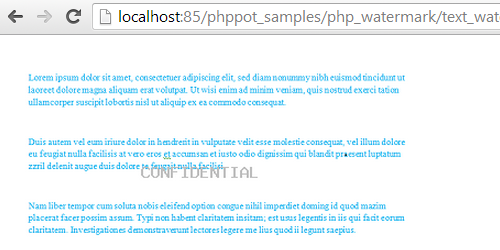
The imagestring() function is sufficient for adding simple watermark without more gimmicks. To add effects like angled text as watermark, imagettftext() function can be used. It provides a rich set of effects.
There are more GD functions to add text watermark to images using other font types Free Type and Post Script Type. For example, imagefttext(), imagepstext().
Output of this image watermarking script will be,
PHP / GD Text Watermarking Example
<?php
$imageURL = "bg.png";
list ($width, $height) = getimagesize($imageURL);
$imageProperties = imagecreatetruecolor($width, $height);
$targetLayer = imagecreatefrompng($imageURL);
imagecopyresampled($imageProperties, $targetLayer, 0, 0, 0, 0, $width, $height, $width, $height);
$WaterMarkText = 'CONFIDENTIAL';
$watermarkColor = imagecolorallocate($imageProperties, 191, 191, 191);
imagestring($imageProperties, 5, 130, 117, $WaterMarkText, $watermarkColor);
header('Content-type: image/jpeg');
imagepng($imageProperties);
imagedestroy($targetLayer);
imagedestroy($imageProperties);
?>
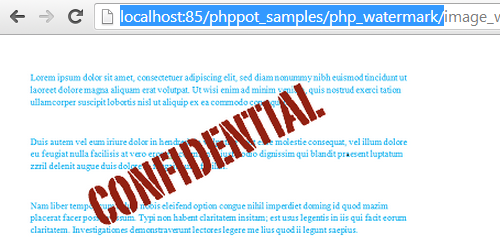
The output of this PHP script will be,
PHP / GD Image Watermarking
In PHP, adding an image onto another image layer as a watermark can be done using imagecopy() function.
imagecopy($destinationImage, $srcImage, $destinatioX, $destinationY, $sourceX, $sourceY, $sourceWidth, $sourceHeight);
This function copies source image onto destination image by overwriting destination image pixels.
There is another similar GD function imagecopymerge() which is to copy and merge source onto the destination.
imagecopymerge($destinationImage, $srcImage, $destinatioX, $destinationY, $sourceX, $sourceY, $sourceWidth, $sourceHeight,$pct);
imagecopymerge() function has an extra parameter $pct. It is used for image merging.
While merging png images with transparent background as a watermark, imagecopymerge() function will not preserve transparency onto the destination. So, imagecopy() is preferable for image watermarking.
PHP / GD Image Watermarking Example
<?php
$watermark = imagecreatefrompng('watermark.png');
$imageURL = imagecreatefrompng('bg.png');
$watermarkX = imagesx($watermark);
$watermarkY = imagesy($watermark);
imagecopy($imageURL, $watermark, imagesx($imageURL) / 5, imagesy($imageURL) / 5, 0, 0, $watermarkX, $watermarkY);
header('Content-type: image/png');
imagepng($imageURL);
imagedestroy($imageURL);
?>



Thanks a lot !!!
for teach us such a nice topic of php…
hai mam, i m php new learner and i have problem in php mail function. mail function is working correctly but but after sending mail using php script, it is saying that its sent but when i open the inbox to see the mail then its not there … will u plz help me to rectify this
Great stuff, thank you.
Welcome Daisy.
Wow! God bless you for this. It’s quite simple to understand and comprehensive. You just earned a regular visitor!!
Thank you Oscar. Comments like this really motivates me. Have a good day. Keep reading.