We have seen a variety of jQuery expand collapse in this tutorial. Recently, we have seen jQuery horizontal expand collapse for header menu.
In this tutorial, we have an example to expand/collapse sidebar menu. We are showing a list of main menu items in a list. On clicking this main menu, the corresponding submenu list will be expanded by using jQuery.
HTML Sidebar Menu List
This is the list of sidebar menu list followed by the styles.
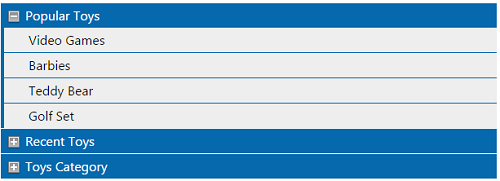
<div id="popular" class="mainmenu">
	<a href="#">Popular Toys</a>
	<div class="submenu">
		<ul>
		<li><a href="#">Video Games</a>
		<li><a href="#">Barbies</a>
		<li><a href="#">Teddy Bear</a>
		<li><a href="#">Golf Set</a>
		</li></ul>
	</div>
</div>
<div id="recent" class="mainmenu">
	<a href="#">Recent Toys</a>
	<div class="submenu">
		<ul>
		<li><a href="#">Yoyo</a>
		<li><a href="#">Doctor Kit</a>
		<li><a href="#">Puzzles</a>
		<li><a href="#">Uno Cards</a>
		</li></ul>
	</div>
</div>
<div id="category" class="mainmenu">
	<a href="#">Toys Category</a>
	<div class="submenu">
		<ul>
		<li><a href="#">Battery Toys</a>
		<li><a href="#">Remote Toys</a>
		<li><a href="#">Magnet Toys</a>
		<li><a href="#">Soft Toys</a>
		</li></ul>
	</div>
</div>
.submenu {
	display: none;
}

.mainmenu {
	margin: 1px;
	line-height: 30px;
	background: #0769AD url(plus.png) left top no-repeat;
}

.mainmenu a {
	margin: 10px;
	color: #FFFFFF;
	text-decoration: none;
	padding-left: 20px;
}

.submenu ul {
	list-style: none;
	margin: 0;
	padding: 0px;
}

.submenu li {
	background-color: #EEEEEE;
	margin: 0px 0px 1px 4px;
	line-height: 30px;
}

.submenu li a {
	color: #000000;
}
jQuery Expand Collapse
This jQuery script is used to expand collapse submenu items by clicking on the main menu.
$(document).ready(function() {
	$(".mainmenu").click(function() {
		if ($(this).children("div.submenu").css("display") == "none") {
			$(this).css('background-image', 'url(minus.png)');
			$(this).children("div.submenu").show();
		} else {
			$(this).css('background-image', 'url(plus.png)');
			$(this).children("div.submenu").hide();
		}
	});
});