In HTML Form, the dropdown, checkbox type fields have an array of values. In this post, we are going to see how to get the array of selected values from these form fields using jQuery.
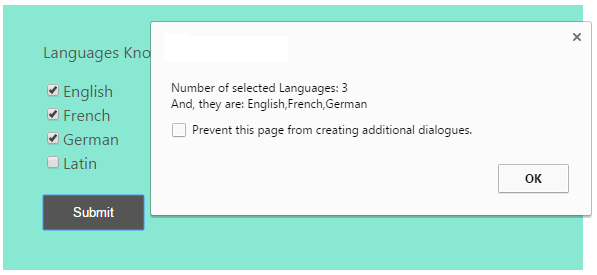
In this example, we are using jQuery each() to get each checked value in an array. Then these array values will be shown using a Javascript alert box. This will be used to validate the checkbox field.
Creating HTML Form with Checkboxes
This HTML shows a form containing a list of languages with checkbox field.
<form name="matching_Form" id="matching_Form" action="" method="post">
	<table border="0" cellpadding="10" cellspacing="1" width="500"
		align="center">
		<tr class="tableheader">
			<td>Languages Known</td>
		</tr>
		<tr class="tablerow">
			<td><input type="checkbox" name="language" id="language1"
				value="English">English<br /> <input type="checkbox" name="language"
				id="language2" value="French">French<br /> <input type="checkbox"
				name="language" id="language3" value="German">German<br /> <input
				type="checkbox" name="language" id="language4" value="Latin">Latin<br />
			</td>
		</tr>
		<tr class="tableheader">
			<td><input id="btnSubmit" type="button" value="Submit" /></td>
		</tr>
	</table>
</form>
Getting Checked Values using jQuery
This jQuery script is used to get the checked value from the form checkbox field using jQuery each(). Using this jQuery function it runs a loop to get the checked value and put it into an array. Then the selected values with the count will be shown using an alert box.
$(document).ready(function() {
	$("#btnSubmit").click(function() {
		var selectedLanguage = new Array();
		$('input[name="language"]:checked').each(function() {
			selectedLanguage.push(this.value);
		});
		alert("Number of selected Languages: " + selectedLanguage.length + "\n" + "And, they are: " + selectedLanguage);
	});
});

This is the ultimate zingalala i have ever seen
Thius is d best code I am looking for. thanks vincy
Nice tutorial and its useful. Thanks.
This post is very useful for me because I am also want to know more about jquery. so thanks for this tutorial.
how to pass the selectedLanguage into ajax
Thank you very much Vincy, you are a life saver
Welcome Missy.