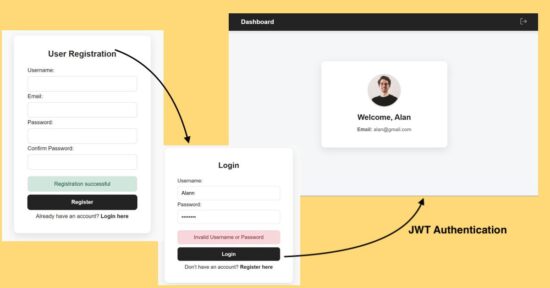
The JWT authentication is a secure way of implementing a web login process without session management. This tutorial is for implementing React JWT authentication with PHP. It has the following steps to understand the process easily.
Additionally, this example code provides a user registration code to create new user to the database. With the registration and login code you are getting a base for your websites authentication module from this tutorial.
- React login form submits the registered username and password.
- PHP backend script validates the login details with the database.
- PHP login success case generates JWT signed encoded user profile data.
- React frontend receives the JWT token and stores to localStorage.
- React validates the existence of the token with the ProtectedRoutes component.
- If the ProtectedRoutes failed to find the JWT token, it denies the access.
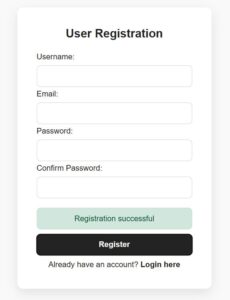
React User Registration
This registration code helps to create data for your login process. Also, with registration this authentication example will be a more complete version to deploy in your application.
This example has a registration form with very few fields. React builds the formData state when the user enters the data. On submit, it passes the entered data to the PHP page register-action.php. It stores the user login name, email and the password to the database.
In the below JSX script, the formData, success/error state variables are managed. The handleSubmit hook handles the client-side form validation. This hook posts the data to the server once the validation returns true.
Part of RegisterForm.jsx with React states and hooks
import axios from "axios";
import { useNavigate } from "react-router-dom";
import SERVER_SIDE_API_ROOT from "../config";
import "../styles/style.css";
const RegisterForm = () => {
  const [formData, setFormData] = useState({
    username: "",
    email: "",
    password: "",
    confirmPassword: "",
  });
  const [errorMessage, setErrorMessage] = useState("");
  const [successMessage, setSuccessMessage] = useState("");
  const navigate = useNavigate();
  const handleSubmit = async (e) => {
  e.preventDefault();
  const { username, email, password, confirmPassword } = formData;
  if (!username || !email || !password || !confirmPassword) {
    setErrorMessage("Please fill in all fields");
    setSuccessMessage("");
    return;
  }
  const emailRegex = /^[^\s@]+@[^\s@]+\.[^\s@]+$/;
  if (!emailRegex.test(email)) {
    setErrorMessage("Please enter a valid email address");
    return;
  }
  if (password.length < 6) {
    setErrorMessage("Password must be at least 6 characters");
    return;
  }
  if (password !== confirmPassword) {
    setErrorMessage("Passwords do not match");
    setSuccessMessage("");
    return;
  }
  try {
    const res = await axios.post(
      `${SERVER_SIDE_API_ROOT}/registration-action.php`,
      { username, email, password },
      { headers: { "Content-Type": "application/json" } }
    );
    console.log("Server response:", res.data);
    if (res.data.status === "success") {
      setSuccessMessage(res.data.message);
      setErrorMessage("");
      setFormData({
        username: "",
        email: "",
        password: "",
        confirmPassword: "",
      });
      setTimeout(() => { navigate("/login");
      }, 2000);
    } else {
      setErrorMessage(res.data.message || "Registration failed");
      setSuccessMessage("");
    }
  } catch (err) {
    console.error("Axios Error:", err);
    setErrorMessage("Server error or CORS issue");
    setSuccessMessage("");
  }
};
Returning Form UI code with RegisterForm.jsx
<div className="admin-wrapper">
    <div
      className="card-container"
      style={{ maxWidth: "400px", margin: "95px auto" }}>
    <h2>User Registration</h2>
    <form onSubmit={handleSubmit}>
      <div>
        <label>Username:</label>
        <input value={formData.username}
          onChange={(e) =>
            setFormData({ ...formData, username: e.target.value }) }/>
      </div>
      <div>
        <label>Email:</label>
        <input type="email" value={formData.email}
          onChange={(e) =>
            setFormData({ ...formData, email: e.target.value }) } />
      </div>
      <div>
        <label>Password:</label>
        <input type="password" value={formData.password}
          onChange={(e) =>
            setFormData({ ...formData, password: e.target.value }) } />
      </div>
      <div>
        <label>Confirm Password:</label>
        <input type="password" value={formData.confirmPassword}
          onChange={(e) =>
            setFormData({
              ...formData,
              confirmPassword: e.target.value, }) }/>
      </div>
      {errorMessage && (
        <div className="alert alert-danger" role="alert">
          {errorMessage}
        </div>
      )}
      {successMessage && (
        <div className="alert alert-success" role="alert">
          {successMessage}
        </div>
      )}
      <button type="submit">Register</button>
      <p style={{ textAlign: "center", marginTop: "10px" }}>
        Already have an account?{" "}
        <a href="/login" style={{ color: "#232323", fontWeight: "600",textDecoration: "none" }}>
          Login here
        </a>
      </p>
    </form>
    </div>
  </div>
);
};
export default RegisterForm;
PHP backend handles the registration request and stores the entered password in an encrypted form. It validates the user email uniqueness. If the entered email is already in the database, then this code rejects the user’s insertion.
react-jwt-login-register-api/registration-action.php
<?php
header("Access-Control-Allow-Origin: *");
header("Access-Control-Allow-Headers: Content-Type, Authorization");
header("Access-Control-Allow-Methods: POST, OPTIONS");
header("Content-Type: application/json");

if ($_SERVER['REQUEST_METHOD'] === 'OPTIONS') {
    http_response_code(200);
    exit;
}
include "db.php";
$input = file_get_contents("php://input");
$data = json_decode($input);
if (
    !isset($data->username) ||
    !isset($data->email) ||
    !isset($data->password)
) {
    echo json_encode(["status" => "error", "message" => "Invalid input"]);
    exit;
}
$username = mysqli_real_escape_string($conn, $data->username);
$email = mysqli_real_escape_string($conn, $data->email);
$password = password_hash($data->password, PASSWORD_BCRYPT);
$check = $conn->query("SELECT * FROM users WHERE email='$email'");
if ($check->num_rows > 0) {
    echo json_encode(["status" => "error", "message" => "Email already exists"]);
    exit;
}
$sql = "INSERT INTO users (username, email, password) VALUES ('$username', '$email', '$password')";
if ($conn->query($sql) === TRUE) {
    echo json_encode(["status" => "success", "message" => "Registration successful"]);
} else {
    echo json_encode(["status" => "error", "message" => $conn->error]);
}
?>
React login JWT authentication
If the user submits the correct username and password, the client receives success response from the server. The response will contain a JWT signed user profile data array.
In the client-side, the jwt-decode is used to decode the JWT response. The jwt-decode is the JavaScript library which can read and decode the JWT encoded string.
Run the following command to install this library into the application repository.
npm install jwt-decode

[OR]

yarn add jwt-decode
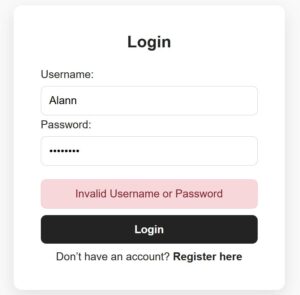
In the below script, if the response status is success it sets the JWT authentication token to a JavaScript localStorage. Then, it redirects to the dashboard. The dashboard is a protected page that can be accessed if a user is JWT-authenticated.
src/components/LoginForm.jsx
import React, { useState } from "react";
import { Link } from "react-router-dom";
import SERVER_SIDE_API_ROOT from "../config";
import "../styles/style.css";
import axios from "axios";

const LoginForm = () => {
    const [formData, setFormData] = useState({
        username: "",
        password: "",
    });
    const [errorMessage, setErrorMessage] = useState("");
    const handleLogin = (e) => {
    e.preventDefault();
    const { username, password } = formData;
    if (!username || !password) {
        setErrorMessage("Please enter both username and password");
        return;
    }
  axios.post(`${SERVER_SIDE_API_ROOT}/login-action.php`, {
        username,
        password,
    })
    .then((res) => {
        if (res.data.status === "success") {
            localStorage.setItem("token", res.data.token);
            setErrorMessage("");
            setTimeout(() => {
                window.location.href = "/dashboard";
            }, 1000);
        } else {
            setErrorMessage(res.data.message);
        }
    })
    .catch((err) => {
        setErrorMessage("Server error: " + err.message);
    });
};
return (
<div className="admin-wrapper">
  <div
    className="card-container"
    style={{ maxWidth: "400px", margin: "154px auto" }}>
    <h2>Login</h2>
    <form onSubmit={handleLogin}>
    <div>
        <label>Username:</label>
        <input  value={formData.username}
            onChange={(e) =>
            setFormData({ ...formData, username: e.target.value })} />
    </div>
    <div>
        <label>Password:</label>
        <input  type="password" value={formData.password}
            onChange={(e) =>
            setFormData({ ...formData, password: e.target.value }) } />
    </div>
    {errorMessage && (
        <div className="alert alert-danger" role="alert">
            {errorMessage}
        </div>
    )}
    <button type="submit">Login</button>
    <p style={{ textAlign: "center", marginTop: "10px" }}>
        Don’t have an account?{" "}
        <Link to="/registerform" style={{ color: "#232323", fontWeight: "600", textDecoration: "none" }}>
            Register here
        </Link>
        </p>
    </form>
  </div>
</div>
);
};
export default LoginForm;
In PHP the firebase/php-jwt library is installed by using this composer command. Once the logged-in details matched, this library is used to generate the JWT token with the profile array.
composer require firebase/php-jwt
react-jwt-login-register-api/login-action.php
<?php
header("Access-Control-Allow-Origin: *");
header("Access-Control-Allow-Headers: Content-Type, Authorization");
header("Access-Control-Allow-Methods: POST, OPTIONS");
header("Content-Type: application/json");

include "db.php";
require 'vendor/autoload.php';

use Firebase\JWT\JWT;
use Firebase\JWT\Key;

$secret_key = "MY_SECRET_KEY_12345";
if ($_SERVER['REQUEST_METHOD'] == 'OPTIONS') {
    http_response_code(200);
    exit;
}
$data = json_decode(file_get_contents("php://input"));
if (!isset($data->username) || !isset($data->password)) {
    echo json_encode(["status" => "error", "message" => "Missing credentials"]);
    exit;
}
$username = $conn->real_escape_string($data->username);
$password = $data->password;
$result = $conn->query("SELECT * FROM users WHERE username = '$username' LIMIT 1");
if ($result->num_rows === 0) {
    echo json_encode(["status" => "error", "message" => "Invalid Username or Password"]);
    exit;
}
$user = $result->fetch_assoc();
if (!password_verify($password, $user['password'])) {
    echo json_encode(["status" => "error", "message" => "Invalid password"]);
    exit;
}
$payload = [
    "iss" => "http://localhost",
    "aud" => "http://localhost",
    "iat" => time(),
    "exp" => time() + (60 * 60),
    "user" => [
        "id" => $user['id'],
        "username" => $user['username'],
        "email" => $user['email']
    ]
];
$jwt = JWT::encode($payload, $secret_key, 'HS256');
echo json_encode([
    "status" => "success",
    "message" => "Login successful",
    "token" => $jwt
]);
?>
Protected Route Component that validates JWT token to permit
This component validates if the localStorage has the JWT token. If not, then it will stop the user from accessing a requested page. Instead, it redirects to the login page.
src/components/ProtectedRoute.js
import { Navigate } from "react-router-dom";

const ProtectedRoute = ({ children }) => {
  const token = localStorage.getItem("token");
  if (!token) {
    return <Navigate to="/login" replace />;
  }
  return children;
};

export default ProtectedRoute;
Dashboard with profile information
The React main App component imports the ProtectedRoutes to bring the validation process at the top layer. This ProtectedRoutes wrapper around the Dashboard will help to permit only a JWT-authenticated user to the dashboard.
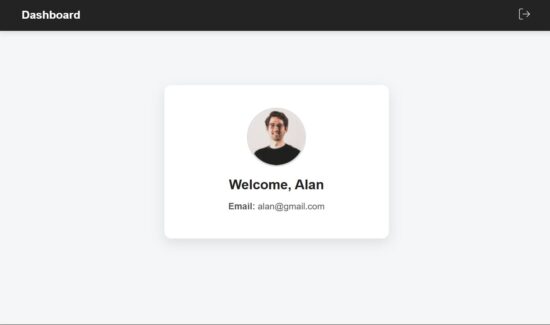
This React dashboard script gets the user details from the decoded JWT token. Then, those details are rendered to the UI as shown below.
A simple header is created for this dashboard view with a logout option. On clicking logout, it clears the localStorage and redirects to the login page.
src/pages/Dashboard.jsx
import React, { useEffect, useState } from "react";
import { useNavigate } from "react-router-dom";
import { jwtDecode } from "jwt-decode";
import "../styles/style.css";

const Dashboard = () => {
  const [user, setUser] = useState(null);
  const navigate = useNavigate();
  useEffect(() => {
    const token = localStorage.getItem("token");
    if (!token) {
      navigate("/login");
      return;
    }
    try {
      const decoded = jwtDecode(token);
      setUser(decoded.user);
    } catch (error) {
      console.error("Invalid token:", error);
      localStorage.removeItem("token");
      navigate("/login");
    }
  }, [navigate]);
  if (!user) return <p>Loading...</p>;
  const handleLogout = () => {
    localStorage.removeItem("token");
    navigate("/login");
  };
  return (
    <div className="dashboard-wrapper">
      <nav className="navbar">
        <div className="navbar-left">
          <h2>Dashboard</h2>
        </div>
        <div className="navbar-right">
          <button className="logout-btn" onClick={handleLogout}>
            <img src="./logout.svg" alt="Logout" className="logout-icon" />
          </button>
        </div>
      </nav>
      <div className="card">
        <img src="/profile.jpg" alt="" className="profile-pic" />
        <h2>Welcome, {user.username}</h2>
        <p>
          <strong>Email:</strong> {user.email}
        </p>
      </div>
    </div>
  );
};
export default Dashboard;
conclusion
With this login authentication base, you can have a good start to create a React JWT login. The user registration involves PHP and MySQL connection to generate backend data for this login. It can be enhanced by adding server-side JWT validation to improve the security. The concept of securing application pages with protected routes helps to reuse the wrapper for more components.
References:



With thanks, great tutorial!
Welcome Jeremy.
Well expressed without a doubt! !
Thank you Jeremy.