A PHP timestamp is a number that represents a date and time. It is used to store, compare, and format time values.
In this tutorial, you will learn how to get the current timestamp, convert date strings to Unix time, and format timestamps using simple PHP examples.
This is commonly used in features like logs, scheduling, and password reset links.
Quick answer: How to get a timestamp in PHP
Use the time() function to get the current Unix timestamp in PHP.
<?php
echo time();
?>
Output:
1711111111
This returns the current time as the number of seconds since January 1, 1970 (UTC).
Now let us understand what a timestamp means and how it is used in real applications.
What is a PHP timestamp?
A PHP timestamp is a numeric value used to represent a specific moment in time.
It is easy to store, compare, and convert into different date formats.
For example, timestamps help you:
- track when a record is created
- compare two dates
- display user-friendly date values
In real projects, timestamps are commonly used for:
- created_at and updated_at fields
- logging events
- scheduling tasks
This helps you understand how timestamps are used in real applications.
Get the current timestamp in PHP
There are multiple ways to get the current timestamp in PHP. The most common and recommended method is using the time() function.
Using time() (recommended)
The time() function returns the current Unix timestamp.
<?php
$currentTimestamp = time();
echo $currentTimestamp;
?>
Output:
1711111111
This stores the current timestamp in a variable before using it. You can reuse this value anywhere in your application.
This is the simplest and fastest way to get the current timestamp. In the example project, this value is used to store when a record is created.
Using strtotime(“now”)
You can also use strtotime() to get the current timestamp.
<?php
echo strtotime("now");
?>
This gives the same result as time(). It is useful when you are already working with date strings.
Using date(“U”)
The date("U") format returns the current Unix timestamp.
<?php
echo date("U");
?>
This is less commonly used. It internally depends on the system time, similar to time().
Using microtime(true) (advanced)
If you need more precision, use microtime(true).
<?php
echo microtime(true);
?>
Output will include decimal values:
1711111111.4567
This is useful for measuring execution time, not for storing normal timestamps.
For most applications, always use time() unless you need special handling.
Convert date string to timestamp in PHP
To convert a date string into a Unix timestamp, use the strtotime() function.
Using strtotime()
<?php
echo strtotime("2026-03-22 10:30:00");
?>
Output:
1774175400
The strtotime() function reads a date string and converts it into a Unix timestamp.
Using human-readable date strings
strtotime() can understand simple English phrases.
<?php
echo strtotime("next Monday");
echo "\n";
echo strtotime("+2 days");
?>
This makes it very useful for quick date calculations.
Handling invalid date input
If the input is invalid, strtotime() returns false.
<?php
$timestamp = strtotime("invalid date");

if ($timestamp === false) {
    echo "Invalid date string";
}
?>
Always validate user input before using it. In the example project, we validate the input date before saving it to the database.
Using mktime() (optional)
You can also create a timestamp using individual date values.
<?php
echo mktime(10, 30, 0, 3, 22, 2026);
?>
This is useful when you already have separate values for hour, minute, day, month, and year.
For most use cases, strtotime() is the easiest and most flexible option.
Convert timestamp to readable date in PHP
To convert a Unix timestamp into a readable date, use the date() function.
Using date()
<?php
$timestamp = time();
echo date("Y-m-d H:i:s", $timestamp);
?>
Output:
2026-03-22 10:30:00
The date() function formats a timestamp into a human-readable string.
Common date formats
<?php
echo date("d-m-Y", $timestamp);      // 22-03-2026
echo date("M d, Y", $timestamp);     // Mar 22, 2026
echo date("h:i A", $timestamp);      // 10:30 AM
?>
You can change the format based on your application needs. See this guide on formatting dates in PHP.
Setting timezone
Always set the correct timezone before working with timestamps. Learn more about PHP timezone settings.
<?php
date_default_timezone_set("Asia/Kolkata");
?>
If timezone is not set, you may get incorrect date values. In the example project, the formatted date is shown along with the raw timestamp for clarity.
The date() function is the standard way to display timestamps in PHP.
PHP timestamp examples you will actually use
Here are some practical examples of how timestamps are used in real applications.
Add or subtract time
<?php
echo time() + 86400; // add 1 day
echo "\n";
echo time() - 3600;  // subtract 1 hour
?>
This is useful for setting expiry times or deadlines.
Compare timestamps
<?php
$t1 = strtotime("2026-03-22");
$t2 = strtotime("2026-03-25");

if ($t1 < $t2) {
    echo "t1 is earlier";
}
?>
This is commonly used to check if a date is expired or upcoming.
Store timestamp in database
<?php
$timestamp = time();

$stmt = $conn->prepare("INSERT INTO events (event_title, unix_timestamp) VALUES (?, ?)");
$stmt->bind_param("si", $title, $timestamp);
$stmt->execute();
?>
Storing timestamps makes it easier to sort and filter records.
In the example project, we store both the original date and the converted timestamp for better clarity.
Display formatted date from database
<?php
echo date("Y-m-d H:i:s", $row['unix_timestamp']);
?>
This converts stored timestamps into readable dates when displaying data.
Example output
Below is the output from the example project:
- User enters a date
- It is converted into a timestamp
- Both values are stored and displayed
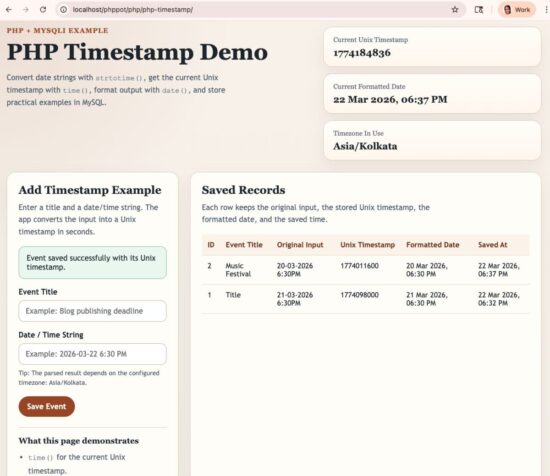
PHP timestamp example showing form input, stored Unix timestamp, and formatted date output
Common mistakes and fixes
Timezone not set correctly
If timezone is not set, PHP may return incorrect date values.
<?php
date_default_timezone_set("Asia/Kolkata");
?>
Always set timezone at the start of your application.
Invalid date string in strtotime()
<?php
$timestamp = strtotime("wrong date");

if ($timestamp === false) {
    echo "Invalid date";
}
?>
Always check the return value before using it.
Seconds vs milliseconds confusion
PHP timestamps are in seconds. Some systems (like JavaScript) use milliseconds.
<?php
// convert milliseconds to seconds
$timestamp = 1711111111000 / 1000;
?>
Mixing these can cause wrong date values.
Using microtime() when not needed
microtime(true) gives high precision.
But for normal applications, time() is enough.
Use microtime() only for performance measurement.
Not escaping output
<?php
echo htmlspecialchars($row['event_title']);
?>
Always escape output when displaying user input.
Avoiding these common mistakes will help you work with timestamps more reliably.
Best practices
- Always set the correct timezone before working with dates
- Use
time()for current timestamp in most cases - Validate input when using
strtotime() - Store timestamps in seconds (standard Unix time)
- Use
date()to format timestamps for display - Use DateTime class for complex date handling
- Avoid unnecessary use of
microtime() - Always escape user input before displaying
FAQ
What is a Unix timestamp in PHP?
A Unix timestamp is the number of seconds since January 1, 1970 (UTC). PHP uses this format to represent date and time values.
How to get the current timestamp in PHP?
Use the time() function.
echo time();
How to convert a date to timestamp in PHP?
Use the strtotime() function.
echo strtotime("2026-03-22");
How to format a timestamp in PHP?
Use the date() function.
echo date("Y-m-d H:i:s", $timestamp);
Why is strtotime() returning false?
It returns false when the input date string is invalid or not recognized.
Does PHP use seconds or milliseconds for timestamps?
PHP uses seconds. JavaScript usually uses milliseconds.
Conclusion
PHP timestamps are simple but very useful. You can use them to store, compare, and format date values easily.
In this tutorial, you learned how to:
- get the current timestamp using
time() - convert date strings using
strtotime() - format timestamps using
date()
Understanding timestamps is essential for handling dates correctly in any PHP application.
With these basics, you can handle most date and time tasks in PHP applications.
Download source code
You can download the complete example project used in this tutorial below.
It includes:
- form input for date and event
- timestamp conversion using
strtotime() - database storage using
MySQLi - formatted output using
date()

Hi can you guys help me with this?
Let’s suppose that I have the following columns on my DB table:
Column type
User int
Start_time time without time zone
End_time time without time zone
I’ll add the first user. insert into horarios(user, start_time, end_time) values (‘7′,’09:00:00′,10:30:00’)
With this data on the table the system should only accept for the next insert values values like (‘7′,’10:31:00′, ’11:30:00’). meaning that from 9:00am to 11:30am the user 7 will be unavailable. The only way to add the next scheduled for this user is after the hour 11:30am which means that he will be available at 11:31am.
I’ve been trying so hard but I really can’t figure out how to make it, I even tried to follow some tutorial but the result are negative.
Please ma’am help me on this one.
Hi! You’re basically trying to prevent overlapping time ranges for the same user – that’s a common scheduling problem.
Instead of checking manually, you should validate that the new time range does not overlap with existing records.
SELECT *
FROM horarios
WHERE user = 7
AND (
’10:31:00′ <= end_time AND '11:30:00' >= start_time
);
If it returns no rows. it’s ready to execute the insert values values like (‘7′,’10:31:00′, ’11:30:00’)
Great article. I really appreciate your help that’s really exactly what I was looking for, thank’s for that!
Welcome Dev.
Thank you so much!! I’m gonna be googling forwards. But I’m recording right now. Elise Knuuti from Sweden
More than helpful, I do not know if you believe in Angels but I think you are one.
Thank you Michael.